

VPN Site-to-Site and VPN Client-to-Site are two widely used virtual private network connection models, especially in businesses that need to ensure data security and remote access. If Client-to-Site VPN is suitable for individuals who need to access internal systems remotely, Site-to-Site VPN plays the role of connecting branches together through an encrypted connection, operating as a unified internal network.
This article will help you better understand each type of VPN, how it works, and the specific benefits – especially when combined with an antidetect browser like Hidemium for enhanced security and easy access management.
1. What is Site-to-Site VPN?
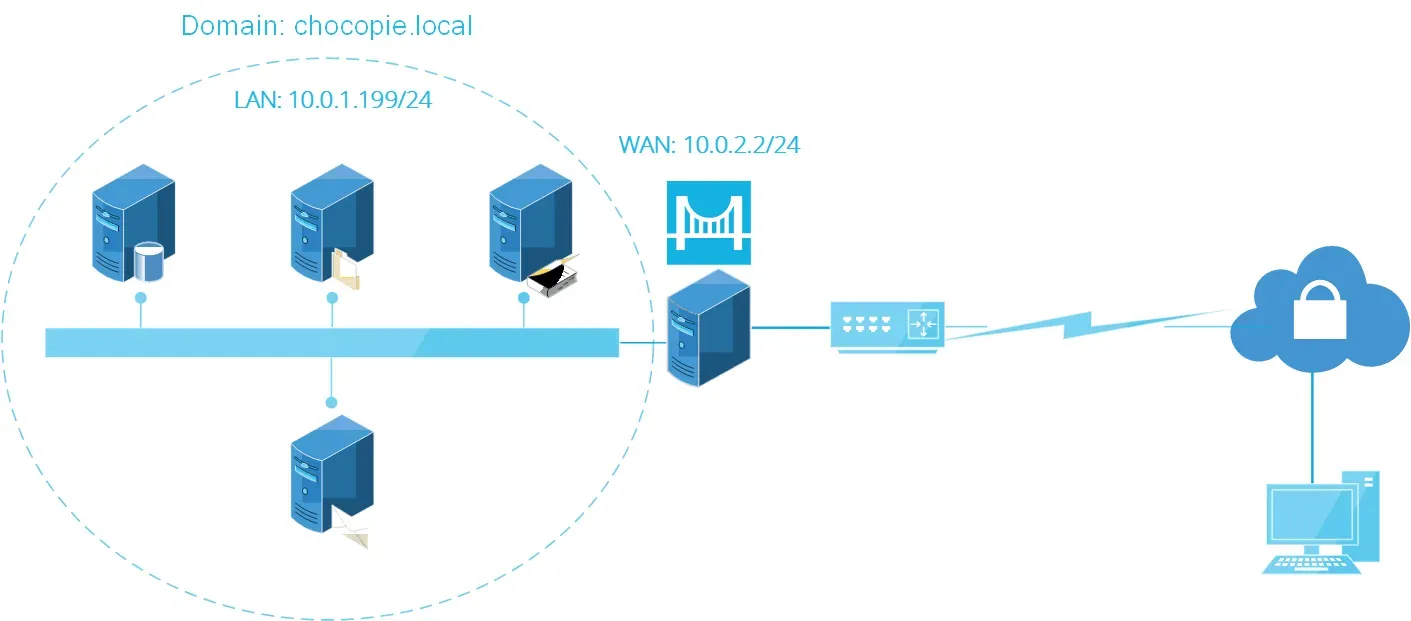
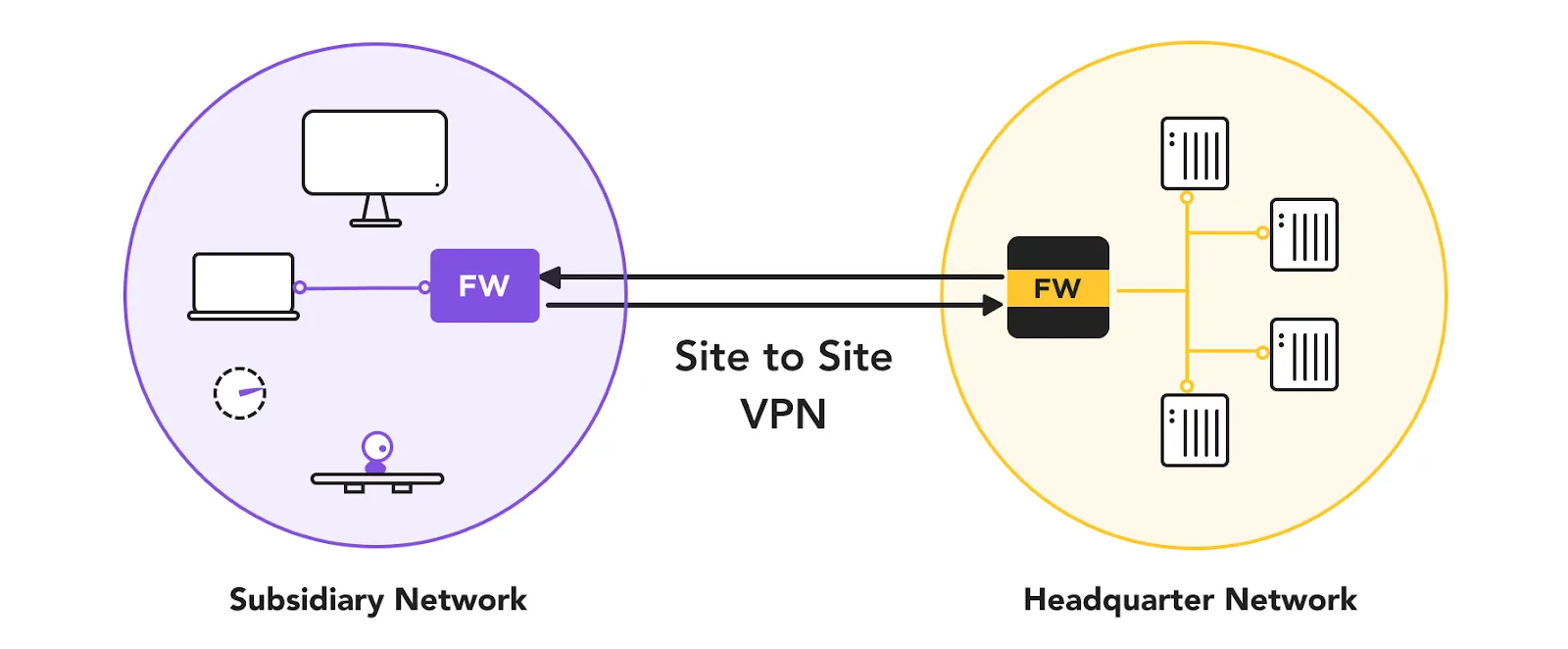
VPN Site-to-Site is a secure connection solution between multiple local area networks (LANs) at different locations through an encrypted VPN tunnel. This technology helps businesses' offices, branches or data centers communicate as a unified network system, while ensuring the security of all data transmitted over the Internet.
Thanks to its smart encryption and routing, Site-to-Site VPN Enhanced Security, while helping businesses maintain stable and seamless internal communication and performance.
>>> Learn more: What is Radmin VPN? How to Download it for Free
2. What is Client-to-Site VPN?
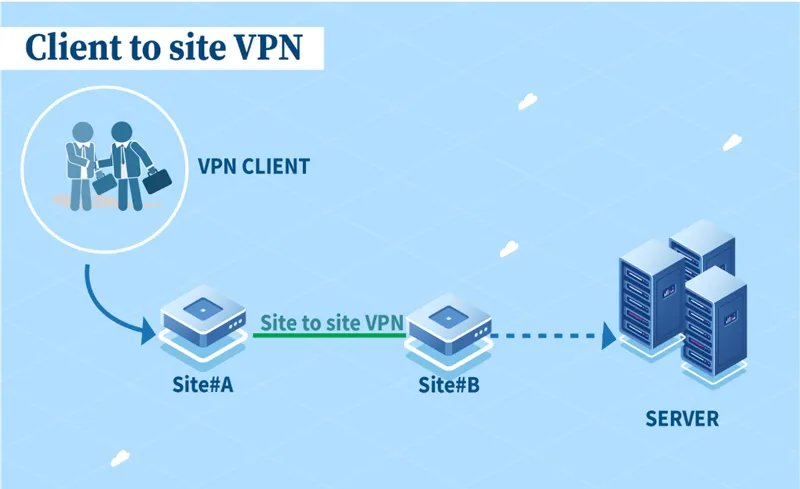
VPN Client-to-Site is a model that allows individual users to securely access corporate network systems remotely, through VPN software installed on personal devices (laptops, phones, etc.).
This solution creates an encrypted data tunnel between personal devices and the company's internal network. This keeps data protected even when accessed from public Wi-Fi networks.
Protocols commonly used for this model include PPTP, L2TP, IPsec, SSL/TLS, providing high customization of security and connectivity performance – especially suitable for hybrid and remote working models.
>>> Learn more: Top 10 Best Free VPN Apps for Android in 2025
3. How Site-to-Site VPN Works
Site-to-Site VPN works based on the setup of an encrypted tunnel between two LANs at different geographical locations. At each end point of the connection, usually a router or firewall, will perform data encryption and decryption, ensuring that the entire transmission is secure.
Data is transmitted over the Internet but still keep privacy as an internal network, thanks to strong security protocols and streamlined routing configuration. Using Site-to-Site VPN allows branches to connect and operate as if on the same network, creating a smooth, seamless working experience.
4. Site-to-Site VPN vs Client-to-Site VPN: Which is the right choice?
When implementing a secure network system for a business, choosing between VPN Site-to-Site and VPN Client-to-Site depends on purpose of use and organizational size. Each solution has its own characteristics, suitable for different situations and user groups.
Criteria | VPN Site-to-Site | VPN Client-to-Site |
| Intended use | Connect LANs at multiple offices and branches into a single internal network | Allows individual users to securely access the corporate network remotely |
| Target audience | Enterprises with many branches and offices | Remote workers, freelancers, or individual users |
| Connection method | Automatically establish connections between networks without any action from the end user | Users install VPN software and connect manually via personal devices |
| Security level | Data is encrypted through secure tunnels between networks | Data is encrypted from user device to corporate network |
| Connection Management | Administrator setup and control at each location's network gateway | Users self-manage connections via VPN application |
| Configuration complexity | Complex configuration, requiring specialized techniques – suitable for large enterprises | Easy to deploy and use, suitable for individuals or small and medium businesses |
>>> Learn more: How to Fake IP Effectively Using VPN and Proxy
5. Advantages and Disadvantages of Site-to-Site VPN
VPN Site-to-Site is the optimal choice for businesses with many branches, helping to connect the internal network system seamlessly and securely. However, those benefits come with higher technical and infrastructure requirements.
Advantage:
Safe and stable connection between offices or branches.
Share resources effectively such as printers, internal servers without having to set up each location separately.
Long-term cost reduction by synchronizing the network instead of deploying separate networks for each site.
Automate connections, no user action required.
Disadvantages:
Complex configuration, requiring highly specialized IT staff.
Depends on network infrastructure quality– weak connections can affect the whole system.
High initial investment cost due to the need for specialized hardware and software.
System expansion takes time because reconfiguration is required when adding a new office.
Site-to-Site VPN and Client-to-Site VPN are both essential security solutions for modern businesses. Depending on your needs – connecting networks between offices or supporting remote work – you can choose the appropriate configuration. Don’t forget to optimize your infrastructure and have a clear deployment strategy to ensure long-term efficiency and security.
>>> RELATED ARTICLES:
Related Blogs

Imagine you are relaxing after a day of work by playing a game on your browser, when suddenly a message appears: “Your browser does not support WebGL.” This will definitely make you upset as you cannot continue your experience.At that point, you might be wondering: “Is there anything wrong with my device?” Don't worry! The problem is not with your device, but usually WebGL is not enabled in the[…]

WireGuard VPN is a new generation VPN protocol, featuring fast processing speed, lightweight structure and superior security. In this article, Hidemium Antidetect Browser will help you discover in detail: What is WireGuard VPN, why it is popular with the community, and specific instructions on how to install and configure it to protect your network connection most effectively.1. What is WireGuard[…]

What is Turbo VPN is the question many people ask when looking for a tool to help personal information security and Bypass regional content access restrictionsIn this article, Antidetect Browser Hidemium will explore Turbo VPN in detail with you - from concept, outstanding features to how to use it effectively on devices like Windows, Android and iOS.1. What is Turbo VPN?Turbo VPN is a trusted[…]

IPv6 (Internet Protocol version 6) is the latest version of the Internet protocol, developed to replace IPv4 which is gradually being exhausted. In this article, Antidetect Browser Hidemium will help you learn what IPv6 is, clarify the difference between IPv6 and IPv4, and explore the outstanding benefits of IPv6 in the context of digital transformation and Internet of Things (IoT) development.1.[…]

How to Convert YouTube Views into RevenueEvery day, millions of creators upload content to YouTube, sharing their passions, educating the masses, and entertaining audiences worldwide. But for those looking to turn their channel into a sustainable business, the ultimate goal is cracking the code of the view to money youtube pipeline.Understanding exactly how a simple click translates into actual[…]
Etsy – one of the leading e-commerce platforms today – stands out thanks to its focus on handmade products, antiques and personalized items. This difference makes Etsy more approachable and "human" than its competitors who sell mass-market, impersonal goods. In an era where the market is flooded with mass-produced industrial products, Etsy is the ideal destination for those who appreciate[…]
