

What is VPN Proxy Masterand and what makes it the top choice for many users today? It is a tool that supports secure internet access, allows overcoming geographical barriers and protects personal data from cyber threats. In this article, Antidetect Browser Hidemium will provide detailed information about VPN Proxy Master, including the Main features, benefit, as well as How to install and use effectively.
1. What is VPN Proxy Master?
VPN Proxy Master Is one virtual private network (VPN) service designed to ensure your internet connection is always safe and secure. With the ability to data encryption strong and hide ip address, this tool allows users to:
Easy access to the blocked website due to geographic restrictions or censorship policies.
Protecting online privacy, avoid being tracked by third parties such as carriers, hackers or advertising organizations.
Maintain stable connection speed, even when using public Wi-Fi networks.
Thanks to its flexibility and stable performance, VPN Proxy Master Is being evaluated as one of the popular and reliable VPN solution best now.

>>> Learn more: Top 10 Best Free VPN Apps for Android in 2025
2. Outstanding features of VPN Proxy Master
VPN Proxy Master is equipped with many superior features, providing a comprehensive solution for users in protecting privacy, enhancing security and optimizing online experience. Here are the highlights:
Maintain privacy with incognito mode:
VPN Proxy Master allows users to hide their real IP address by replacing it with an IP from a global proxy server system. Thanks to that, your identity is absolutely protected when accessing the Internet, avoiding being tracked by third parties such as advertisers, hackers or Internet service providers (ISPs).
Encrypt connections, protect data:
All data transmitted through VPN Proxy Master is encrypted using advanced technology, helping to establish a solid layer of security. This effectively prevents information theft, eavesdropping or tracking from bad actors, ensuring you can browse the web safely anytime, anywhere.
Unlimited access to blocked content:
One of the most notable features of VPN Proxy Master is its ability to bypass geo-restrictions by routing connections through different countries. This allows users to easily access websites, online video platforms, and social networks that are blocked in their region.
Fast and stable connection speed:
VPN Proxy Master is equipped with a rich global server system, allowing users to easily connect to the nearest server location. As a result, internet access speed is significantly improved, ensuring a stable and smooth connection. This is an important factor for activities that require high bandwidth such as watching online videos, playing games or working remotely.
No-log policy:
VPN Proxy Master promises not to record any data or activity history of users. This ensures complete privacy and personal security, without disclosing information to third parties - a prominent advantage in an increasingly risky network environment.
Connect on multiple devices at the same time:
Users can use VPN Proxy Master on multiple devices at the same time such as computers, phones, tablets, etc. without having to log out or change accounts. This feature helps maintain a consistent level of security across the entire personal device ecosystem.
Automatically disconnect when VPN is lost (Killing Switch):
In case of VPN connection interruption, Kill Switch will automatically disconnect the network to prevent the risk of personal data leaking into an unsafe environment. This is an important layer of protection, especially when accessing sensitive content or using public networks.
Smart data compression:
VPN Proxy Master supports data compression technology before transmission, which helps to reduce bandwidth consumption and improve connection speed. This is especially useful when accessing heavy websites or using a network with limited speed, providing a faster and more seamless online experience.
Thanks to these outstanding features, VPN Proxy Master not only maximizes privacy protection but also enhances internet access performance, suitable for the needs of individual and business users. This is the ideal choice for those who are looking for a powerful, secure and easy-to-use VPN solution.
>>> Learn more: Proxy, VPN and Antidetect Browser Comparison – What are the Main Differences?
3. Detailed instructions on how to install VPN Proxy Master on your computer
After understanding What is VPN Proxy Master And the outstanding features that this tool brings, the next step you should not miss is VPN Proxy Master Settings on your computer. Setting it up properly will not only help protect your privacy when accessing the internet, but also optimize your connection performance. Here are detailed step-by-step instructions:
Step 1: Go to Chrome Web Store
Open browser Google Chrome, then access Chrome Web Store. In the search box, enter the keyword "VPN Proxy Master" and select the correct utility from the list of results.
Step 2: Add the extension to your browser
Click the button "Add to Chrome" , then select "Add widget" to start the installation process. The system will automatically add the extension to your browser.

Step 3: Confirm successful installation
After the installation is complete, the icon of VPN Proxy Master will appear in the upper right corner of your Chrome browser. This is where you can quickly access and control the app.
Step 4: Log in or create an account
Click on the application icon and proceed Log in to your VPN Proxy Master accountIf you do not have an account, you can easily create a new one by providing information according to the instructions displayed on the application interface.
Step 5: Select a server and start a secure connection
After successful login, you will be provided with a list of VPN server in multiple countries. Choose the server that best suits your location for the best connection speed, then press"Go"to start browsing safe and security.
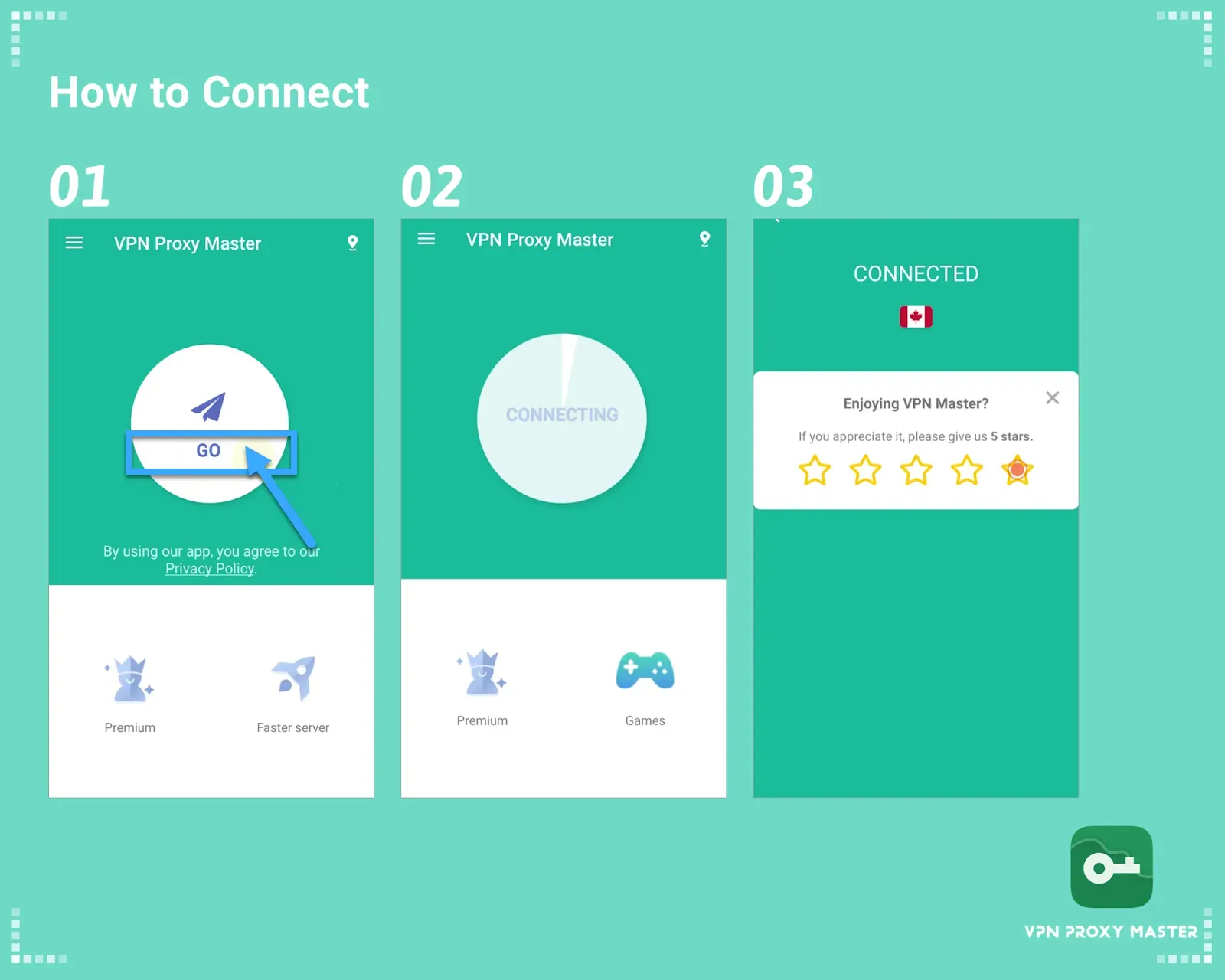
✅ Tips: For a better experience, it is recommended to choose a server near your geographical area. Also, do not forget to turn on VPN every time you access public Wi-Fi networks to ensure absolute safety of personal data.
>>> Learn more: Top 15 Trusted Free Proxy Sites
4. Detailed review of VPN Proxy Master
VPN Proxy Master is one of the popular choices today for users who need security when accessing the internet. Below is a brief overview of the main elements of the service, to help you get an overview before diving into the detailed analysis in the following sections:
Evaluation criteria | Details |
| Connection speed | The connection speed is stable, meeting basic needs well. However, compared to premium VPN services, the speed is still limited. |
| Server system | Provides 6 servers located in 6 countries, suitable for users who do not have high requirements on access location. |
| User Experience | The interface is simple and easy to use for beginners. However, the free version displays ads, which can be annoying. |
| Customer Support | Email support is solid, but not 24/7 online like some competitors. |
| Cost of use | Free for the basic version but with ads. VIP packages are more expensive than the average VPN market. |
4.1. Connection speed
VPN Proxy Master provides relatively stable connection speeds when used for online activities such as watching movies or accessing websites. Although it cannot be compared to premium VPN services, this platform still ensures a smooth experience on popular applications such as Netflix or YouTube. However, users may experience lag when connecting to servers at long distances. Download and upload speeds are somewhat reduced, but the quality is still sufficient to meet basic needs. Note that performance may vary depending on each user's geographic location and network quality.
4.2. Server system
VPN Proxy Master currently offers 6 servers in the following countries: United States, United Kingdom, France, Netherlands, Singapore, and Germany. While this number is not much compared to its competitors, it is still enough to overcome geographical access barriers. However, the lack of servers in many other regions may reduce the connection efficiency for users who are far from the server location.
4.3. User experience
VPN Proxy Master's app is designed with a minimalist interface, easy to use, and friendly to new users. Connecting takes only a few seconds and does not require complicated account registration. One downside is that the app displays quite a lot of ads, which can affect the experience. However, this is understandable for free VPN services, which rely on ads to stay active.
4.4. Customer support service
VPN Proxy Master’s support is limited. The website offers little documentation and no effective online support system. Users have to contact via email, which often takes a long time to get a response. Additionally, the process of canceling subscriptions through platforms like the App Store or Google Play is also quite inconvenient.
4.5. Costs and service packages
VPN Proxy Master offers a free version with basic features. If users want to remove ads and use dedicated servers, they need to upgrade to the VIP package. However, the price of the monthly or yearly VIP package is considered quite high compared to the general level of other VPNs. The plus point is that VPN Proxy Master has a 7-day free trial policy for the VIP package, allowing users to experience the full features before deciding to upgrade.
>>> Learn more: How to Fake IP Effectively Using VPN and Proxy
With the above reviews, the question “What is VPN Proxy Master?” has been clearly answered through the criteria of speed, servers, user experience and price. If you are looking for a reliable alternative, Hidemium is the ideal choice to help you protect your online identity and access the internet without restrictions. Contact the team now Hidemium for detailed advice and dedicated support!
>>> ARTICLES ON THE SAME TOPIC:
Related Blogs

If you are looking for a Kiwi VPN review, the main questions are whether the service is safe, whether it keeps user logs, how much it affects internet speed, and whether the Premium version is worth paying for.Kiwi VPN is a VPN application designed to route your internet traffic through a remote server and change the IP address websites see. It offers both free and paid options, but the right[…]

Selling on Etsy in 2026 is still one of the easiest ways to start an online business, but it’s no longer as simple as uploading a product and waiting for sales. The platform has grown significantly, with millions of buyers actively searching for specific products every day. That means opportunity is still there, but competition has increased, and only sellers with a clear strategy tend to[…]
Is your Hidemium subscription about to expire? You can pay directly in the app to continue using the service. This guide explains how to renew, check your subscription status, and resolve common issues.1. Check Your Hidemium Plan Before RenewingSign in to your account and check your current plan and expiration date. Review the number of profiles, team members, and features you need to choose a[…]

Think about what sits inside the average online shopping account.A customer's name and home address are the obvious things. There might also be saved cards, previous orders, store credit, loyalty points and gift card balances. Add the ability to place an order without entering all that information again and it's easy to see why somebody else might want access.For retailers, that's the awkward[…]

Doing YouTube is no longer a trend, it is a serious career and can generate sustainable passive income, witnessing the development from "just for fun" to YouTube becoming a "billion dollar money making machine".If you're wondering, "Is YouTube still viable for beginners?", the answer is yes – and even more than before. This article Hidemium Antidetect Browser will summarize all the necessary[…]

You're wondering...How to calculate TikTok earningsHow can you maximize your income from today's most popular short-video platform? Understanding TikTok's reward system and applying smart monetization strategies is key to turning your passion for content creation into a stable source of income.This article Hidemium will give you a comprehensive overview of How TikTok calculates earnings, analyze[…]
