
Facebook can i see who viewed my profile
Understanding Who Views Your Facebook Profile: Facts vs Myths
If you have ever posted a new profile picture, shared an exciting life update, or simply wondered if an old flame is checking up on you, you have likely asked yourself the ultimate social media question. We all want to know who is looking at our digital footprint. The curiosity surrounding facebook profile views is as old as the platform itself, leading millions of users down a rabbit hole of Google searches and questionable app downloads.
But what is the truth? In an era where data is everything, shouldn’t you be able to see exactly who is virtually stopping by your personal page?
In this comprehensive guide, we will cut through the noise, debunk common rumors, and give you the absolute truth about whether can u see who views your profile on facebook. We will also explore legitimate ways to gather social media insights and protect your online privacy.

The Short Answer: Can You See Who Views Your Facebook Profile?
Facebook Does Not Show Who Views Your Profile
Let’s rip the band-aid off right away: No, you cannot see who views your personal Facebook profile.
Despite years of user requests and endless rumors, Facebook (now Meta) has never provided a feature that allows everyday users to see exactly who is clicking on their personal profiles. If you are wondering, "does facebook have profile views built into its standard user interface?" the answer is a definitive no.
According to the official meta data privacy policy, Facebook strictly guards user activity data. While the platform tracks nearly everything you do for advertising and algorithm purposes, they do not share this specific browsing data with other users. The rationale is simple: privacy. If users knew their every click was being monitored and reported to the profile owner, they would engage with the platform much less. Facebook thrives on frictionless, anonymous browsing.
The Danger of "Who Viewed My Profile" Apps
Beware of Fake Facebook Profile Viewer Apps and Scams
Because Facebook refuses to offer this feature natively, a massive shadow industry has popped up promising to reveal your secret admirers. If you search for ways to see who visited your timeline, you will undoubtedly stumble across hundreds of apps, browser extensions, and websites claiming they have the secret formula.
Do not fall for them.
These are entirely third-party tracker scams. Because Facebook’s API (Application Programming Interface) explicitly prevents third-party software from accessing profile visitor data, it is technologically impossible for any outside app to provide you with a real list of profile viewers.
Here is what happens when you interact with these fake visitor tracking apps:
- Data Theft: Many of these apps require you to log in with your Facebook credentials, immediately compromising your account security.
- Malware and Viruses: You might inadvertently download malicious software that tracks your keystrokes or steals personal information.
- Browser Extension Privacy Risks: Some extensions promise to show you profile views but instead hijack your browser, inject unwanted ads, or monitor your web traffic across all sites.
- Spamming Your Friends: Once granted access, these malicious apps often post spam links to your timeline, tricking your friends into downloading the same fake software.
It is crucial to ignore social media visitor tracking myths. If an app promises to show you who is looking at your profile, report it and move on.

Legitimate Ways to Gauge Your Audience
While the direct answer to "how can you find out who views your facebook profile?" is that you can't, you are not entirely in the dark. There are several safe, built-in methods to understand who is actively engaging with your content.
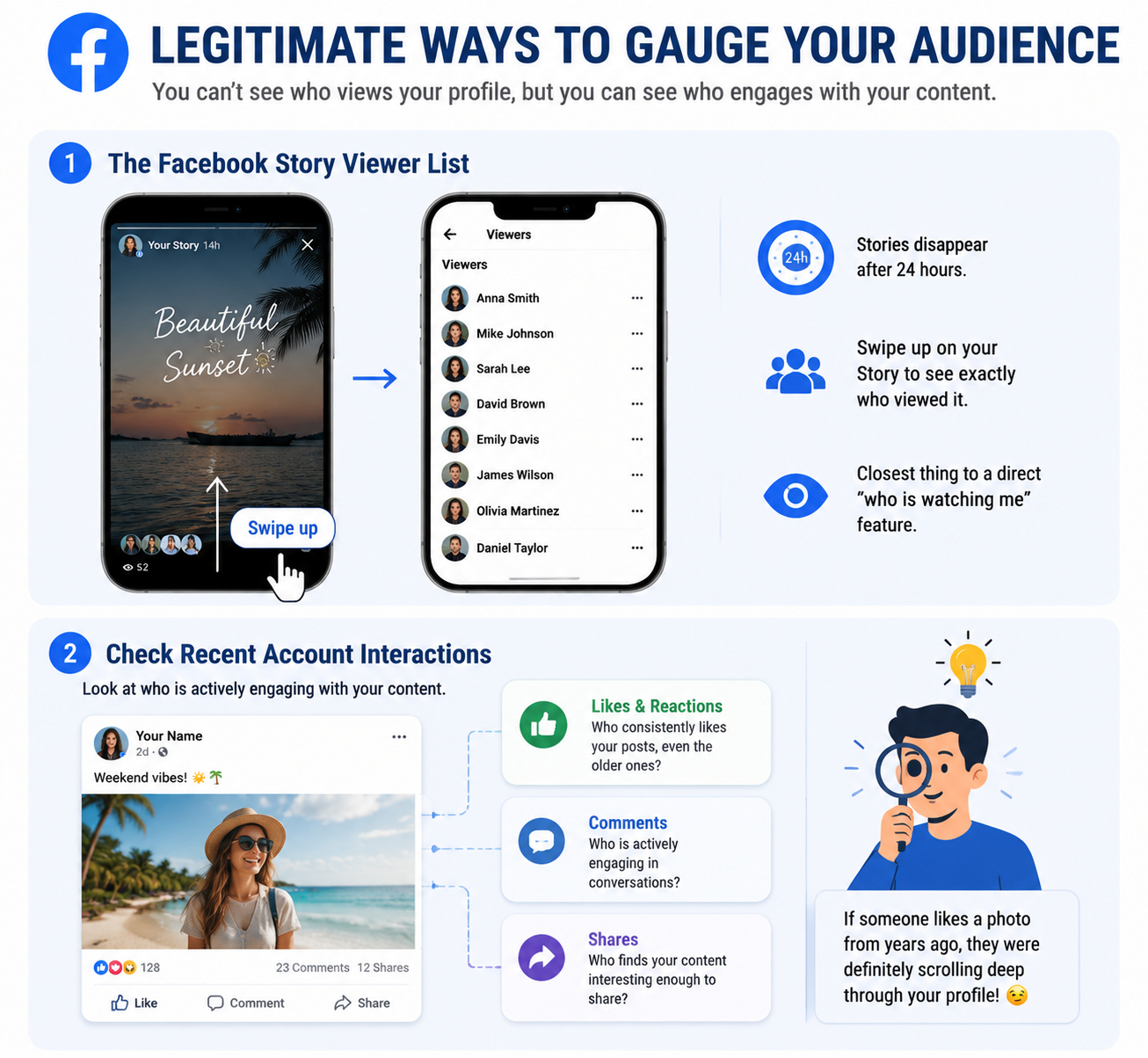
1. The Facebook Story Viewer List
If you want to know who is paying attention to you right now, Facebook Stories are your best friend. Similar to Instagram and Snapchat, Facebook allows you to post photos or short videos that disappear after 24 hours.
When you post a Story, Facebook provides a comprehensive facebook story viewer list. Simply tap on your active Story and swipe up. You will see the profile pictures and names of exactly who has watched it. While this doesn't tell you who looked at your main profile page, it is the closest thing Facebook offers to a direct "who is watching me" feature.
2. Check Recent Account Interactions
Sometimes, the best way to see who is viewing your profile is simply to look at who is interacting with it. You can check recent account interactions by looking at:
- Likes and Reactions: Who consistently likes your posts, even the older ones?
- Comments: Who is actively engaging in conversations on your timeline?
- Shares: Who finds your content interesting enough to share with their own network?
If someone accidentally "likes" a photo from three years ago, you have your answer—they were definitely scrolling deep through your profile!
Advanced Tracking: Professional Mode and Business Pages
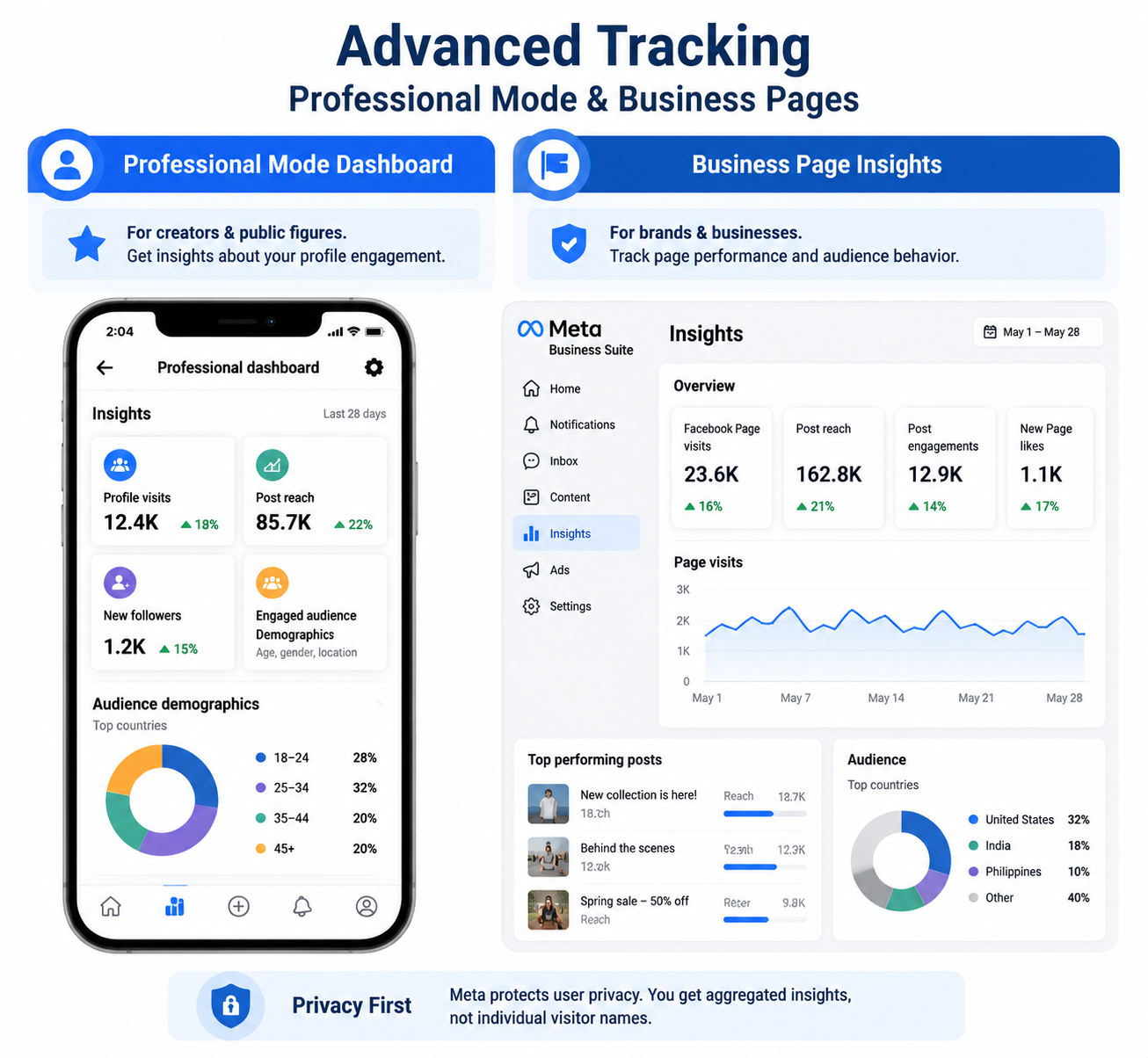
The rules change slightly if you are running a business or establishing yourself as a public figure. While you still cannot see individual names of people who view your page, Meta offers robust analytics to help you understand your audience demographics.
Meta Professional Mode Dashboard
In recent years, Facebook introduced "Professional Mode" for personal profiles. Designed for digital creators, this mode unlocks tools previously reserved only for Business Pages.
When you activate this feature, you gain access to the meta professional mode dashboard. While it won't answer "can you see your profile visitors by name?", it provides vital profile engagement metrics. You can see:
- Total profile visits over a 28-day period.
- Post reach and engagement (how many feeds your post showed up in).
- New follower counts.
- Demographic breakdowns (age, gender, and location of your engaged audience).
Track Visitors to Your Facebook Page
If you run a dedicated Business Page rather than a personal profile, you have access to even deeper insights. By utilizing meta business suite analytics, you can effectively track visitors to your facebook page in a macro sense.
The Business Suite allows you to see how many people visited your page, which posts drove the most traffic, and how your audience is interacting with your brand. Again, it prioritizes user privacy, meaning it aggregates the data rather than providing a specific list of names.
Taking Control: Managing Your Profile Privacy
If you are researching "how to see who views your profile facebook," your underlying concern might actually be privacy. If you don't know who is looking at your profile, you might want to restrict what strangers can see.
Instead of worrying about invisible profile visitors, take proactive steps to secure your digital footprint.
Manage Public Timeline Visibility
You have total control over who sees the content you post. To manage public timeline visibility, you should adjust your default sharing settings.
- Friends Only: This is the most recommended setting for personal users. Only people you have accepted as friends can see your posts.
- Public: Anyone on or off Facebook can see your content. (Only recommended for public figures or creators).
- Specific Friends: You can hide certain posts from specific people without unblocking or unfriending them.
Follow a Facebook Privacy Checkup Tutorial
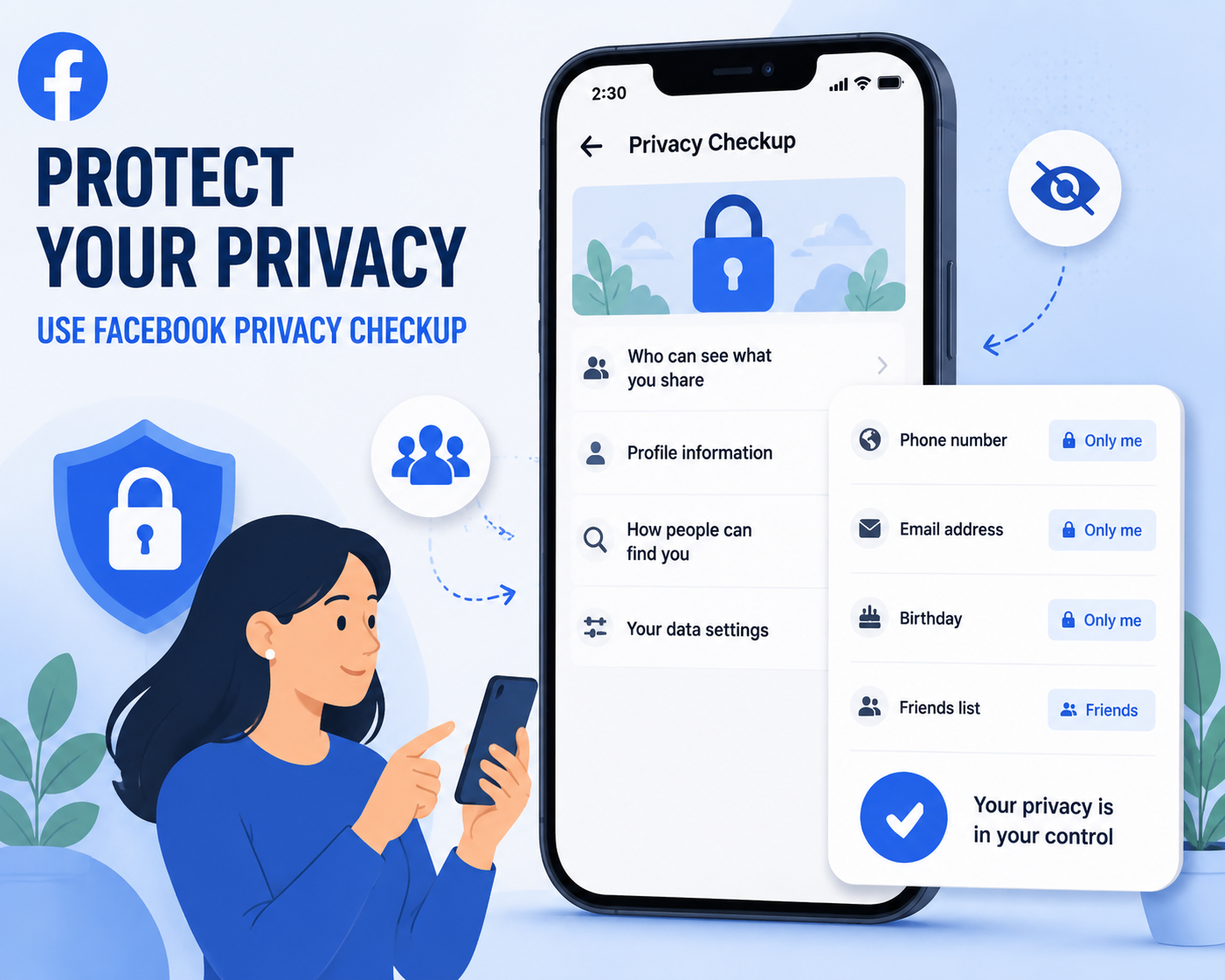
Facebook offers a built-in tool to help you lock down your account. Here is a quick facebook privacy checkup tutorial:
- Open the Facebook app or website and navigate to your Settings.
- Click on "Privacy Center" or search for "Privacy Checkup."
- Select "Who can see what you share."
- Review your profile information (phone number, email, birthday) and set them to "Only Me" or "Friends."
- Change your default post visibility.
- Limit past posts (this automatically changes all your old public posts to "Friends Only").
By utilizing this tool, you can rest easy knowing that even if a stranger finds your profile, they won't be able to see anything more than your profile picture and cover photo.
Frequently Asked Questions
To wrap up, let’s address a few specific variations of this question that commonly confuse users.
Q: Can you see who views your profile in facebook if you pay for a premium account? A: No. Unlike LinkedIn, which offers a premium subscription that allows users to see who viewed their profile, Facebook does not offer a paid tier that unlocks this feature. All claims stating otherwise are false.
Q: If I look at someone else's profile, will they know? A: No. Because you cannot see who views your profile, the reverse is also true. You can browse other people's public profiles anonymously. However, if you accidentally like a post or watch their Facebook Story, your name will appear to them.
Q: Why does Facebook suggest certain friends? Does it mean they viewed my profile? A: The "People You May Know" algorithm is incredibly complex. While many users suspect that people appear on this list because they viewed your profile, Meta has officially denied this. The algorithm is based on mutual friends, shared networks (like a workplace or school), being in the same Facebook groups, or your uploaded phone contacts.
Conclusion
Understanding Facebook Profile Views and Protecting Your Privacy
The allure of knowing exactly who is looking at our social media is undeniably strong. However, when it comes to the question, "can you see who views your facebook profile?", the definitive answer remains no.
Meta has prioritized browsing privacy, ensuring that your digital window-shopping remains entirely anonymous. While this might be frustrating for the curious, it also protects you when you are the one doing the browsing!
Instead of risking your account security by downloading dangerous third-party scam apps, focus on the metrics you can control. Utilize Facebook Stories to see who is engaging with your daily updates, turn on Professional Mode if you want broader audience insights, and use the Privacy Checkup tool to ensure that your private life remains visible only to the people you trust.
By understanding the reality of facebook profile views, you can navigate the platform safely, smartly, and securely.
Related Blogs

What is Cloudflare WARP? This is a service VPN (virtual private network) Developed by Cloudflare, it helps users protect personal data while effectively increasing Internet access speed. If you are looking for a safe, fast and stable web surfing solution, let's go Antidetect Browser Hidemium Explore details about Cloudflare WARP in the article below.1.What Is Cloudflare WARP and How Does It Work[…]

How to Integrate IPRoyal with Hidemium — Complete Privacy at Your FingertipsIn today’s digital landscape, privacy, speed, and scalability are crucial. Whether you’re a digital marketer, developer, or eCommerce entrepreneur, managing multiple accounts and operations demands tools that are secure, seamless, and efficient.That’s why combining Hidemium with IPRoyal creates a powerful solution — one[…]
.png)
In the context of multi-account management on mobile applications becoming increasingly popular, Geelark Antidetect Browser emerging as a breakthrough solution, specifically designed for diverse needs from affiliate marketing, e-commerce to advertising management. Unlike regular antidetect browsers, Geelark provides an ecosystem cloud phone Unique, realistic Android device simulation, helping[…]
Are you looking for a way to access websites restricted at school, work, or in your region? Unblocked browsers and related browsing tools may help in certain situations by using proxy servers, privacy networks, or alternative connection methods.However, not every browser works the same way. Some tools focus on privacy and accessing restricted content, while antidetect browsers such as Hidemium[…]
.png)
Whether you are a social media administrator, an affiliate marketer, or someone who needs to operate multiple accounts at the same time, antidetect browser is the ultimate solution to help each online profile act as an independent user. To optimize work efficiency and ensure safety, updating information about new anti-detection platforms is essential.In this article, we will evaluate it in[…]
.png)
You are accessing a familiar website and suddenly receive a message: "Your IP address has been blocked"? This is a common error in 2025, especially for those who do MMO, affiliate, online marketing or use automatic tools such as auto view, auto sub, content seeding tools.... When your IP is blocked, you cannot access the website, send emails, or even get checkpointed on platforms like Facebook,[…]
