Does Clearing Cookies Change Your Browser Fingerprint? What Actually Changes
Try Hidemium for free

Quick Answer: Does Clearing Cookies Change Your Browser Fingerprint?
No. Clearing cookies usually does not change your browser fingerprint.
Deleting cookies removes stored identifiers and website session data from your browser, but a browser fingerprint is built from characteristics such as your operating system, browser version, screen resolution, language, time zone, fonts, Canvas, WebGL, and other device or browser signals.
So after you clear cookies:
Cookie-based identifiers may disappear.
But:
Your browser fingerprint may remain the same or very similar.
That distinction matters because modern websites can use several identification methods at the same time.
If your goal is simply to remove saved sessions, clearing cookies may be enough.
If your goal is to create genuinely separate browser environments, cookies are only one part of the picture.
Cookies and Browser Fingerprints Are Not the Same Thing
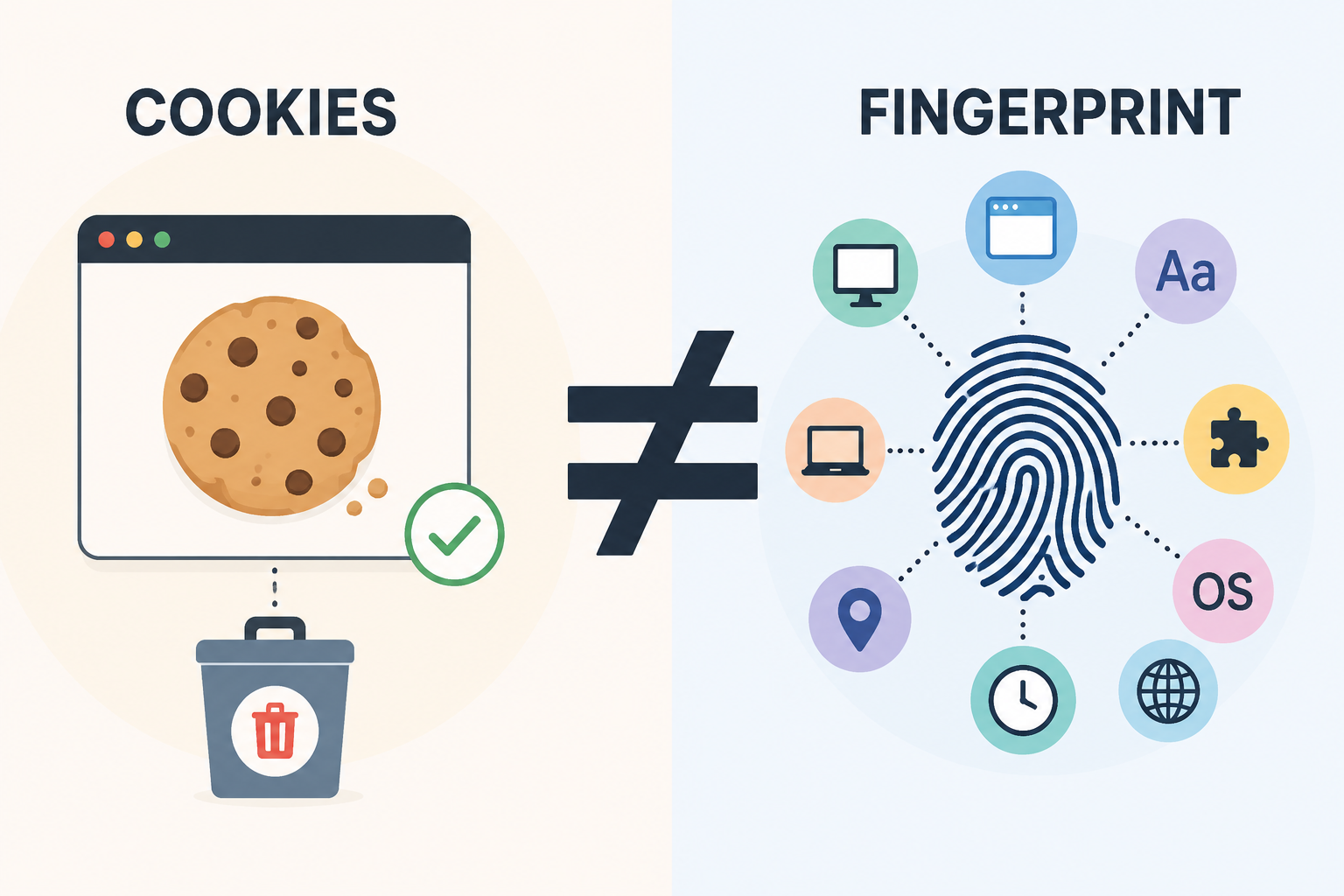
Cookies and browser fingerprints can both help websites recognize a returning browser, but they work very differently.
What Are Cookies?
A cookie is a small piece of information that a website stores in your browser.
Cookies can be used for legitimate purposes such as:
- keeping you logged in;
- remembering language preferences;
- maintaining a shopping cart;
- storing consent choices;
- measuring website usage;
- remembering a returning browser.
A cookie may contain a unique identifier associated with your browser session.
When you delete that cookie, the website can no longer read that particular stored identifier.
That is why clearing cookies can make a site treat you like a new session.
But it does not necessarily make your browser look like a new device.
What Is a Browser Fingerprint?
A browser fingerprint is generated from information that a website can observe about your browser and device.
Depending on the website and fingerprinting technique, signals may include:
- browser type and version;
- operating system;
- screen size and resolution;
- language;
- time zone;
- installed or available fonts;
- Canvas rendering;
- WebGL characteristics;
- hardware concurrency;
- device memory;
- touch capabilities;
- audio-processing characteristics;
- browser features and APIs.
No single signal necessarily identifies a person.
The important part is the combination.
A sufficiently distinctive combination of characteristics can make one browser environment easier to distinguish from others.
For a deeper explanation, see Hidemium's guide to browser fingerprinting.
What Happens to Your Browser Fingerprint After Clearing Cookies?
The easiest way to understand this is to separate stored data from observable characteristics.
| Signal | Does Clearing Cookies Remove It? |
|---|---|
| Login session cookies | Usually yes |
| Tracking cookies | Usually yes |
| Shopping cart cookies | Usually yes |
| Site preferences stored in cookies | Usually yes |
| Browser version | No |
| Operating system | No |
| Screen resolution | No |
| Time zone | No |
| Language | No |
| Canvas characteristics | No |
| WebGL characteristics | No |
| Hardware concurrency | No |
| Public IP address | No |
Clearing cookies changes what websites can read from local cookie storage.
It does not automatically change the browser and device characteristics exposed during a new visit.
That means a website may lose one identifier while still seeing many of the same fingerprint signals.
Can a Website Recognize You After You Clear Cookies?
Potentially, yes.
Suppose a website previously observed:
- Chrome on Windows;
- a specific screen resolution;
- a particular language;
- a specific time zone;
- distinctive Canvas output;
- particular WebGL characteristics;
- a certain set of browser capabilities.
You then delete all cookies and return.
The old cookie identifier may be gone.
But many of the browser and device characteristics can still look identical.
A sophisticated detection system may therefore conclude that the new session resembles a previous browser environment.
This does not mean browser fingerprinting is perfect.
Fingerprints can change over time.
Browser updates, operating system updates, hardware changes, display changes, privacy protections, and other factors may alter individual signals.
The key point is simply:
Deleting cookies removes cookie-based identification. It does not reset the browser environment itself.
What Exactly Changes When You Clear Cookies?
Clearing cookies can still be useful.
It just solves a different problem.
You May Be Logged Out
Authentication sessions are often stored in cookies.
Delete them, and websites may require you to sign in again.
Website Preferences May Reset
A site may forget:
- language choices;
- personalization settings;
- consent preferences;
- shopping carts;
- recently viewed items.
Cookie-Based Tracking Can Be Interrupted
If a tracking system depends on a particular browser cookie, deleting that cookie removes the stored identifier.
The tracking system may issue a new identifier when you return.
Your Browser Fingerprint Usually Does Not Reset
The browser is still running on the same operating system, using the same hardware, resolution, fonts, rendering characteristics, and browser configuration.
Those signals are not stored inside cookies.
Does Clearing Cache Change Your Browser Fingerprint?
Usually not in any meaningful way.
Browser cache stores resources such as:
- images;
- CSS;
- JavaScript;
- fonts;
- other downloaded website assets.
Deleting cached files can cause websites to reload resources, but it normally does not change core fingerprint characteristics such as your screen resolution, operating system, WebGL renderer, or browser version.
So:
Clear cookies → removes stored cookie identifiers.
Clear cache → removes downloaded site resources.
Neither action should be treated as a complete browser fingerprint reset.
What About Local Storage?
This is where things become slightly more complicated.
Websites can store information in places other than traditional cookies.
Examples include:
- localStorage;
- sessionStorage;
- IndexedDB;
- service-worker data;
- cached application data.
If you only clear cookies but leave other site storage untouched, some website-specific data may remain.
Modern browsers often provide an option such as:
Clear cookies and site data
rather than just:
Delete cookies
Using the broader option can remove more locally stored website information.
Even then, however, browser fingerprint characteristics may remain.
Site storage and browser fingerprinting are still different mechanisms.
Does Incognito Mode Change Your Browser Fingerprint?
Not necessarily.
Private or Incognito browsing generally creates a temporary session that avoids retaining some local browsing data after the private window is closed.
That can help separate:
- cookies;
- browsing history;
- temporary sessions.
But the private window usually still runs on:
- the same device;
- the same operating system;
- a similar browser version;
- the same display;
- the same hardware.
As a result, many fingerprint signals can remain similar.
Incognito mode is useful for temporary local session separation.
It should not automatically be considered a separate device identity.
Does Changing Your IP Change Your Browser Fingerprint?
An IP address and a browser fingerprint are different signals.
Changing your network connection or using a proxy may change the public IP address visible to a website.
But it does not automatically change:
- screen resolution;
- browser version;
- Canvas output;
- WebGL;
- language;
- operating system;
- hardware characteristics.
Likewise, changing a browser fingerprint does not inherently change your IP address.
Websites may evaluate both network and browser signals together.
This is one reason consistent browser environments matter more than changing one individual parameter.
Why Websites Use More Than Cookies
Cookies are useful, but relying entirely on them has limitations.
Users can:
- delete them;
- block them;
- browse privately;
- restrict third-party cookies;
- use browser privacy protections.
For security and fraud prevention, online platforms may therefore evaluate additional signals.
A login system, for example, may consider:
- cookie history;
- IP address;
- browser characteristics;
- geographic consistency;
- device behavior;
- account activity;
- authentication history.
This is important because the common assumption:
“I deleted my cookies, so the website sees a completely new browser.”
is usually too simplistic.
A cookie is only one signal among many.
Clearing Cookies vs Creating a Separate Browser Profile
This distinction becomes particularly important for teams managing multiple online environments.
Imagine you manage Client A and Client B.
You log into Client A's services.
Then you clear cookies and log into Client B.
You removed Client A's stored cookies.
But both sessions may still use:
- the same browser installation;
- the same operating system;
- the same screen;
- the same browser configuration;
- many of the same fingerprint characteristics.
That is very different from maintaining separate browser profiles.
A dedicated profile can isolate persistent data such as:
- cookies;
- sessions;
- storage;
- bookmarks;
- extensions;
- proxy settings;
- other profile-specific configuration.
This is why browser profile isolation is often more practical than repeatedly clearing cookies when users need several persistent work environments.
When Is Clearing Cookies Enough?
Clearing cookies makes sense when your goal is simple.
For example:
- troubleshooting a broken login;
- resetting a website session;
- removing saved preferences;
- clearing old authentication cookies;
- testing a website without the current session;
- reducing some cookie-based tracking.
For these tasks, there may be no need for anything more sophisticated.
When Is Clearing Cookies Not Enough?
Cookie deletion becomes less useful when you need environments that remain separate over time.
For example:
Managing Multiple Clients
Repeatedly clearing cookies every time you move between clients wastes time and destroys useful sessions.
Separate profiles provide a cleaner workflow.
Persistent Account Environments
If you need to return to the same account tomorrow with its session and settings intact, continuously deleting cookies works against you.
Team Workflows
Teams need to know:
- which profile belongs to which project;
- who has access;
- which proxy is assigned;
- which session should remain active.
Cookie deletion does not provide that management layer.
Testing Separate Browser Environments
QA, research, and operational teams may need multiple reproducible environments.
Separate profiles are more practical than constantly resetting one browser.
Clear Cookies vs Browser Profile Isolation
Here is the practical difference:
| Clearing Cookies | Separate Browser Profile | |
|---|---|---|
| Removes cookie sessions | Yes | Profiles keep their own sessions |
| Separates local storage | Depends on what is cleared | Yes, by profile |
| Preserves multiple logins | No | Yes |
| Changes browser fingerprint | Usually no | Can maintain profile-specific environments |
| Useful for troubleshooting | Yes | Sometimes |
| Useful for persistent workflows | Limited | Yes |
| Useful for multiple accounts | Inconvenient | Much more practical |
| Team organization | No | Possible with dedicated tools |
The important point is not that one approach is always “better.”
They solve different problems.
How Hidemium Approaches Browser Profile Isolation
For individual users, built-in browser profiles may be sufficient.
But once teams need dozens or hundreds of environments, profile management becomes a larger operational problem.
Hidemium is designed around separate browser profiles that can be organized for different accounts, projects, or workflows.
Instead of:
log in → work → clear cookies → log in again,
a team can maintain:
Profile A → Client A
Profile B → Client B
Profile C → Research
Profile D → Testing
Each environment can maintain its own browser data and configuration.
This approach is especially relevant for agencies, e-commerce teams, marketers, QA teams, and businesses that need persistent browser environments rather than temporary cookie resets.
You can explore browser profile management at Hidemium.io.
Tools involving browser profiles and fingerprints should always be used in accordance with applicable laws and the terms of the services being accessed.
Frequently Asked Questions
Does clearing cookies change your browser fingerprint?
No. Clearing cookies removes locally stored cookie identifiers and sessions, but it normally does not change fingerprint characteristics such as your operating system, browser version, screen resolution, Canvas, WebGL, language, or hardware-related signals.
What does a browser fingerprint look like after clearing cookies?
A browser fingerprint after clearing cookies will often remain identical or very similar because most fingerprint signals come from browser and device characteristics rather than cookie storage.
Does clearing cookies make you anonymous?
No. Clearing cookies can remove some stored identifiers, but websites may still receive your IP address and browser characteristics. Cookie deletion should not be treated as a complete anonymity mechanism.
Does clearing cookies remove tracking?
It can remove tracking identifiers stored specifically in cookies. However, websites may use other storage mechanisms, account logins, IP information, browser fingerprinting, or other signals.
Does clearing cache change a browser fingerprint?
Usually not. Cache contains downloaded website resources and is separate from most browser fingerprint signals.
Does Incognito mode change browser fingerprinting?
Incognito or private browsing creates a temporary browsing session, but many browser and device characteristics remain similar. It does not necessarily create a completely different browser fingerprint.
How can I keep multiple browser sessions separate?
For a small number of accounts, built-in browser profiles may be sufficient. For larger or team-based workflows, a dedicated browser profile manager can keep cookies, sessions, storage, proxies, and browser environments organized separately.
Final Answer
So, does clearing cookies change your browser fingerprint?
In most cases, no.
Clearing cookies removes stored website identifiers and sessions.
It does not automatically change the characteristics that make up a browser fingerprint.
The simplest way to remember the difference is:
Cookies tell a website what was stored in your browser.
Fingerprinting describes characteristics of the browser and device itself.
If you only need to reset a login or remove stored website data, clearing cookies is often enough.
If you need persistent separation between multiple accounts, clients, or projects, using isolated browser profiles is a more suitable approach than repeatedly deleting cookies.
For teams that need that type of structured profile isolation, Hidemium provides a dedicated browser profile management environment.
Related Blogs

Multiple internet identities include anything from multiple accounts on a single website to different computers with a different connections. The reason why people need them is various.Within the context of our website and Hidemium, we view identity as a set of computer, browser, and connection parameters that the server can read off your client. Calling those parameters fingerprints. Here we[…]
.png)
Managing multiple accounts on Instagram is not a simple thing. Photos and videos aren’t synced to one account, confusing you with posting from one account to another. Using multiple accounts also makes it easy for you to be flagged as suspicious by the platform. So what is the optimal way to manage multiple accounts on Instagram? Stay tuned to the article for more details!What is the use of[…]

How to Integrate PiaProxy with Hidemium — Complete Privacy at Your Fingertips In today’s digital world, privacy, stability, and efficiency are essential — especially for marketers, developers, and eCommerce professionals managing multiple accounts and geo-targeted operations. Combining Hidemium with PiaProxy brings a powerful synergy — one that enhances anonymity, bypasses restrictions, and[…]

If your application uses open-source code, it means that you are relying on components you didn’t write and can’t fully control, including the vulnerabilities coming with that code.This is where you should consider using Software Composition Analysis (SCA) tools, which scan your dependencies and catch any hidden security issues or risky licenses before they cause problems.Below, we will offer[…]

Why Online Privacy Matters More Than EverEvery time you open your laptop or unlock your phone to surf the web, you leave a trail. From the ads that eerily follow you across different websites to the invisible trackers logging your device details, the internet is designed to collect data. This reality makes protecting personal data online one of the most critical digital skills you can master[…]

In China, the Internet censorship system – commonly known as The Great Firewall (GFW)– continuously blocks access to thousands of international websites and applications such as Google, Facebook or WhatsApp. Therefore, for tourists, foreigners living in China or local residents, VPN became an important tool to maintain digital freedom and access the services needed for work and personal[…]
