


You’ve just signed in to several Outlook accounts and are immediately met with a “Your account has been locked” message or a request to verify your phone number. Changing your password or browser doesn’t help. In many cases, the cause may be something you rarely check: the history of the IP address you’re using.
Spamhaus is one of the most widely referenced IP blocklists. IP addresses listed there may have been associated with spam or malware, so accounts signing in from those addresses may be considered higher risk.
There’s one important limitation to keep in mind: Spamhaus isn’t the only factor. Microsoft uses its own risk scoring system, and IP reputation is just one signal. A clean IP can remove one major risk factor, but it can’t guarantee that an account will never be locked.
This guide explains how to check an IP address on hideip.us, how to interpret each line of the results, and when to change your IP address or look for another cause.
Quick answer
To check whether an IP address is listed on a Spamhaus blocklist, follow these four steps:
- Turn on the proxy or connect to the network you plan to use with Outlook.
- Open hideip.us and confirm that it shows the proxy’s IP address.
- Run a blacklist check and see which Spamhaus lists, if any, contain the IP.
- Review the results: if the IP is listed on SBL, CSS, or XBL, change it. If it’s listed only on PBL, it can still be used to sign in.
If the IP is clean but the account is still locked, other signals may be involved, such as multiple accounts using the same IP or unusual sign-in activity.
Concepts and scope
What are DNSBLs and Spamhaus?
A DNSBL (DNS-based Blocklist) is a list of IP addresses with a poor reputation, checked through DNS. Email servers may query these lists when a connection is made to help decide whether to accept or reject it.
Spamhaus operates some of the most widely used DNSBLs. Its system includes several lists, each with a different purpose:
| List | What it identifies | What it may mean for Outlook account management |
|---|---|---|
| SBL | Sources of spam that Spamhaus has manually verified | Serious; change the IP |
| CSS | IP addresses with a poor email-sending reputation, identified automatically | Serious; change the IP |
| XBL | Infected or compromised devices, including open proxies | Serious; change the IP |
| PBL | End-user IP ranges that shouldn’t send email directly | Normal for residential IPs |
| ZEN | A combined lookup covering the lists above | Check the response code to see which list applies |
What an IP blacklist checker can and can’t tell you
A blacklist checker can tell you whether an IP address appears on public lists at the time of the lookup.
It can’t tell you how Microsoft scores that IP address. Microsoft uses internal reputation data that it doesn’t make public. An IP address that’s clean on Spamhaus may still be rated poorly by Microsoft if many accounts have used it.
Three things that are easy to confuse
Being listed for email sending and having an account locked are different things. Spamhaus is designed to help filter email. Account locks are decisions made by Microsoft’s own anti-abuse systems. The two can be related because they may both reflect IP reputation, but they aren’t the same thing.
Outlook.com and Exchange Online are different services. Personal Outlook accounts and Microsoft 365 business mailboxes have different policies. This guide covers personal Outlook accounts.
A PBL listing doesn’t mean an IP address is dirty. PBL identifies IP ranges assigned to end users. Most residential IP addresses appear on PBL.
How to check an IP address on hideip.us
Step 1: Connect through the IP address you want to check
Turn on the proxy in the browser or profile you’ll use to sign in to Outlook. If you check from a different browser, the result may show your home network’s IP instead of the proxy’s IP.
Expected result: The browser can access the internet through the proxy.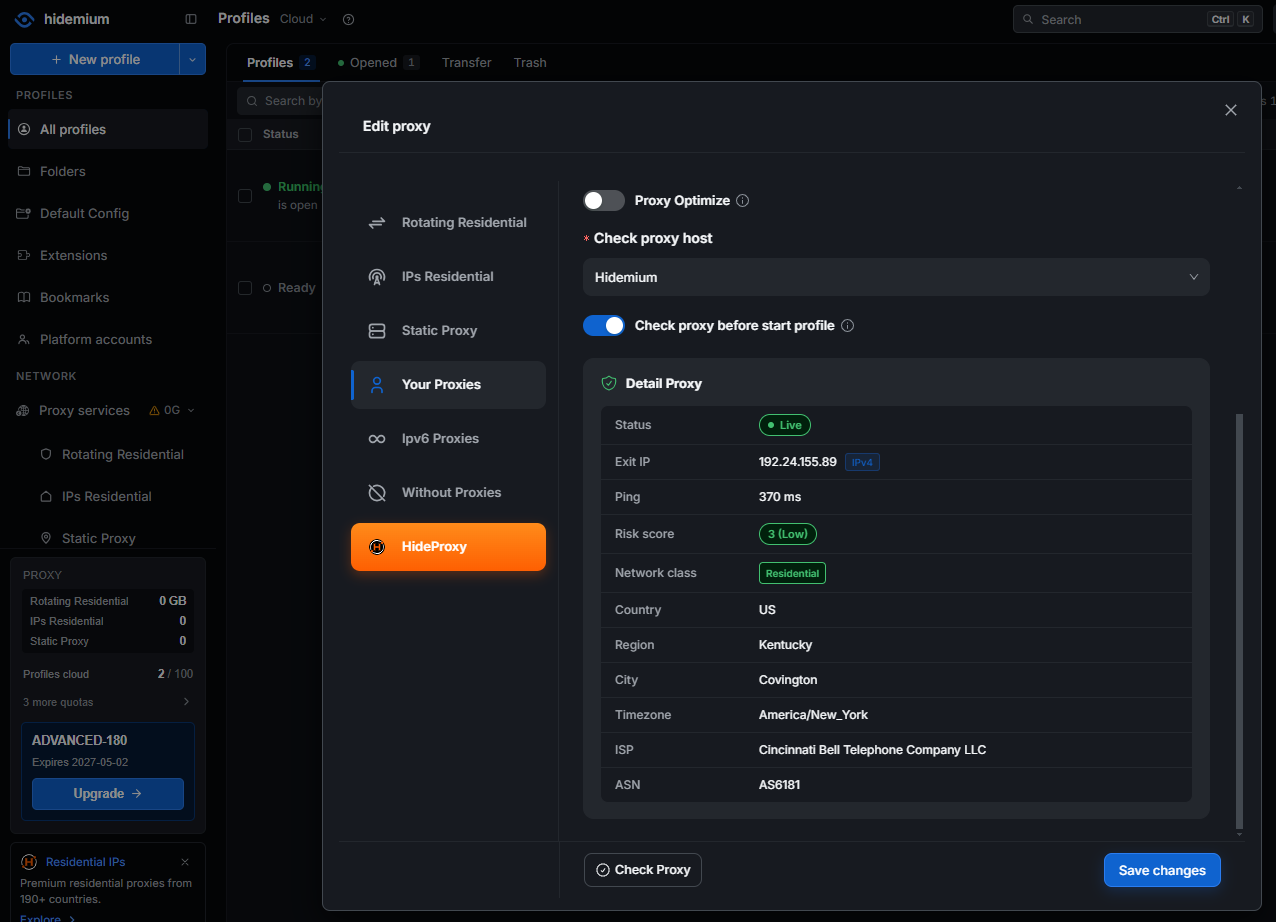
Note: Turn off any VPN running at the same time to avoid checking the wrong IP address.
Step 2: Open hideip.us and confirm the IP address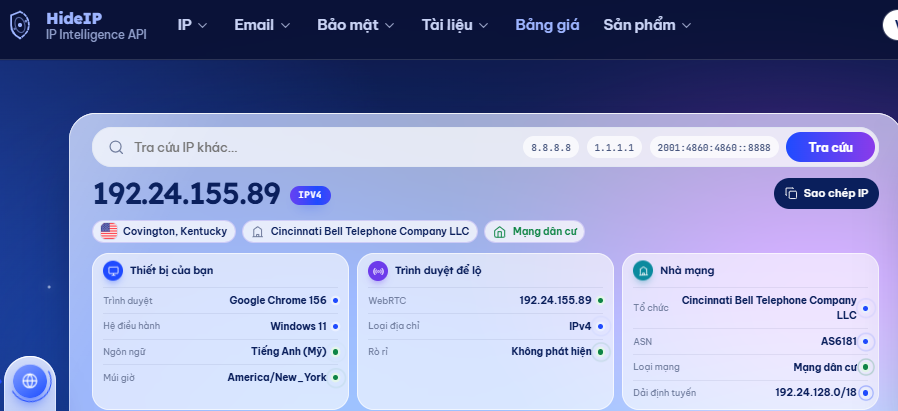
Go to hideip.us. The site will show the IP address it sees for your connection. Compare it with the IP address provided by your proxy provider.
Expected result: The displayed IP matches the proxy IP.
Note: If the addresses don’t match, the proxy may not be active or it may be rotating IP addresses. Check your configuration before continuing.
Step 3: Run a blacklist check
Enter the IP address in the lookup field, or use the IP address shown on the page, then run a blacklist check. The tool will query Spamhaus and other DNSBLs.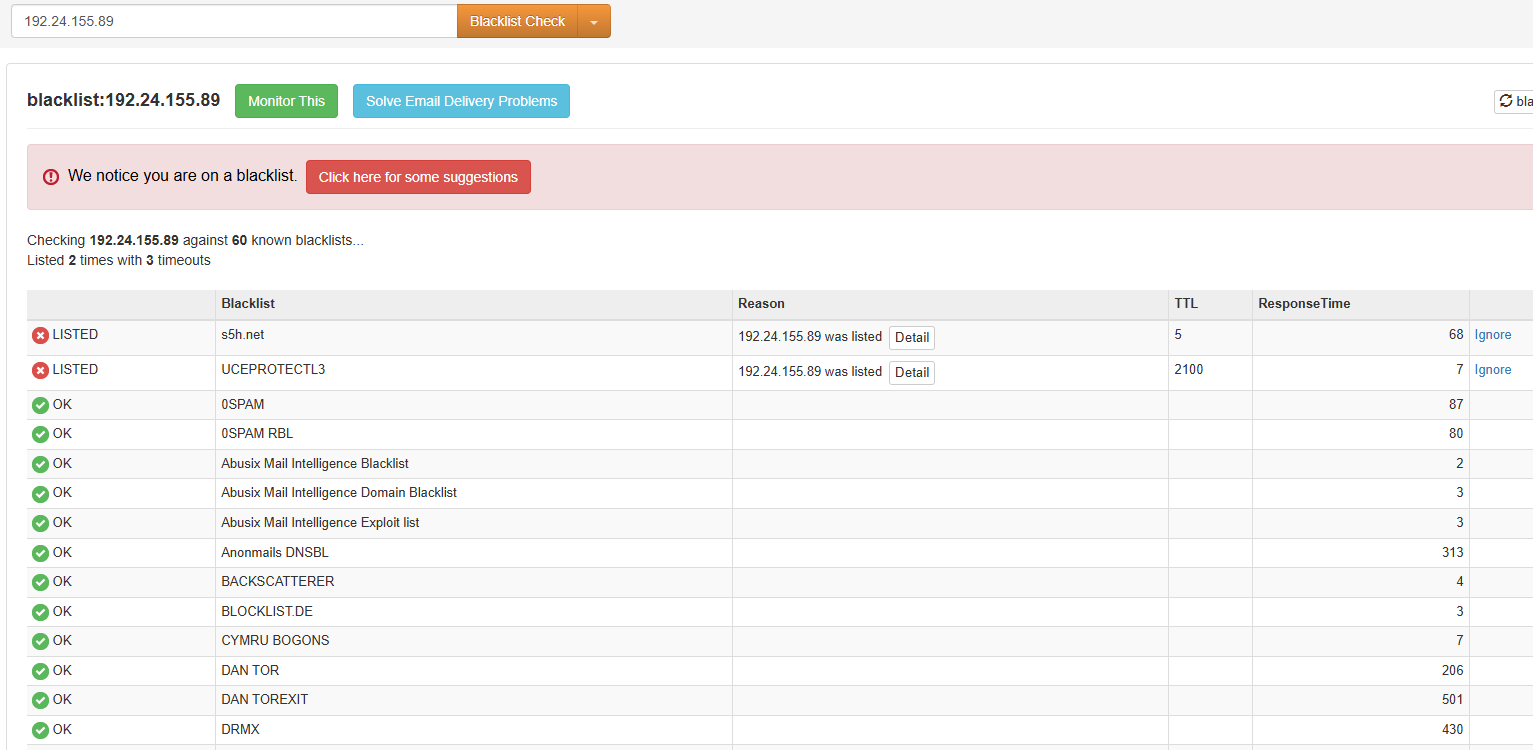
Expected result: A table showing each list and whether the IP address is listed.
Note: Wait for the tool to complete all its lookups. An incomplete result can make you think an IP is clean when it hasn’t finished checking.
Step 4: Check the IP address type
In addition to the blacklist results, review the IP details: its network provider (ASN), location, and whether it’s classified as residential, datacenter, or VPN/proxy.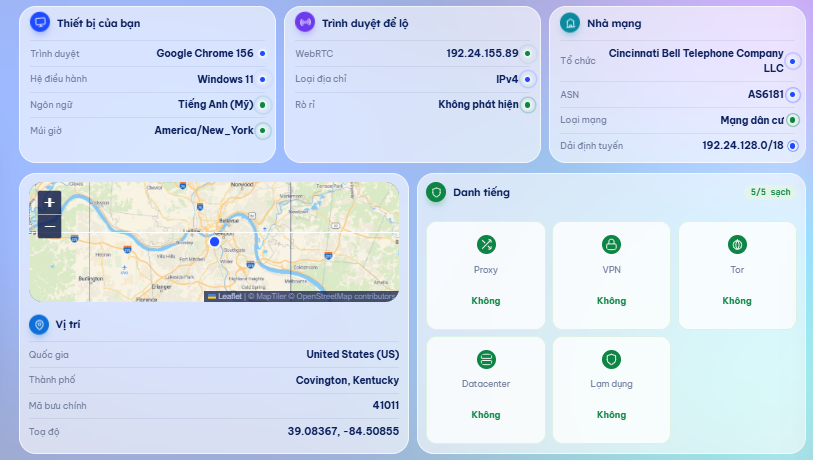
Expected result: The ASN belongs to a residential network provider, and the location matches the country you selected when purchasing the proxy.
Note: A proxy sold as “residential” may actually be a datacenter IP if its ASN belongs to a hosting provider.
How to read the results
When you query Spamhaus ZEN, the server returns a code in the 127.0.0.x format to indicate which list contains the IP address. Some tools display this code directly, so it helps to know what it means. See the Spamhaus documentation.
| Response code | List | Meaning | What to do |
|---|---|---|---|
| 127.0.0.2 | SBL | A verified source of spam | Change the IP |
| 127.0.0.3 | CSS | An IP with a poor email-sending reputation | Change the IP |
| 127.0.0.4 | XBL | An infected or compromised device | Change the IP |
| 127.0.0.9 | DROP | A hijacked IP range, always associated with SBL | Change the IP and avoid the entire range |
| 127.0.0.10 | PBL | An end-user IP range listed by the network provider | Usable |
| 127.0.0.11 | PBL | An end-user IP range listed by Spamhaus | Usable |
| 127.255.255.x | Lookup error | Not a blacklist result | Run the lookup again |
Examples
- Only 127.0.0.10 or 127.0.0.11 appears: This is normal for a residential IP address. It’s the result you’d generally expect.
- 127.0.0.4 appears alongside 127.0.0.11: The IP is residential, but the device behind it may be infected or operating as an unauthorized proxy. Don’t use it.
- 127.0.0.2 or 127.0.0.3 appears: The IP has been associated with spam. Don’t use it.
- No codes appear: The IP isn’t listed on any of the checked lists. This is less common for residential IPs; check the ASN to make sure it isn’t a datacenter IP.
Special case: The IP is clean, but Outlook still locks the account
This is often the most confusing situation: you’ve checked the IP and it isn’t listed on SBL, CSS, or XBL, but Outlook still asks you to verify your account. Here are four possible explanations.
1. The IP you checked wasn’t the IP used to sign in
A rotating proxy may change its IP address after each session or every few minutes. The IP you checked at 9 a.m. may not be the one used when you sign in. For accounts that need a stable connection, use a static IP and check that specific address.
2. The lookup returned an error instead of a result
Spamhaus may block queries routed through large public DNS services and return code 127.255.255.254. Some tools may mistakenly interpret this code as “clean” or “listed.” If the result looks suspicious, check again at check.spamhaus.org.
3. Microsoft uses its own reputation data
Microsoft may have records of a proxy IP being used by many other customers to sign in to hundreds of accounts, even if Spamhaus hasn’t listed it. This is one reason a dedicated IP may be preferable to a shared IP.
4. The problem may not be the IP address
Microsoft may also consider other signals, including:
- Many accounts signing in from the same IP address or device in a short period.
- Sign-ins from locations that change suddenly, such as Vietnam one day and the United States the next.
- A new account sending a large volume of email or repeated messages.
- An account that doesn’t have recovery information, such as a phone number or alternate email address.
If Microsoft asks you to verify your account, complete the verification using Microsoft’s instructions, then review the signals above. Keep in mind that creating accounts in bulk with automated tools violates Microsoft’s terms of service, and no IP address can protect accounts in that situation.
Common mistakes
“If an IP is listed on Spamhaus, I have to discard it.” Not necessarily. It depends on the list. PBL includes nearly all IP addresses used by home internet customers. If you reject every IP listed on PBL, you may reject the very residential IPs you’re looking for. Focus on whether the IP is listed on SBL, CSS, or XBL.
“If an IP isn’t on a blacklist, it’s completely safe.” Public blocklists are only one part of the picture. Microsoft has its own reputation systems and also considers account activity. Treat a blacklist check as an initial screening step, not a guarantee.
“Every residential proxy is clean.” Not necessarily. Some residential proxy networks get their IPs from devices running bandwidth-sharing software, and some of those IPs may have been misused. The IP type doesn’t replace checking each address.
“The account was locked because of the IP, so changing the IP will fix it.” Not necessarily. If the cause is account behavior, such as a new account sending bulk email, a new IP may soon be flagged too. Changing the IP helps only when the old IP is actually the problem.
Practical checklist
Before using an IP address for an Outlook account:
- The IP shown on hideip.us matches the proxy IP provided to you.
- The IP isn’t listed on SBL (127.0.0.2).
- The IP isn’t listed on CSS (127.0.0.3).
- The IP isn’t listed on XBL (127.0.0.4).
- The ASN belongs to a residential network provider, not a hosting provider.
- The IP location matches the account’s country and time zone.
- The IP is static or remains stable for the duration of the session.
- You’ve checked again at check.spamhaus.org if the result seems unclear.
While using the account:
- Use a stable, trusted connection.
- Add recovery information, such as a phone number or alternate email address.
- Check the IP periodically and record the results.
- Recheck the IP if the account is asked to verify your identity.
Frequently asked questions
Can I use an IP listed on PBL for Outlook?
Yes. PBL mainly affects direct email delivery from that IP over port 25. Signing in and sending email through the Outlook interface aren’t affected in the same way.
Can an IP listed on SBL or XBL be delisted?
The owner of the IP can request free removal at check.spamhaus.org after fixing the underlying problem. If you rent the proxy IP, you aren’t its owner, so the quickest option is to ask the provider for a replacement.
Should I use a residential or datacenter IP?
Residential IPs generally have a reputation closer to that of ordinary home users. Datacenter IPs are easier to identify through their ASN and may be considered higher risk when signing in to personal email services.
How many accounts should use one IP?
Microsoft doesn’t publish a threshold. In general, fewer accounts using the same IP is closer to how a typical household connection is used.
Conclusion
Checking an IP before using it is a simple step that can help you troubleshoot Outlook account access issues. The key points are to confirm you’re checking the IP you’re actually using, interpret the result by list instead of looking only for a generic “blacklisted” label, and check again periodically. Change an IP listed on SBL, CSS, or XBL. An IP listed only on PBL can still be used for ordinary Outlook access.
Next steps:
- Check your current IP address on hideip.us.
- If the IP is listed on SBL, CSS, or XBL, review HideProxy’s residential IP plans and check any replacement IP against the checklist before using it.