
Have you ever wanted to access a website through another IP address without installing additional software? Web proxy services such as Proxyium are designed to make this type of browsing possible.
However, using a web proxy does not automatically mean your internet connection is private, encrypted end to end, or anonymous.
In this guide, we explain what Proxyium is, how web proxies work, their benefits and limitations, and how they compare with VPNs and other browser management tools.
1. What Is Proxyium?
Proxyium is a web-based proxy service designed to let users access websites through an intermediary server.
Instead of connecting directly to a destination website, users enter a website address into a proxy interface. The intermediary then requests the content and delivers it through the proxy service.
As a result, the destination website may see the proxy server's IP address rather than the user's direct public IP address for requests passing through that proxy.
This does not mean the user's entire internet connection changes IP addresses. The effect generally applies to supported browsing activity routed through the web proxy.
A web proxy is also different from a browser fingerprint management solution. Changing the IP address visible to a destination does not necessarily change every identifying characteristic of the browsing environment.
2. How Does Proxyium Work?
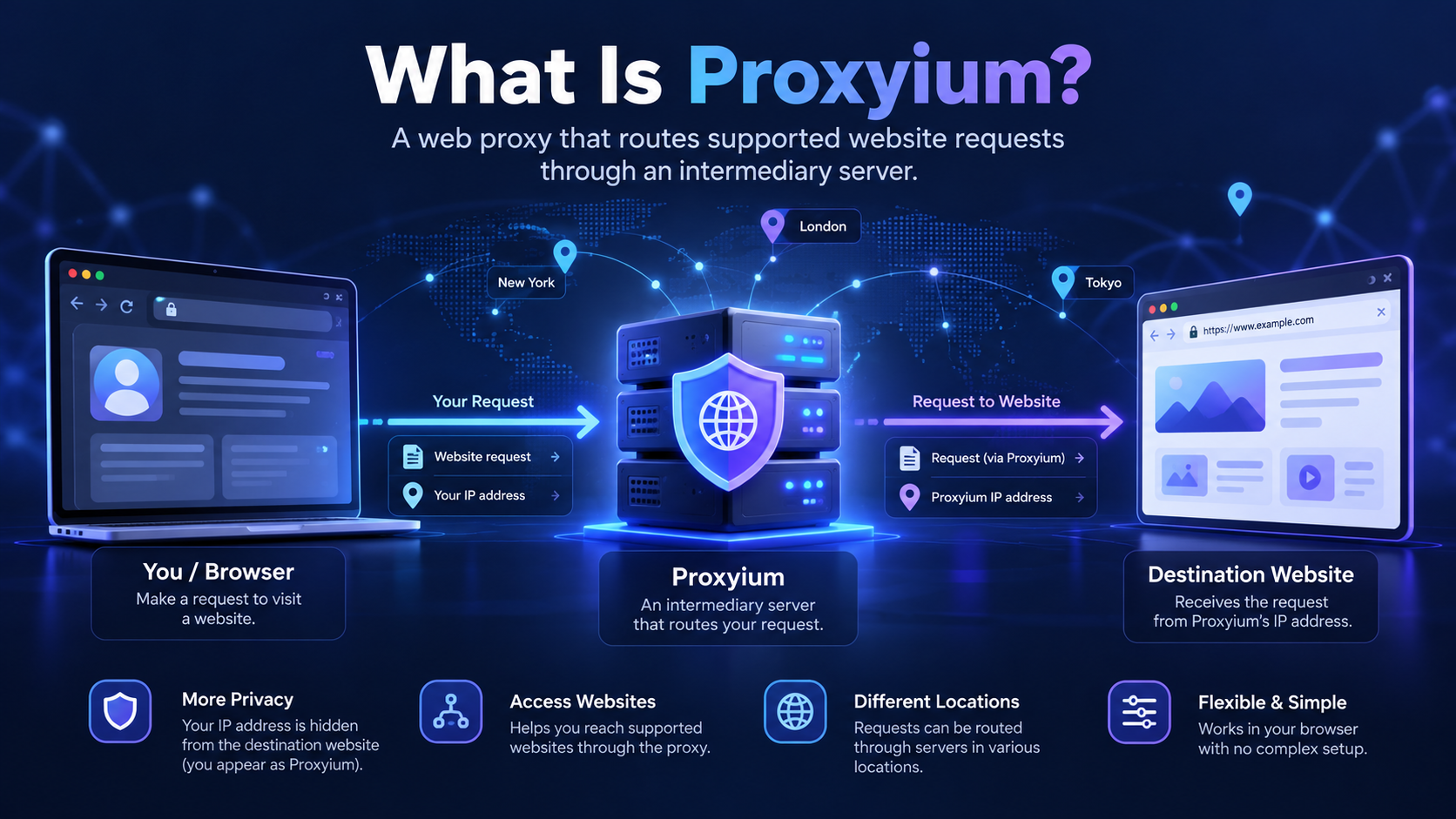
A web proxy operates between your browser and the website you want to access.
The typical process involves four steps:
- You open the proxy service.
- You enter the URL of the website you want to visit.
- The proxy server retrieves the requested web content.
- The service delivers the resulting page through its interface.
This process can change how the destination website sees the network source of the request.
However, the exact behavior depends on the proxy's technical implementation, the website being visited, and the browser features involved.
For example, complex websites that require authentication, modern JavaScript features, streaming, or interactive applications may not work as expected through every web proxy.
Important: A web proxy should not be assumed to protect all applications on your device. Other browser tabs, apps, or network requests may still use your regular connection.
3. How to Use Proxyium
Using a web proxy is generally straightforward.
Step 1: Open the Official Proxy Service
Navigate to the official Proxyium website using a browser. Check the domain carefully to avoid imitation websites.
Step 2: Enter the Destination URL
Find the website address field and enter the site you want to open.
Avoid entering passwords, financial information, or other sensitive data unless you have independently verified the service's trustworthiness and privacy practices.
Step 3: Open the Website Through the Proxy
Submit the URL and allow the service to retrieve the page.
Depending on the destination, some functions may be unavailable or behave differently.
Step 4: Check the Result
If your goal is to understand which IP address the destination observes, use an appropriate checking method and remember that a web proxy may only affect the browsing session routed through it.
Do not assume that checking a separate browser tab will produce the same IP address as the proxied page.
4. Benefits of Using a Web Proxy
Web proxies can offer several practical benefits.
No Dedicated VPN Application Required
A browser-based proxy generally does not require a separate VPN app for basic use. This can make it convenient for occasional browsing.
Quick Access Through an Intermediary
The proxy can send supported website requests through its own server, which may change the public IP address seen by the destination.
Useful for Basic Testing
Web proxies can help users learn how intermediary connections work or conduct simple accessibility checks.
Convenient for Occasional Use
If you only need to open a supported webpage through a proxy, a browser-based service may be simpler than configuring a system-wide network tool.
These benefits should be balanced against compatibility, privacy, and security considerations.
5. Is Proxyium Safe?
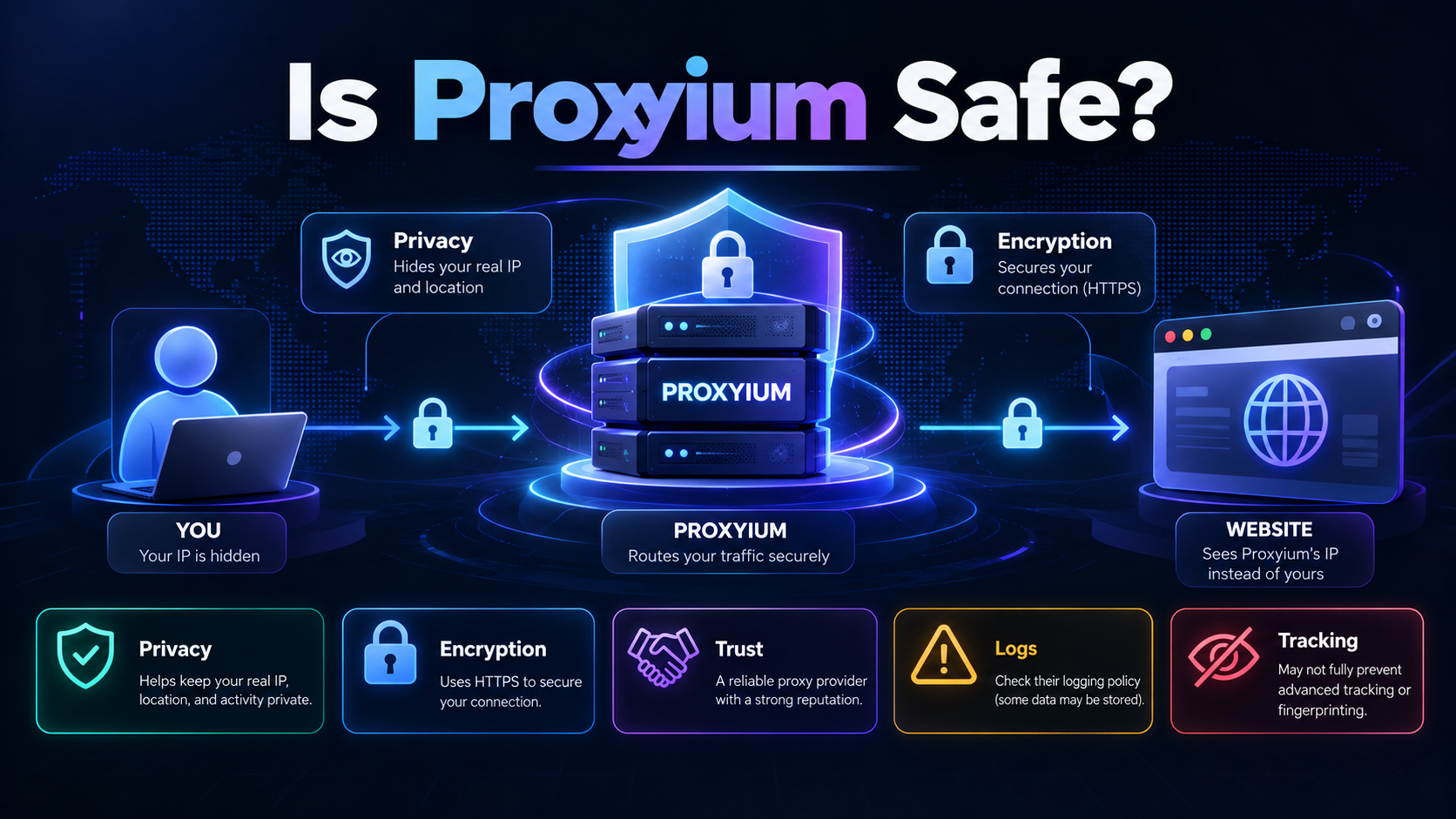
Proxyium should not be considered automatically safe simply because it is a proxy service. Its safety depends on factors such as the operator's security practices, privacy policy, connection handling, data retention, and the websites being accessed.
Before using any web proxy, consider the following questions.
Can the Proxy Operator See My Activity?
Because a proxy intermediates requests, the operator may be able to observe certain connection information and potentially additional data depending on the technical design.
Users should review the service's privacy and logging policies rather than assume that activity is invisible to the provider.
Does a Proxy Guarantee Encryption?
No. Encryption depends on how connections are established between your browser, the proxy service, and the destination website.
The presence of HTTPS in one part of the connection does not automatically establish the security properties of every part of the process.
Does Proxyium Guarantee Anonymity?
No web proxy should be treated as a guarantee of anonymity.
Websites may use cookies, account logins, browser-related signals, and other methods to recognize activity.
Should I Use It for Sensitive Accounts?
For banking, work credentials, private documents, and other sensitive activities, avoid relying on an unverified third-party proxy.
Use trusted access methods approved by the relevant service or organization.
6. Proxyium vs. VPN: What's the Difference?
A web proxy and a VPN both act as intermediaries, but they typically work at different levels.
Feature | Web Proxy Such as Proxyium | VPN |
| Main purpose | Access supported websites through an intermediary | Route traffic through a VPN connection |
| Installation | Often usable in a browser | Usually requires an app or operating-system setup |
| Traffic coverage | Usually limited to proxied browsing activity | Depends on VPN configuration; can cover more device traffic |
| Encryption | Depends on implementation and connections | VPN tunnel encryption is a core feature |
| Website compatibility | Some sites may not function fully | Often works across more applications |
| Privacy | Depends on provider and configuration | Also depends on provider and configuration |
Neither option makes you automatically anonymous.
A VPN may be more suitable when you need a broader network-level connection solution. A web proxy can be convenient for occasional access to supported webpages.
7. Does Proxyium Change Your Browser Fingerprint?
Changing the apparent IP address does not necessarily change your browser fingerprint.
Browser fingerprinting may involve information such as:
- Browser and operating system characteristics.
- Screen resolution and language preferences.
- Time zone.
- Canvas and WebGL behavior.
- Other attributes exposed through browser APIs.
A web proxy may change the apparent network source of supported requests, but it should not be assumed to manage or isolate all these attributes.
To understand the difference, explore our guide to browser fingerprinting and our comparison of browser fingerprint testing tools.
8. When Should You Use a Web Proxy, VPN, or Browser Management Tool?
Choose the solution based on your actual goal.
Use a web proxy when you need occasional access to supported websites through an intermediary and understand the limitations.
Use a VPN when you need broader network traffic routing and an encrypted tunnel, subject to the VPN's configuration and provider practices.
Use a browser profile management tool when your primary need is organizing separate browsing environments for legitimate workflows.
These tools address different problems and should not be considered interchangeable.
Where Does Hidemium Fit?
Hidemium is an antidetect browser solution that supports managing multiple browser profiles.
It is not a direct substitute for a general-purpose VPN, and a web proxy is not a substitute for browser profile management.
For people managing multiple separate browsing environments, understanding IP addresses, proxies, cookies, and browser fingerprints is useful when evaluating configuration and privacy considerations.
Read more about antidetect browsers and browser profile management with Hidemium.
9. Frequently Asked Questions
Is Proxyium Free?
Proxyium is commonly discussed as a web proxy option, but current access conditions, supported features, and limitations should be checked on its official website. Do not assume that all features or usage levels are free.
Can Proxyium Hide My IP Address?
For supported requests sent through a web proxy, the destination may see the proxy server's IP address. This does not mean the IP address of every application or connection on your device changes.
Is Proxyium Better Than a VPN?
Not necessarily. A web proxy can be convenient for individual webpages, while a VPN typically offers broader traffic routing. The better option depends on your privacy, compatibility, and connection requirements.
Is Proxyium Completely Anonymous?
No. IP addresses are only one possible signal. Websites and intermediaries may still process other information that can be relevant to identification.
Can I Use Proxyium on a Mobile Device?
Browser-based proxies may be accessible from mobile browsers, but compatibility varies by website, browser, and the proxy service's current implementation.
10. Conclusion
Proxyium illustrates how a web proxy can provide an alternative route for accessing websites through an intermediary server.
It may be useful for occasional browsing and basic network testing, but it should not be mistaken for comprehensive privacy protection, a system-wide VPN, or a browser fingerprint management tool.
Before using any web proxy, review its official privacy information and consider whether the activity involves sensitive data.
If your work involves managing multiple browser environments, explore Hidemium to learn about its browser profile management features.
Related Blogs
In the digital age, owning and managing multiple Google accounts not only is it a personal need, but it is also an indispensable part of the operations of businesses, marketers or freelancers. The article below Hidemium will guide you how to Create a large number of Google accounts safely and efficiently in 2025, and suggests strategies, support tools, and management tips to help you optimize[…]
When applied correctly, the 10 Antidetect Browser tips not only significantly reduce the risk of account restrictions but also enhance stability in multi-account management. Close synchronization between browser fingerprints, IP addresses, and access behavior helps platform AI systems assess activity as more natural.In addition, these techniques optimize marketing operations, save management[…]

In China, the Internet censorship system – commonly known as The Great Firewall (GFW)– continuously blocks access to thousands of international websites and applications such as Google, Facebook or WhatsApp. Therefore, for tourists, foreigners living in China or local residents, VPN became an important tool to maintain digital freedom and access the services needed for work and personal[…]

Imagine you are relaxing after a day of work by playing a game on your browser, when suddenly a message appears: “Your browser does not support WebGL.” This will definitely make you upset as you cannot continue your experience.At that point, you might be wondering: “Is there anything wrong with my device?” Don't worry! The problem is not with your device, but usually WebGL is not enabled in the[…]

Have you ever wondered why many Amazon sellers are able to generate more revenue? $10,000 per month? In fact, they are not smarter than you, they just know how to Safe business expansion. While most sellers are limited to a single account and struggle to grow, successful ones leverage Multiple Amazon Accounts to capture niche markets and maximize profits.The problem is, Amazon AI system are[…]
.png)
This question comes up more often than you'd think. A handmade jewelry seller wants to spin off a separate vintage shop. A printable seller wants a second store just for digital art. Or maybe you simply want to test a new niche without risking the shop you've spent months building.The short answer: Etsy allows multiple shops — but with clear conditions. Do it wrong, and all your shops could be[…]
