.png)

When managing multiple accounts, performing data scraping, or ensuring online privacy, choosing a stable residential proxy is essential. LokiProxy has recently gained attention for its outstanding performance, global IP coverage, and competitive pricing. It also offers an easy-to-use control panel and integrates smoothly with tools like Hidemium.
What is LokiProxy?
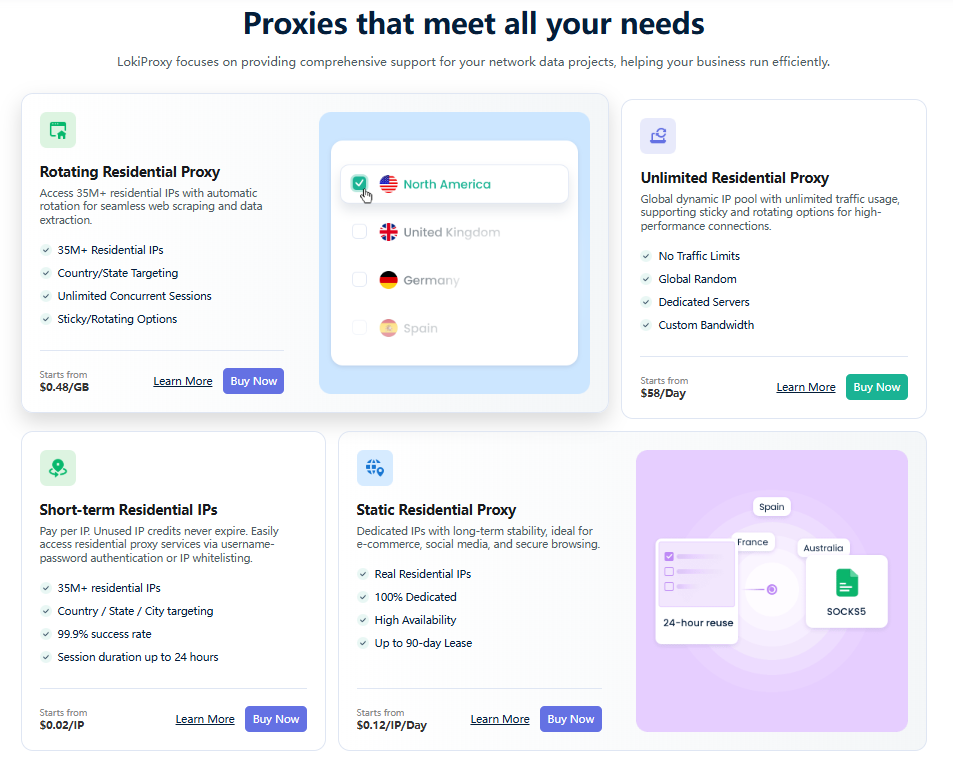
LokiProxy is a global residential proxy service provider with over 35 million real residential IPs covering 190+ countries and regions. Whether for e-commerce store management, social media account operations, or automation tasks, LokiProxy delivers a 99.9% connection success rate with millisecond-level response times.
The platform mainly offers four types of proxies:
Rotating Residential Proxies: Starting from $0.48/GB, with automatic IP rotation, ideal for web scraping and data collection.
Static Residential Proxies: Provide stable IPs, suitable for long-term sessions such as social media or store accounts.
Unlimited Residential Proxies: Starting from $58/day, designed for high-traffic users with no bandwidth limits and support for persistent connections.
Short-Term IP Plans: Support country/state/city targeting, unlimited traffic, and flexible usage with any number of IPs as needed.
In terms of pricing, LokiProxy is typically about 30% lower than the market average, achieving a strong balance between cost and stability.
How to Integrate LokiProxy with Hidemium?
If you are using Hidemium for account management, connecting it with LokiProxy is very straightforward. Follow this quick guide:
Step 1: Get Proxy Information
Log in to the LokiProxy dashboard
Go to “Residential Proxies” and select your proxy configuration
Copy the proxy details (Host, Port, Username, Password)
Step 2: Open Hidemium
Launch Hidemium and go to the Profile list
Click “Create New Profile” or edit an existing one
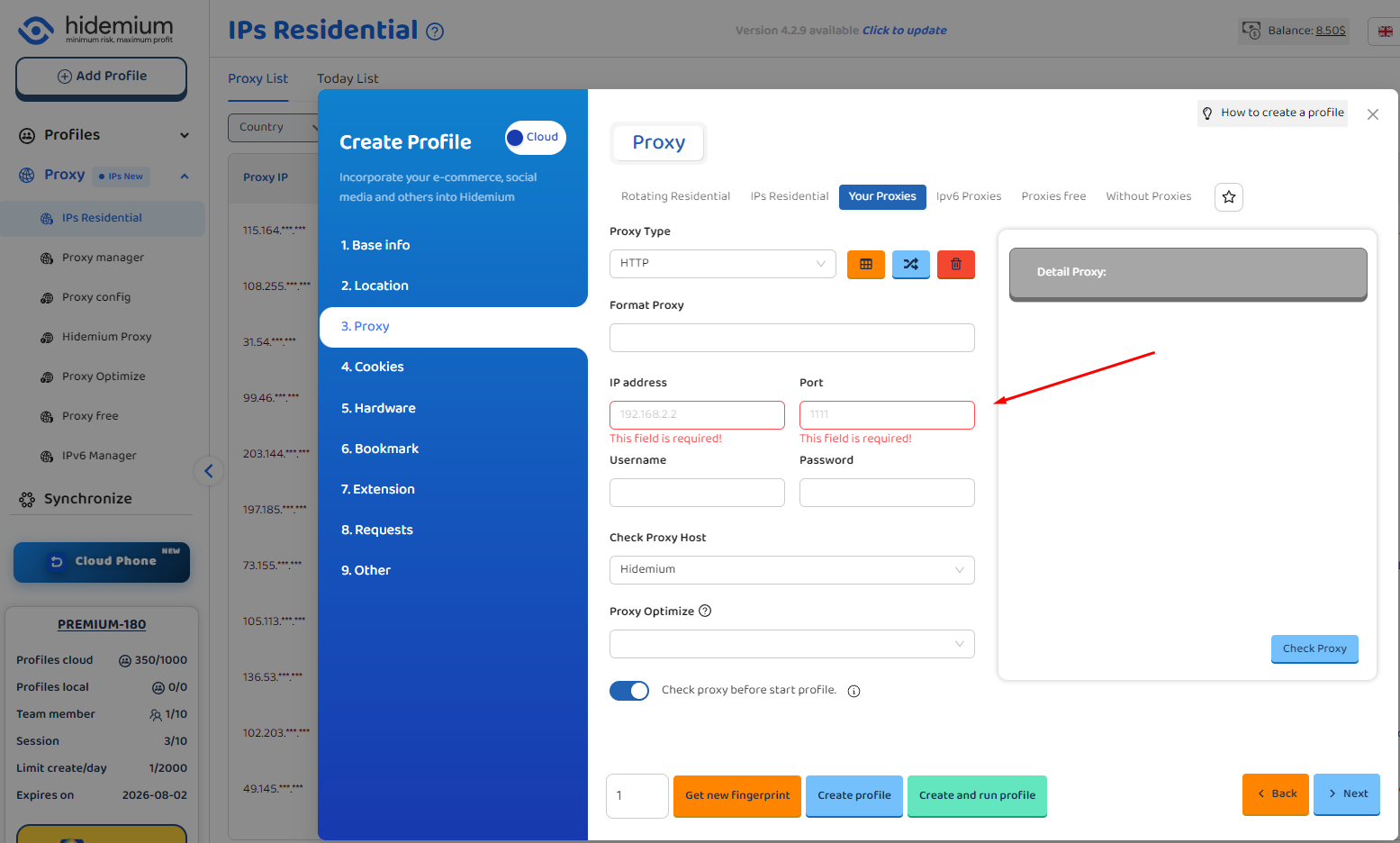
In the proxy settings, choose HTTP or SOCKS5 based on your LokiProxy type
Step 3: Enter Proxy Details
Host: Provided by LokiProxy
Port: Proxy port
Username: Your username
Password: Your password
Click “Check Proxy.” If the displayed location matches the proxy’s region, the connection is successful.
Step 4: Save and Start Using
After verification, click confirm and launch the profile
You are now browsing through a real residential IP via LokiProxy, ensuring stable, fast, and secure connections.
Why Use LokiProxy with Hidemium?
Real residential IPs instead of data center IPs, better for account management
Global coverage, suitable for cross-border business
Stable connections with fast switching support
Excellent compatibility with Hidemium and various anti-detect browsers
Affordable pricing with a free trial for new users
New User Benefits
New users can get 1GB of free trial traffic (valid for 7 days). You can test it with Hidemium first before deciding to purchase.
Conclusion
If you are looking for a cost-effective, high-performance residential proxy service that integrates well with Hidemium, LokiProxy is worth trying. It performs strongly in global coverage, speed, and stability, helping you manage accounts more efficiently and securely.
👉 Visit the official website to try it out: https://lokiproxy.com
Related Blogs

Account management websiteWhy Account Management Solutions Matter for Modern BusinessesIn today's fast-paced business world, managing client relationships is crucial. Account management solutions offer a way to streamline this process. They help businesses automate tasks and improve efficiency.Key Benefits of Integrated Account Management SoftwareThese solutions are not just about managing[…]

If you find Google Gemini quickly reaching its limits as the task becomes more complex, that's perfectly normal. Google applies quotas to prompts, conversations, and features — and the consumption increases rapidly with longer tasks, multiple files, or numerous exchanges.Therefore, each user may encounter limitations at different times. When you reach the limits of higher-end models like Pro or[…]
.png)
In the context of multi-account management on mobile applications becoming increasingly popular, Geelark Antidetect Browser emerging as a breakthrough solution, specifically designed for diverse needs from affiliate marketing, e-commerce to advertising management. Unlike regular antidetect browsers, Geelark provides an ecosystem cloud phone Unique, realistic Android device simulation, helping[…]
.png)
This question comes up more often than you'd think. A handmade jewelry seller wants to spin off a separate vintage shop. A printable seller wants a second store just for digital art. Or maybe you simply want to test a new niche without risking the shop you've spent months building.The short answer: Etsy allows multiple shops — but with clear conditions. Do it wrong, and all your shops could be[…]
IP checking services today are indispensable tools for protecting your online identity and enhancing your privacy. When you connect to the Internet, your device is assigned an IP address, revealing basic information such as your approximate location, Internet service provider (ISP), and even the type of network you are using.Thanks to the IP checker tool, you can quickly grasp this data in just a[…]
What is the best Dolphin Anty alternative in 2026?The best Dolphin Anty alternative in 2026 is Hidemium for teams that need stronger control over browser profiles, proxies, workspaces, team access, and multi-account operations.Dolphin Anty is known among affiliate marketers and media buyers. It can be useful for campaign-focused workflows where speed matters. But not every team wants only a fast[…]
