

Did you know that websites can recognize your browser using technical information even when you are not logged in or using cookies?
Every time you visit a website, your browser may reveal details such as your IP address, operating system, screen resolution, language, time zone, Canvas rendering, and WebGL characteristics. Together, some of these signals can contribute to a browser fingerprint, which websites may use to distinguish one browsing environment from another.
Fortunately, several free online tools can help you examine this information.
In this guide, we explore seven free IP and browser fingerprint testing tools, compare their capabilities, and explain how to check your browser fingerprint and interpret the results.

1. What is a Fingerprint Browser?
Browser fingerprinting is a technique that uses information about a browser and its environment to create a recognizable set of characteristics.
Unlike cookies, which typically store identifiers on a user's device, browser fingerprinting can work by observing technical properties exposed during a browsing session.
Common fingerprinting signals include:
- User-Agent: Information about the browser and operating system.
- Canvas Fingerprinting: Differences in how browsers render graphics.
- WebGL: Graphics-related characteristics associated with the browser and device.
- Screen Resolution: Screen dimensions and display settings.
- Time Zone: The time zone reported by the browser.
- Language: Browser language preferences.
- Fonts: Font-related characteristics that may be detectable.
- Hardware Information: Certain properties exposed through browser APIs.
When combined, these characteristics may make a browsing environment more recognizable.
However, browser fingerprints are not necessarily permanent. They may change after browser updates, operating system changes, or configuration adjustments.
It is also important to distinguish browser fingerprints from IP addresses.
An IP address identifies a network connection, while a browser fingerprint combines multiple browser or device characteristics. An IP address may contribute to broader identification techniques, but it is not the same as a browser fingerprint.
For a deeper explanation, read our guide to browser fingerprinting.
2. How to Accurately Assess the Reliability of an Antidetect Browser
Using an IP checker or browser fingerprint test helps you understand what information websites may observe when you browse the internet.
2.1. Identify Your Public IP Address
A public IP checker reveals the IP address visible to the testing service.
This can be useful when switching networks or checking whether a VPN or proxy is affecting your apparent public IP address.
Some services also display your internet service provider, autonomous system number (ASN), and estimated geographic location.
Remember that IP geolocation is approximate and does not necessarily reflect your physical location.
2.2. Examine Browser Fingerprinting Signals
A browser fingerprint checker can display attributes such as Canvas, WebGL, language, time zone, and screen resolution.
These results help you understand which technical characteristics your browser exposes.
You can also compare test results before and after changing browser settings to observe which properties remain consistent.
2.3. Check for Potential IP, DNS, and WebRTC Leaks
Some tools provide specialized tests for WebRTC and DNS information.
These checks can be helpful when evaluating whether your browser or network configuration is exposing unexpected connection details.
However, an IP leak, a DNS leak, and browser fingerprinting are different concepts. Passing one test does not guarantee complete privacy or anonymity.
Learn more in our guide to WebRTC leaks and how to check them.
3. Top 7 Free IP and Browser Fingerprint Testing Tools
Different tools serve different purposes. Some focus on public IP information, while others provide detailed browser fingerprint analysis.
Here are seven tools worth considering.
3.1. IPHEY – Check IP and Browser Environment Information
IPHEY is an online testing tool that helps users examine signals associated with their browser and network environment.
It can be useful when you want an overview of the information a testing website can observe or when comparing different browser configurations.
Key advantages:
- Provides a convenient starting point for browser environment checks.
- Helps users compare information across different configurations.
- Can highlight attributes worth investigating with additional testing tools.
Limitations:
A favorable test result does not guarantee that a browser is anonymous or cannot be recognized by other websites. Different services may use different identification methods.
Best for: Users who want to review their browser environment and examine how browser or network configuration changes affect the information reported.
Official website: https://iphey.com/
3.2. BrowserLeaks – Test IP, WebRTC, and Browser Fingerprints
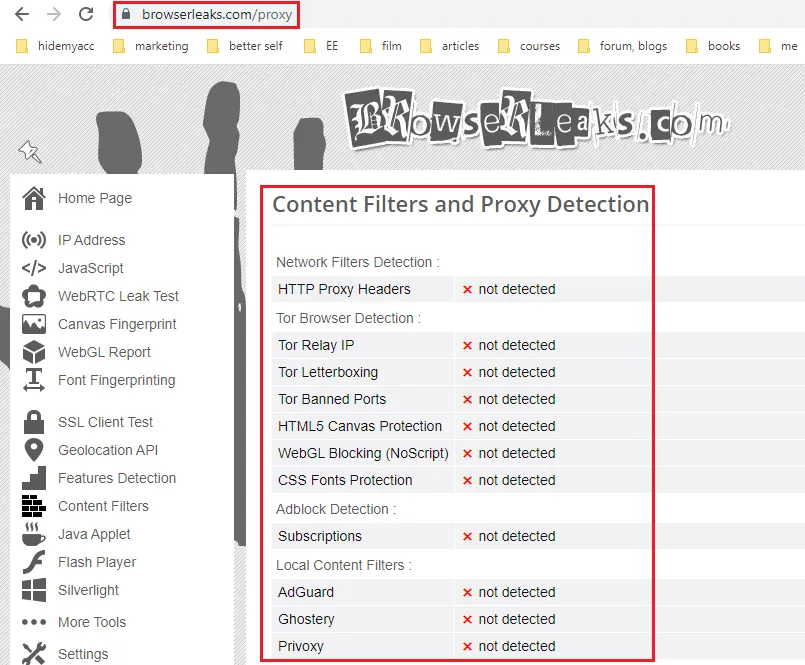
BrowserLeaks is a collection of technical testing tools designed to show information that browsers may expose to websites.
It offers dedicated pages for examining browser-related properties, including Canvas, WebGL, WebRTC, and HTTP request information.
BrowserLeaks is particularly useful for users who want to understand individual fingerprinting signals rather than rely on a single overall score.
Key advantages:
- Offers multiple specialized browser tests.
- Displays detailed technical information.
- Useful for comparing browser behavior before and after configuration changes.
Limitations:
Some results contain technical terminology and may be difficult for beginners to interpret without additional context.
Best for: Developers, technical users, privacy researchers, and anyone interested in a detailed browser fingerprint test.
Official website: https://browserleaks.com/
For more information about graphics-based identification, explore our guide to Canvas fingerprinting.
3.3. Whoer – Check Your Public IP Address Online
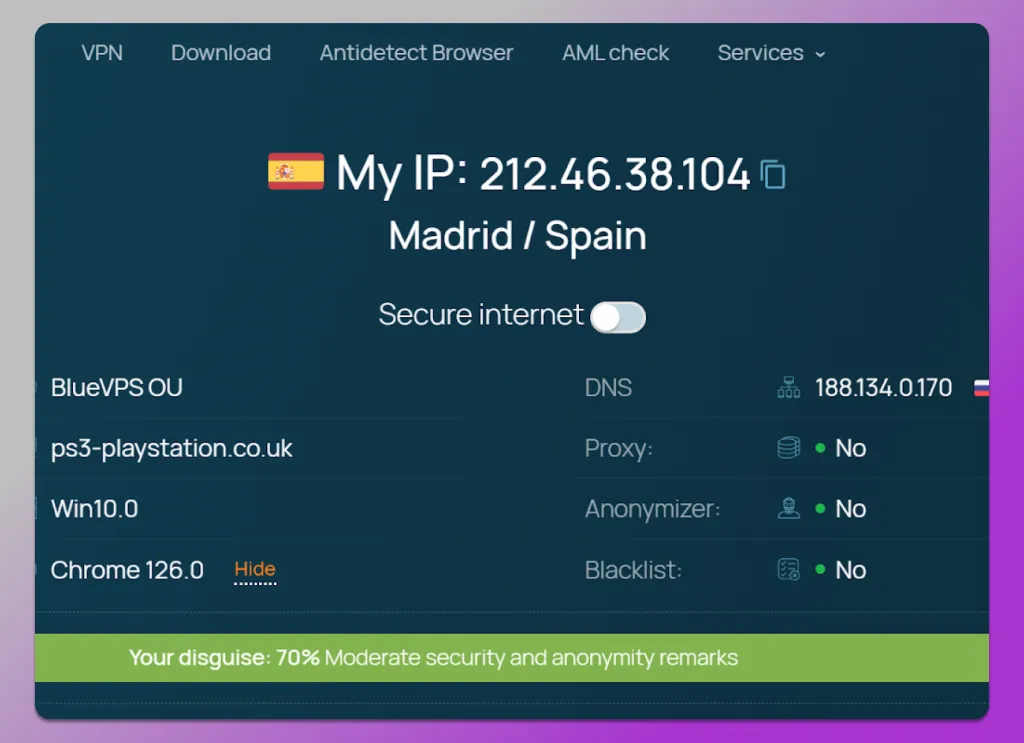
Whoer is an online IP checking service that helps users examine their public IP address and related connection information.
It is a practical option when you need to see which IP address a website detects after switching networks or changing VPN or proxy settings.
Key advantages:
- Straightforward checking process.
- Presents IP-related information in an accessible format.
- Convenient for quick network configuration checks.
Limitations:
An IP checking result alone cannot provide a complete assessment of browser fingerprinting exposure.
Your browser may continue to reveal other characteristics regardless of which public IP address is visible.
Best for: Users who want to check their public IP and obtain basic information about their internet connection.
Official website: https://whoer.net/
3.4. Pixelscan – Analyze Your Browser Environment
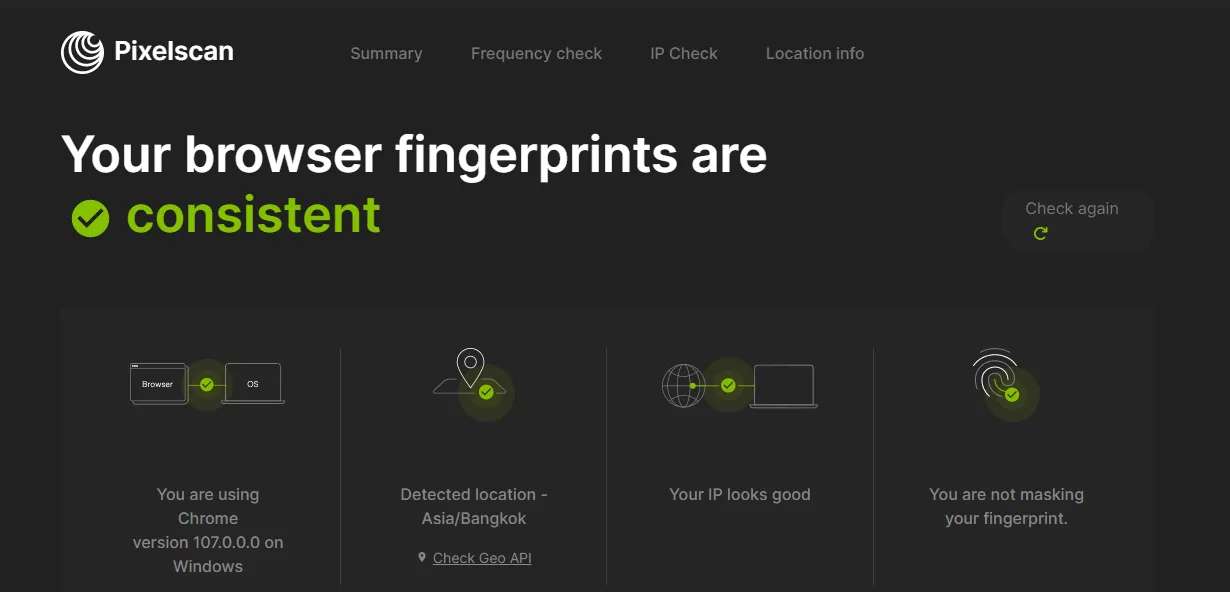
Pixelscan is a browser environment testing service that can help users examine signals associated with their browsing configuration.
It may be useful when comparing different browser profiles or checking which environment characteristics are visible during a test.
Key advantages:
- Focuses on browser environment analysis.
- Useful for comparing different configurations.
- Can complement specialized IP and WebRTC testing services.
Limitations:
No single test can predict how every website will identify a browser. A satisfactory result on one platform does not mean that all websites will interpret the environment in the same way.
Best for: Users working with different browser configurations who want an additional way to review their environment.
Official website: https://pixelscan.net/
3.5. IPinfo – Look Up Detailed IP Address Information
IPinfo specializes in information associated with IP addresses.
Its services provide access to IP intelligence data, which may include internet service provider information, ASN details, and estimated geographic location.
Unlike a browser fingerprint checker, IPinfo is primarily useful for investigating network-related information.
Key advantages:
- Provides detailed IP and network data.
- Helpful for identifying network operators and ASN information.
- Useful when comparing IP information from different sources.
Limitations:
IP-based location estimates are not GPS measurements. They can be inaccurate and should not be treated as proof of a user's exact location.
Best for: Users who need to investigate IP ownership, network information, or approximate geographic data.
Official website: https://ipinfo.io/
3.6. IPLeak.net – Check IP and DNS Leak Information
IPLeak.net focuses on information that may be visible through a user's network connection and browser.
It is particularly relevant when examining IP address exposure, DNS information, and supported WebRTC-related checks.
Users often combine this type of service with fingerprint testing tools to gain a broader picture of their browser and network environment.
Key advantages:
- Focuses on network information exposure.
- Useful when reviewing VPN-related configurations.
- Complements browser fingerprint analysis tools.
Limitations:
Network leak testing does not replace detailed checks of Canvas, WebGL, or other browser fingerprinting characteristics.
Best for: Users who want to examine public IP visibility, DNS information, or potential connection-related leaks.
Official website: https://ipleak.net/
3.7. WhatIsMyIPAddress – Find Your Public IP Address
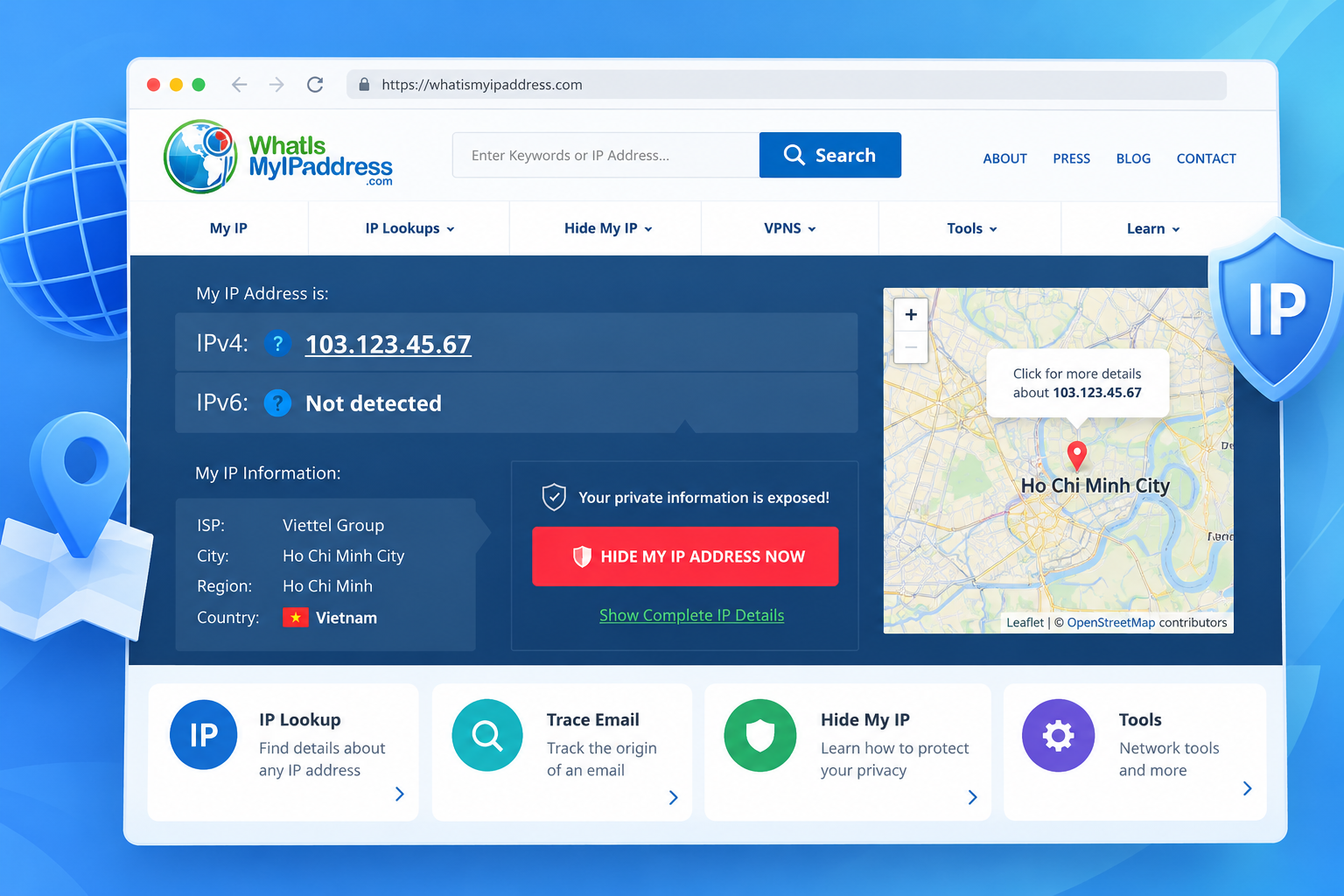
WhatIsMyIPAddress is a website that helps users identify their public IP address and access related IP information.
It is especially useful for beginners who simply want to find out which IP address is visible to a website.
The service is a convenient starting point before performing more detailed network or browser fingerprint checks.
Key advantages:
- Easy to understand and use.
- Suitable for beginners.
- Provides access to basic IP-related information.
Limitations:
It is not a substitute for specialized Canvas, WebGL, or comprehensive browser fingerprint analysis.
Best for: Anyone who wants to check their public IP address without examining complex browser properties.
Official website: https://whatismyipaddress.com/
Quick Comparison: Which Testing Tool Should You Choose?
Tool | Main Purpose | Best For |
| IPHEY | Browser environment checks | Reviewing configurations |
| BrowserLeaks | Detailed browser property tests | Technical analysis |
| Whoer | Public IP and connection checks | Quick IP verification |
| Pixelscan | Browser environment analysis | Comparing browser setups |
| IPinfo | IP intelligence and network information | IP research |
| IPLeak.net | Network exposure and leak checks | VPN and DNS testing |
| WhatIsMyIPAddress | Public IP identification | Beginners |
Which tool is best?
If you only need to check your public IP address, start with Whoer or WhatIsMyIPAddress.
For more detailed browser fingerprint testing, BrowserLeaks is a useful starting point. IPHEY and Pixelscan may provide additional context about your browser environment.
If your primary concern is DNS or network information exposure, consider using IPLeak.net.
The best choice depends on the specific information you want to examine.
4. How to Test Your IP and Browser Fingerprint for Free
You do not need advanced technical knowledge to perform a basic browser fingerprint check.
Follow these five steps.
Step 1: Choose a Suitable Testing Tool
Decide what you want to check.
For your public IP address, use an IP checker. For Canvas, WebGL, and other browser attributes, choose a specialized fingerprint testing service.
Step 2: Run the Test
Visit the tool's official website and follow its instructions.
Some services display information automatically, while others provide separate testing pages for different browser features.
Step 3: Review the Results
Look for information such as your public IP address, browser version, language, time zone, screen resolution, Canvas, and WebGL characteristics.
Not every tool supports every category.
Step 4: Check WebRTC and DNS When Necessary
If you want to investigate network information exposure, use dedicated WebRTC or DNS tests.
Pay attention to unexpected results, particularly when evaluating a VPN or proxy configuration.
Step 5: Compare Your Results
Record the initial findings, change one browser setting, and run the same test again.
This approach can help you identify which characteristics change and which remain stable.
For meaningful comparisons, use the same testing service and similar test conditions.
5. How to Interpret Browser Fingerprint Test Results
Browser fingerprint results can look complicated, especially when a tool displays technical identifiers or uniqueness scores.
Here are four areas to examine.
Fingerprint Uniqueness
A uniqueness score may indicate how uncommon your browser's characteristics are within a testing service's dataset.
However, these results depend on the service's methodology and sample.
A fingerprint that appears unique in one dataset may not have the same level of uniqueness elsewhere.
Canvas and WebGL
Canvas and WebGL tests examine graphics-related browser behavior.
Results may be influenced by hardware, drivers, operating systems, browsers, and browser settings.
Changes in these signals do not automatically indicate improved privacy.
IP, DNS, and WebRTC
These checks help you understand what network-related information may be visible during a browsing session.
If you use a VPN or proxy, compare the results with the network behavior you expect.
Browser Configuration
Properties such as browser language, time zone, screen resolution, and reported platform information can contribute to fingerprinting.
Review these attributes together rather than focusing on a single value.
Important: A highly unique fingerprint does not automatically mean a browser is unsafe. Likewise, a less distinctive fingerprint does not guarantee anonymity.
6. Browser Fingerprint Testing Tools vs. Antidetect Browsers
Browser fingerprint testing tools and antidetect browsers serve different purposes.
A browser fingerprint testing tool helps you observe technical information that websites may collect or infer about your browsing environment.
An antidetect browser, on the other hand, is designed to support the management of separate browser profiles and environments, depending on the product's capabilities.
For people managing multiple browser profiles, fingerprint testing can be a useful way to examine configurations and understand which properties are exposed.
Hidemium is an antidetect browser solution that supports browser profile management.
If you work with multiple browser environments, learning how browser fingerprints work can help you evaluate profile settings and understand the limitations of different configurations.
You can explore our guide to antidetect browsers or learn more about managing browser profiles with Hidemium.
Remember that using an antidetect browser does not guarantee complete anonymity or protection against every form of online identification.
7. Frequently Asked Questions
7.1. Can I Test My Browser Fingerprint for Free?
Yes. Several websites provide free browser fingerprint tests or publicly accessible demonstrations.
However, available features and usage limits can vary. Some services focus on technical browser properties, while others primarily examine IP and network information.
7.2. Is an IP Address the Same as a Browser Fingerprint?
No. An IP address relates to a network connection, while a browser fingerprint can combine numerous technical characteristics from a browser and device.
Changing your IP address does not necessarily change the other properties that contribute to your browser fingerprint.
7.3. Does Incognito Mode Prevent Browser Fingerprinting?
Not completely.
Incognito or private browsing modes primarily limit certain forms of local browsing data retention. They do not automatically remove all browser attributes that websites may use for fingerprinting.
7.4. Does Changing My IP Address Change My Browser Fingerprint?
Changing your IP address affects a network-related signal, but many browser properties may remain unchanged.
For example, Canvas rendering, WebGL characteristics, screen resolution, and language settings may still appear similar.
7.5. What Is the Best Free Browser Fingerprint Checker?
The best tool depends on your needs.
BrowserLeaks is useful for detailed technical analysis. IPHEY and Pixelscan can help you examine browser environments, while Whoer and WhatIsMyIPAddress are more appropriate for basic public IP checks.
Using multiple complementary tools may provide a more complete understanding than relying on one result.
8. Conclusion
Checking your IP address and browser fingerprint is a practical way to understand some of the information websites may observe during your browsing sessions.
Each testing tool has a different focus. Some help identify public IP addresses or network information, while others analyze browser properties such as Canvas, WebGL, and WebRTC.
For a more informed assessment, use tools that match your goals, compare their findings, and avoid treating any single score as a guarantee of privacy.
If your work involves managing multiple browser environments, explore Hidemium to learn more about its browser profile management capabilities.
Related Blogs

You used to post regularly but suddenly your engagement dropped sharply? No likes, comments, or shares at all? It’s very likely you are being shadowbanned – a hidden moderation mechanism that social media platforms apply to limit content visibility without issuing any kind of warning.In this article, Hidemium will help you understand more clearly what shadowban is, the signs to recognize when you[…]

1. What is DNS Encryption?DNS encryption is a security technology that protects domain name queries when you visit websites. Instead of sending plain-text requests, your DNS queries are encrypted to prevent third-party tracking or interference. This is a key method to enhance online privacy and security.>>> Learn more: Latest Viettel DNS & How to change DNS to improve Internet speed2. Why Does[…]

5 Best Places to Buy Taboola Agency Ad Accounts in 2026Scaling native ads on Taboola sounds straightforward until you actually try it. Standard accounts come with tight spending caps, slow approval queues, and a warming period that can drag on for weeks before you see real results. For media buyers and performance marketers managing substantial budgets, that level of friction is more than just a[…]

In MMO, dropshipping, and affiliate business models, managing multiple accounts on a single device always comes with significant risks—frequent checkpoints, shadowbans, or even mass account suspensions. Logging into multiple accounts using a traditional browser makes it easy to leave overlapping digital footprints, which greatly increases the likelihood of account bans. This is exactly why[…]

IPv6 (Internet Protocol version 6) is the latest Internet protocol designed to replace IPv4, which is gradually running out of available addresses. With its 128-bit length, IPv6 provides an almost unlimited number of IP addresses while also improving connection speed, security, and support for IoT devices.However, not all users know whether their network already supports IPv6. Below are 4 simple[…]
Is an Antidetect Browser or a VPN truly the “lifeline” for your account network?While many people mistakenly believe that simply changing an IP with a VPN is enough, in reality, platforms can still easily detect device fingerprints and shut down accounts in bulk. The conflict between only hiding your IP (VPN) and fully masking your digital identity (Antidetect Browser) is the very line that[…]
