

Google Gemini, also known as Google’s new AI, is reshaping the field of artificial intelligence with impressive multimodal capabilities. Developed by Google, Gemini not only processes text but also supports images, videos, and integrates tightly with Google tools. This article provides an overview of Gemini, compares it with traditional AI models, and explores how Hidemium supports Gemini in automation scenarios.

1. Overview of Google Gemini and key highlights
Google Gemini is the latest multimodal AI model developed by Google DeepMind. It marks a major advancement in natural processing of text, images, audio, and data. Formerly known as Bard, Gemini not only builds on its predecessor but also expands real-time AI interaction, deeply integrating with Google’s ecosystem—Search, Docs, Sheets, and more.
Multimodal processing: Gemini handles text, images, and videos simultaneously—ideal for complex, multi-source data tasks.
Integration with Google apps: Seamless operation with Docs, Sheets, and Search, helping automate office workflows.
Real-time inference: With access to live web data, Gemini delivers timely and accurate responses.
High performance: Optimized for heavy tasks—from content generation to advanced data analytics.
2. Comparing Google Gemini to traditional AI models
Compared to traditional AI like BERT or GPT-3, Google Gemini has many superior advantages:
Multimodal capabilities: Unlike BERT, which is limited to text, Gemini supports images and video, broadening its application range.
Speed and efficiency: Gemini outperforms GPT-3 in real-time data tasks due to Google Search integration.
Google ecosystem integration: Gemini leverages Google’s infrastructure for seamless automation—something traditional AI often lacks.
Prompt AI understanding: Gemini interprets complex prompts effectively, especially in logic and data analysis scenarios.
However, Gemini might be less flexible than GPT-3 in creative content generation, and its output interface is not always aesthetically optimized.
3. Benefits of Integrating Gemini into Automation Workflows
Integrating Gemini with the Prompt Script feature in Hidemium not only simplifies automation operations but also opens up a smarter, faster, and more accessible way of working. Here are the standout benefits:
3.1. No-code automation
Previously, building automation processes required programming skills—from DOM manipulation and event handling to complex JavaScript logic. This created a barrier for non-technical users.
Now, with Gemini integrated into Hidemium, there's no need to code. Simply describe the action in natural language and Gemini will:
Understand your intent
Translate it into step-by-step operations
Generate a complete and precise script
🔍 Example:
Access page A
Search for product B
Add to cart
Proceed to checkout
📌 Gemini turns these lines into a fully functional prompt script executed just like a real user.
➡️ This marks a major shift toward AI-powered no-code automation, empowering marketers, content creators, and even beginners to build custom automation flows effortlessly.
3.2. Faster performance, fewer errors, better efficiency
Gemini speeds up Prompt Script creation with:
Time savings: Replace hours of coding with just a few lines of description
Greater accuracy: Context-aware execution minimizes errors
Reduced manual errors: AI ensures consistency in every step
Easy updates: Modify processes without touching source code
3.3. Seamless integration with other AI models
Besides Gemini, Hidemium also supports Claude and ChatGPT—providing a comprehensive automation toolkit.
Choose the best AI for your scenario: speed, tone, or precision
Compare outputs to optimize workflows
Expand AI usage in sales, customer service, marketing, and more
4. How to Write a Prompt Script Using Gemini on Hidemium
Hidemium – one of today’s leading antidetect browsers – has integrated the Automation + AI Prompt Script feature. Here's how to get started:
Step 1: Download the Hidemium app to receive 1000 free profiles and a 3-day trial.
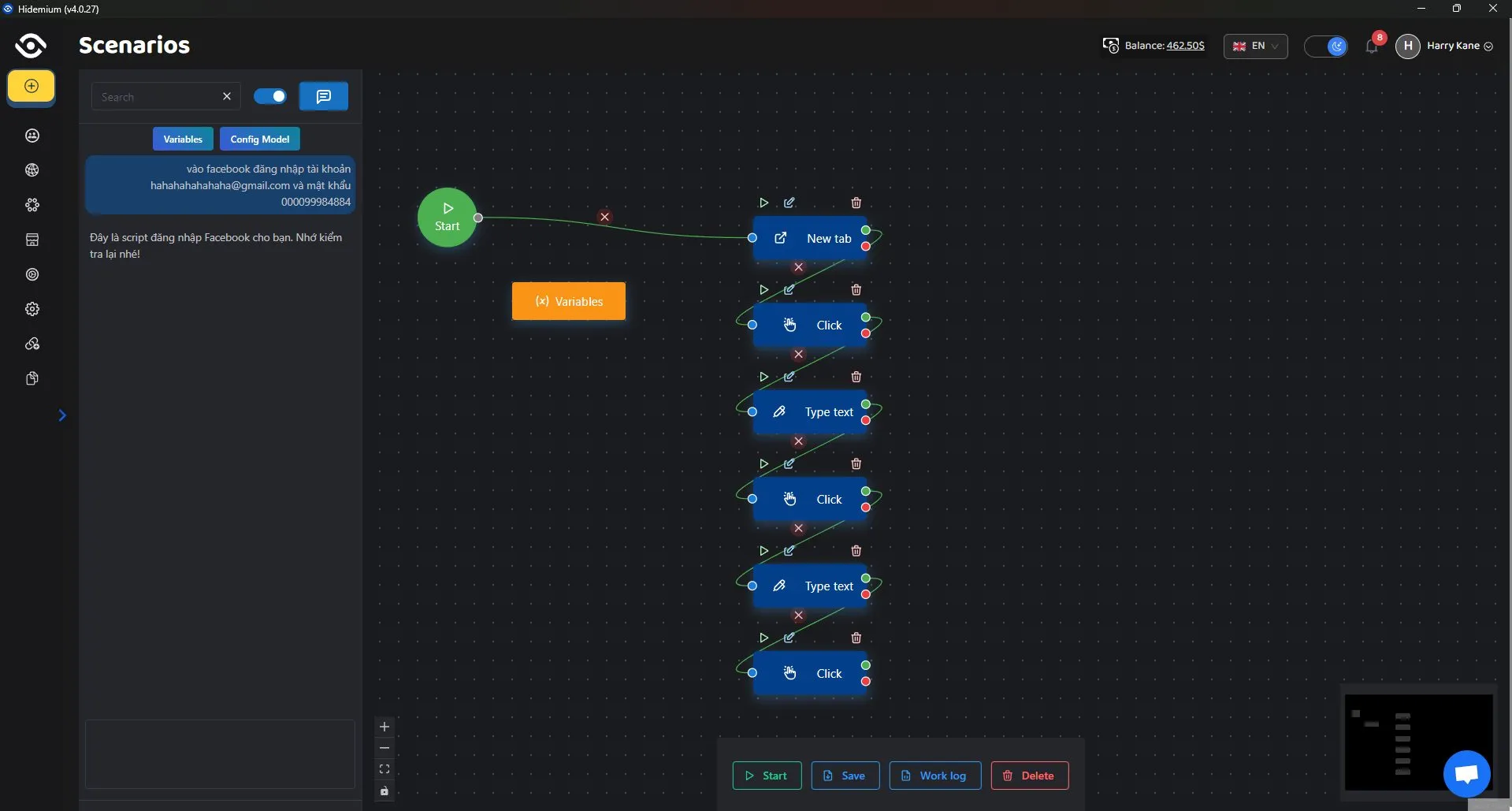
Step 2: Click on Automation → Workflows in the Hidemium app.

Step 3: Click on Add Script.

Step 4: Click on Config Model → Gemini. Enter your prompt, and the AI will automatically convert it into an automation script compatible with the browser.

5. Conclusion: Hidemium and Gemini – The Ideal Duo for Automation
Google Gemini is not only a powerful AI tool, but also an ideal “smart assistant” for automation when paired with the Hidemium platform. Thanks to the Prompt Script feature, users can fully leverage Gemini’s capabilities in workflows—ranging from content creation and data analysis to information management—without requiring any complex coding skills.
👉 Hidemium provides full support for Gemini, helping you master modern AI technology and boost your productivity.
>>> Learn more: What is ChatGPT? Easily automate tasks with Prompt Script
Related Blogs
.png)
With TikTok becoming an increasingly lucrative platform for advertising and e-commerce, understanding trends and analyzing competitors is no longer an advantage—it's a necessity. However, with millions of ads running daily, how do you know which content is actually driving conversions?That's when the toolsTikTok AdspyUnleash your strengths. Platforms like Pipiads and BigSpy allow you to "spy" on[…]

If you ever wondered “What are TikTok spam accounts?”, this article will provide the most complete and accurate view. Hidemium will help you understand the definition of spam accounts, the reasons why TikTok marks your account as spam and effective ways to prevent it. At the same time, you will also know how to use tools like Hidemium Antidetect Browser to manage multiple TikTok accounts safely[…]

If your application uses open-source code, it means that you are relying on components you didn’t write and can’t fully control, including the vulnerabilities coming with that code.This is where you should consider using Software Composition Analysis (SCA) tools, which scan your dependencies and catch any hidden security issues or risky licenses before they cause problems.Below, we will offer[…]
.png)
In multi-account operations, e-commerce monitoring, and ad verification scenarios, browser environment isolation and reliable proxy services have become essential “infrastructure.” For users of multi-account browsers like Hidemium, choosing a stable, secure, and widely covered residential proxy service is crucial.This article will introduce you to IPPeak, explain why it’s worth considering, and[…]

“You have been banned” is a situation often faced by most advertisers, affiliate marketers, or e-commerce professionals… on platforms:Can you get banned from FacebookCan you get banned from GoogleBanned amazon accountSo why? How to find out why I was banned from Facebook? What do I need to do to solve this problem? Find the answer right away in this article.What if your account has been[…]

Cryptocurrency airdrops are becoming an indispensable strategy for new blockchain projects to attract community interest and expand their initial user base. Moving into 2025, this trend continues to explode with a series of confirmed airdrop programs, providing the opportunity to own free tokens with extremely low risk.In this article, Hidemium will update list Top 5 most reputable crypto[…]
