.png)

In the field of computer networks, port port is a familiar concept, acting as an important bridge in work Data transmission and connection between devices. Ports appear in both hardware and software, supporting effective communication between components in the system. So What is port?, what is its outstanding function and how is it classified? Let's go together Hidemium Antidetect Browser – Explore in detail through the following article.
1. What is port?
In information technology, “Port” is understood as a communication point that allows devices or software connect and exchange data. Port can exist in form physical port (hardware port) or software download (used in computer networks to identify specific services).
Some common applications of ports:
Physical port: Are connection ports on devices such as USB, HDMI, Ethernet – helps transmit data and connect hardware such as mouse, keyboard, hard drive, screen.
Software port: Operates in a network environment, identifies specific services. For example, port 80 used for HTTP (web access), port 443 for HTTPS (secure web), and port 25 used for SMTP email service.
Porting software: Is the process of converting software from one operating system or platform to another, ensuring the software can run stably in the new environment.
Easy to understand example: When you connect an external hard drive via a USB port, this is a physical port that helps data move between the device and the computer. Similarly, when accessing a website, the browser will send a request through port 80 or 443 to the server to receive the website content back.

2. Basic functions of Port - Understand correctly to optimize system performance and security
Ports on the device not only play a connection role but also undertake many important functions in transmitting data and ensuring network security. Below are the basic functions that users need to understand to use the port effectively.
2.1. Supports data transmission and control
Although they do not directly filter content, ports play an important intermediary role in the process of transferring data between devices and networks. Thanks to that, the connection is faster and more stable.
Data selection and processing are often handled by specialized tools such as information filtering systems, search engines or content management platforms. After processing, the data will be transferred through the port - the port now performs the task of checking and controlling the input data flow. If the data does not match the required format or port, the system will automatically deny access, helping to protect the device from the risk of unauthorized intrusion.
2.2. Automatically identify and route data
When a port is registered and configured on the device, the system is able to automatically recognize the data type and route it to the correct corresponding port. Exactly matching data bits to the port makes the transmission process seamless, minimizing errors and optimizing transmission speed.
2.3. Contribute to preventing malicious access
Effective port management is one of the important measures to improve system security. If open ports are not controlled, they can become vulnerabilities for hackers or malware to exploit.
To minimize risks, users should regularly check port configuration, use firewalls, anti-virus software, and intrusion detection and prevention systems (IDS/IPS). In addition, the port also acts as the initial data filtering layer, helping to prevent malicious files before entering the system.
2.4. Other extended functions
In addition to the ability to transmit data, ports also play an important role in many other functions:
Connect peripheral devices: USB port helps connect mouse, keyboard, external hard drive, printer...
Data exchange: Ethernet or USB port supports efficient data transfer between devices.
Charging and power supply: Some ports such as USB are used to charge the battery or supply power to the device.
Network connection: Ethernet port allows access to internet and internal network resources.
Transmits audio & video signals: HDMI port, audio jack helps output signals to the screen, TV or speaker system.

3. Popular types of ports today
In the field of information technology, Port port plays an important role in connecting, transmitting data, charging devices and ensuring stable operation between electronic devices. Below are the most popular types of connection ports today, often appearing on computers, phones, and other technology devices.
3.1. Classify ports according to function
The Port port type designed to serve each specific connection need, from data exchange to audio and video signal transmission. Some common Port types by function include:
USB (Universal Serial Bus): Is a multi-purpose connection port, supporting connection with peripheral devices such as mouse, keyboard, hard drive, printer or phone.
Ethernet: LAN or Internet connection port via network cable, providing stable and high-speed connection.
HDMI (High-Definition Multimedia Interface): Dedicated port for transmitting high-quality sound and images to your TV, monitor or sound system.
Thunderbolt: High-speed data transfer port, supports connecting multiple devices at the same time such as external hard drives, high-resolution screens.
DisplayPort: Mainly used to output image and sound signals, suitable for computer screens and specialized graphics devices.
Audio Jack: Familiar audio port to connect headphones, speakers or microphones.
3.2. Classify ports according to protocol
In addition to physical function, Port ports are also classified according to protocol version, plays a key role in network communication and data exchange between systems:
Port 20 (TCP): Used in FTP data transmission, serving the process of uploading and downloading files.
Port 21 (TCP): Plays the role of controlling FTP connections and managing data transfer activities.
Port 22 (TCP/UDP): Used for SSH protocol, ensuring secure remote access.
Port 23 (TCP): Applies to Telnet - a remote connection tool but has low security.
Port 25 (TCP): Send email via SMTP protocol.
Port 80 (TCP): Popular port for accessing websites via HTTP protocol.
Port 119 (TCP/UDP): Supports accessing online news services using the NNTP protocol.
Port 143 (TCP/UDP): Allows remote email access via IMAP.
Port 161 (TCP/UDP): Used in managing and monitoring network devices using SNMP protocol.
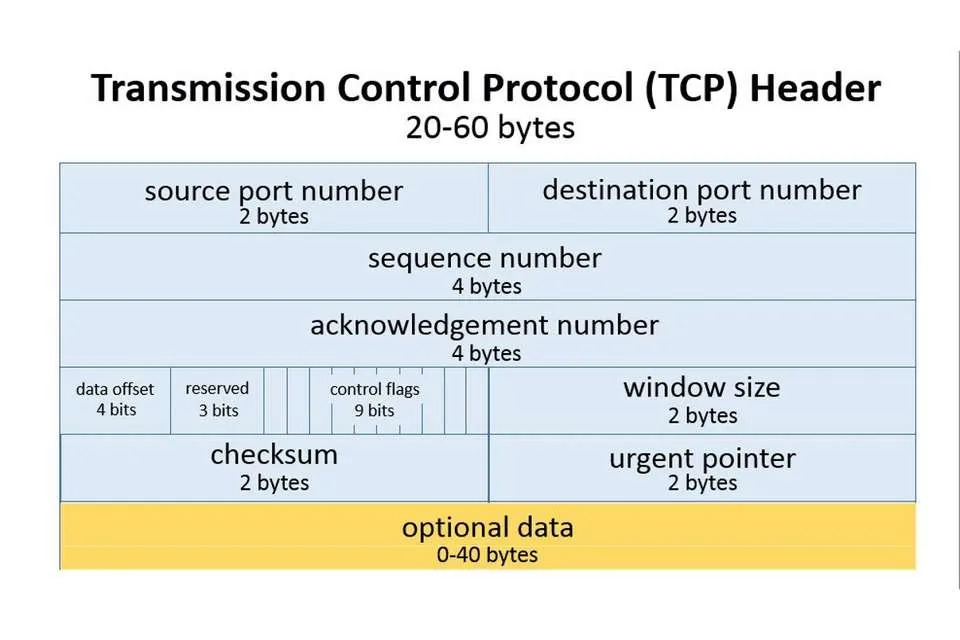
4. Important factors when registering a port
Port registration is not as simple as choosing a random number. To ensure the system operates effectively and stably, you need to consider many of the following technical factors:
4.1. Hard drive parameters
Hard drive configuration directly affects Port selection. Depending on the type and number of drives being used, you need to determine the appropriate number of ports to ensure stable connectivity. Consulting experts or technical documents will help you make a more accurate decision.
4.2. Storage system and data type
Each port has the ability to optimize for different types of data and file sizes. Therefore, before registering the Port, you should clearly determine:
Type of file format supported by the system.
Current storage capacity and future usage needs.
5. Instructions on how to check Port number on Windows
Checking active Ports on Windows helps you monitor the network effectively and quickly handle related problems. The steps are as follows:
Press the key combination Windows + R to open the Run dialog box or search for "Run" in the search bar.
Enter cmd then press Enter to open the Command Prompt window.
Type ipconfig to display network connection information.
Enter again netstat to see a list of active ports on the system.
6. Port Frequently Asked Questions (FAQ)
When learning about Ports, you may have some questions related to how they work, functions and roles in the network system. Below are common questions and detailed answers:
6.1. What is Port 8080?
Port 8080 is a commonly used network port for the HTTP protocol - acting as a replacement for Port 80 in many cases such as:
Run backend web services.
Website development and testing environment.
Deploying internal business services.
6.2. What is IP Port?
IP Port is a combination of IP address and port number, used to determine the exact location of a specific service in the network system. We can imagine the IP address as a home address and the Port number as a room number - helping data go to the right application or device.
6.3. What is Network Port?
Network Port (network port) is a logical connection point that allows data transfer between devices on the network. Each Port is assigned a word number 0 to 65,535, helps route information to the right destination.
6.4. What is Port 80?
Port 80 is the default port for the HTTP protocol, used to transmit web content such as text, images and HTML code from the server to the user's browser.
6.5. What are interfaces?
In software development, Interface (interface) is a means to help users interact directly with the system. The interface plays an important role in enhancing user experience, ensuring easy-to-understand and intuitive operations.
Above is important information to help you clearly understand the concept of Port, how it works and applications in the network system. Hope the article from Hidemium will provide you with useful knowledge to apply effectively in work and study.
>>> Learn more: What is AdGuard DNS? How to configure AdGuard DNS on all devices.
Related Blogs

In the fast-paced world of social commerce, AI UGC Video Generator tools have become game-changers for brands and creators who need scroll-stopping content without the hassle of traditional shoots. These platforms let you turn product images or simple prompts into realistic user-generated-style videos in minutes.I spent weeks testing popular options—uploading products, tweaking scripts, and even[…]

How to Get More Views on TikTok: 10 Proven Steps That Actually Work If your TikTok views are stuck or falling, the problem is rarely just “the algorithm.” The issue is usually a mix of content, targeting, and signals TikTok uses to decide who should see your videos.Here’s how to get more TikTok views using a simple system: diagnose what’s wrong, optimize your videos for discovery, post[…]

You're wondering...How to calculate TikTok earningsHow can you maximize your income from today's most popular short-video platform? Understanding TikTok's reward system and applying smart monetization strategies is key to turning your passion for content creation into a stable source of income.This article Hidemium will give you a comprehensive overview of How TikTok calculates earnings, analyze[…]

Did you know that websites can recognize your browser using technical information even when you are not logged in or using cookies?Every time you visit a website, your browser may reveal details such as your IP address, operating system, screen resolution, language, time zone, Canvas rendering, and WebGL characteristics. Together, some of these signals can contribute to a browser fingerprint,[…]

Choosing an antidetect browser is easy when every product page promises the same things:“Realistic fingerprints.”“Secure profiles.”“Fast automation.”“Team collaboration.”The harder question is:How do you actually compare them?A tool may look impressive in a feature list and still become frustrating when you manage 100 profiles, add a team, connect proxies, or automate recurring browser[…]

What is Expressvpn? This is one of the keywords that users are most interested in today, especially in the context of the increasing need to protect personal data and access the Internet without limits. Express VPN is a famous virtual private network (VPN) service that allows users to personal information security and Bypass Geo-Restrictions. Let's Antidetect Browser Hidemium Express VPN detailed[…]
