What Is an ISP Proxy? How to Use It Safely for Multi-Account Management (2026 Guide)
Try Hidemium for free

What Is an ISP Proxy? And How to Use It Safely for Multi-Account Management
Managing multiple accounts today isn’t just about creating more profiles—it’s about staying undetected.
Whether you're running stores on Amazon, scaling TikTok accounts, or doing affiliate marketing, your setup is only as strong as your proxy—especially when using an antidetect browser.
One wrong IP choice can lead to account bans, verification loops, or even complete shutdowns.
In this guide, we’ll break down what ISP proxies are, how they work, and how to use them safely with tools like Hidemium.
What Is an ISP Proxy?
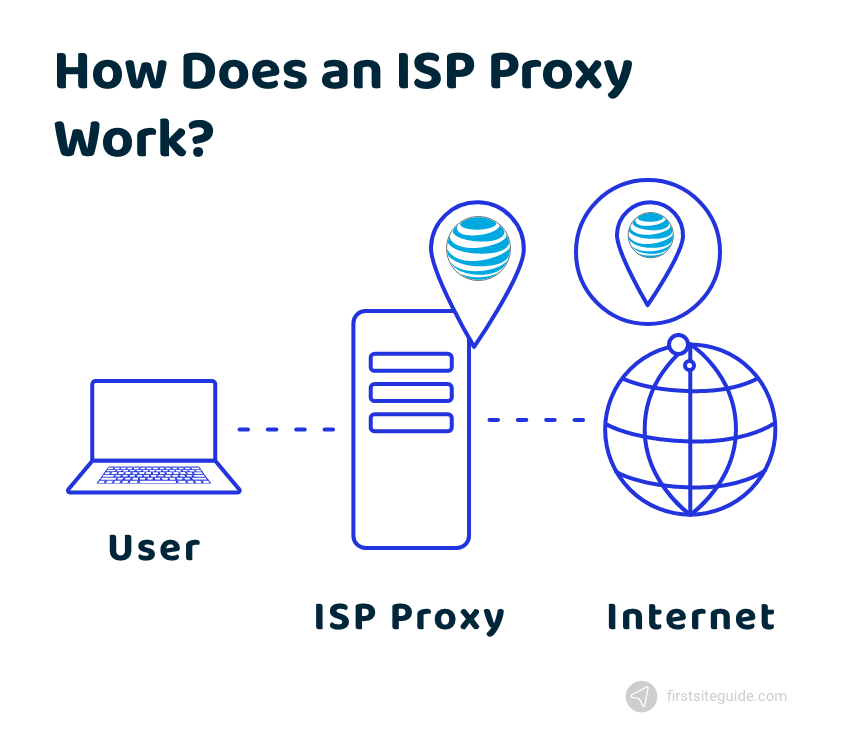
An ISP proxy (Internet Service Provider proxy) is a type of proxy that combines:
- The speed of datacenter proxies
- The trust level of residential IPs
In simple terms, ISP proxies are real IP addresses issued by Internet Service Providers, but hosted on high-performance servers.
Why does that matter?
Because platforms like Facebook, Amazon, or Google tend to trust residential IPs more than datacenter ones.
👉 ISP proxies give you:
- Fast connection speed
- Stable performance
- Lower risk of being flagged
Why ISP Proxies Matter for Multi-Account Users
If you're managing multiple accounts, platforms are constantly looking for signals like:
- IP address
- Device fingerprint
- Location
- Browser behavior
If multiple accounts share similar data → they get linked → and eventually banned.
This is where ISP proxies come in
Using ISP proxies allows you to:
- Assign a unique IP per account
- Maintain consistent identity per profile
- Reduce the risk of account linkage
👉 When combined with Hidemium, each account runs in a fully isolated environment:
- Separate browser profile
- Unique fingerprint
- Dedicated proxy
Common Use Cases of ISP Proxies
ISP proxies are widely used in:
🔹 Multi-account management
Run multiple Facebook, Amazon, TikTok, or Gmail accounts safely without cross-linking.
🔹 Web scraping
Collect data at scale while avoiding rate limits and IP bans.
🔹 Affiliate marketing
Manage multiple ad accounts or landing pages across regions.
🔹 Ad testing & automation
Simulate different user environments to test campaigns.
Can ISP Proxies Hide You From Your ISP?
Short answer: No, not completely.
Your ISP can still detect that you’re using a proxy.
However, what matters more is:
👉 Websites cannot see your real IP
This means:
- Your identity is hidden from platforms
- Your activity appears as coming from a different user
When using Hidemium:
- Your IP + fingerprint + environment are all aligned
- This makes detection much harder for platforms
Can ISPs Detect or Block Proxies?
Yes, especially if you use:
- Free proxies
- Public/shared IPs
- Low-quality proxy providers
These can lead to:
- IP bans
- Slow performance
- Suspicious activity flags
How to Use ISP Proxies Without Getting Blocked
To stay safe, follow these best practices:
✅ 1. Use high-quality ISP proxies
- Clean IP history
- Dedicated or low-share IPs
- Location targeting
✅ 2. Assign one proxy per account
Never reuse the same IP across multiple accounts.
✅ 3. Combine with an antidetect browser
Using only proxies is not enough.
With Hidemium, you can:
- Create isolated browser profiles
- Customize fingerprints (OS, timezone, language…)
- Attach a unique proxy to each profile
👉 This creates a complete digital identity per account
✅ 4. Avoid free or overused proxies
They are the fastest way to get banned.
Should You Create Your Own ISP Proxies?
Technically possible—but not practical.
You would need:
- IP leasing from ISPs
- Server infrastructure
- Network configuration
👉 For most users, this is:
- Expensive
- Complex
- Time-consuming
✔️ The better option: buy from trusted providers and integrate with Hidemium
Final Thoughts
ISP proxies are one of the most reliable solutions for managing multiple accounts safely.
But proxies alone are not enough.
To truly avoid detection, you need a complete setup:
- Clean IP (ISP proxy)
- Unique browser fingerprint
- Isolated environment per account
👉 That’s exactly where Hidemium comes in.
By combining ISP proxies with advanced fingerprint control and profile isolation, you can scale your operations with confidence—without worrying about bans or account linkage.
Related Blogs
Amazon Affiliate program, also known as Amazon Associates, is a way of making money from your website or blog. You must signup, wait for approval, and place Amazon links on your website. You’ll receive a commission when someone purchases on Amazon through one of the links you share.You’re at the right place if you need help figuring out where to start. Whether you are planning a large or small[…]
Have you ever wanted to share your weekend gardening projects, but felt awkward posting them right next to your professional networking updates? Keeping personal and professional spaces separate creates much-needed mental clarity and focus — and if you've ever wondered can you have multiple Bluesky accounts to solve this clutter?, the answer is a resounding yes.In practice, managing two personas[…]
.png)
Managing multiple online accounts has become an essential part of building a strong digital presence for businesses. Tools like AdsPower Browser, GoLogin, Hidemium, and other antidetect browsers are proving to be crucial in optimizing multi-account management, ensuring businesses operate efficiently and securely.According to Hidemium, the trend of using secure multi-account browsers is set to[…]

Why Did You Get Banned Even After Using a Proxy?You carefully set up your proxy. Created a new email address. Used different devices. Yet your account was still banned within 24 hours.Why? A Proxy only hides your IP address — but your browser fingerprint doesn't.Every time you open Chrome or Firefox, the browser sends dozens of identification signals to the server: canvas fingerprint, WebGL[…]
In response to feedback from our valued users and customers, we are excited to announce that our popular Multibrowser product will now be known as Hidemium.We understand that the name of a product is crucial in conveying its purpose and value, and after careful consideration, we believe that Hidemium better represents the features and benefits of our browser.Hidemium, reflects our commitment to[…]

How can I download YouTube videos legally and safely?Whether you are preparing for a long flight, commuting through a cellular dead zone, or simply want to curate a personal archive of educational content, the desire to save YouTube videos is incredibly common. However, the internet is flooded with sketchy websites and misleading software promising free downloads, leaving many users confused[…]
