



As artificial intelligence becomes part of daily business operations, more companies are using ChatGPT for content creation, research, marketing campaigns, and internal documentation.
A typical team may include employees who use AI throughout the day and others who only need occasional access. This creates a common question: Can several employees share one ChatGPT Plus or Pro account to reduce subscription costs?
Quick answer: Individual ChatGPT subscriptions are intended for the account holder, not for multiple people sharing the same login. Teams should use suitable collaboration features, separate accounts, or a multi-user workspace. Hidemium can organize browser environments, but it does not change OpenAI's account-sharing rules.
This guide explains why teams consider account sharing, compares six commonly discussed approaches, and shows how Hidemium can support legitimate AI workflows.
1. Why Do Teams Want to Share ChatGPT Plus or Pro?
1.1. Collaborating on Conversations and Projects
AI work rarely involves just one employee.
A content team might have a strategist preparing prompts, a writer drafting articles, an editor refining the text, and a manager approving publication.
When everyone uses separate tools and undocumented workflows, sharing results can become difficult.
Teams therefore look for a common place to review prompts, access outputs, and maintain project continuity.
However, sharing a conversation is different from sharing account credentials.
A shared conversation link may allow other people to review content, but it does not automatically grant them access to the original account or all future activity.
Likewise, collaborative workspaces and shared projects depend on the features and permissions available in a specific plan.
For workflow ideas, read What Is ChatGPT? Automate Tasks with Prompt Scripts.
1.2. Reducing Subscription Costs
Subscription efficiency is another important concern.
Consider a marketing department with 20 employees. Five employees may use ChatGPT extensively, while the others occasionally review AI-generated reports.
Providing every employee with the same paid subscription might not be necessary.
However, sharing one personal account is not a suitable substitute for managing access correctly.
Instead, businesses should identify who needs direct AI access, who only needs completed outputs, and who requires access to a shared workspace.
This helps avoid unnecessary subscriptions without creating account security or compliance problems.
The objective should be to reduce the cost per completed business task, not simply minimize the number of accounts.
2. Should You Share a ChatGPT Plus Account?
Sharing your personal ChatGPT Plus or Pro login with multiple people is not recommended.
One account holder may use their account on several personal devices, but that does not mean several people are authorized to operate the same account.
When multiple people share one login, conversations, files, project information, and preferences may become mixed together.
Employees might accidentally access confidential information, delete conversations, or alter settings.
A shared account also makes it harder to determine who performed a particular action.
Comparison of Team Access Options
Option | Main Benefit | Main Concern | Recommendation |
| Separate personal accounts | Clear individual ownership | Work needs coordination | Suitable for smaller teams |
| Multi-user workspace | Centralized team management | Per-user costs | Suitable for organizations |
| Share conversation outputs | Simple collaboration | Limited shared editing | Useful for review |
| Shared Plus/Pro login | Appears inexpensive | Security and policy issues | Not recommended |
A small business may find that only a handful of employees actually require paid AI capabilities.
Others can work from approved documents, summaries, and reports created by those employees.
For teams that need centralized administration, a business workspace may be a better long-term option.
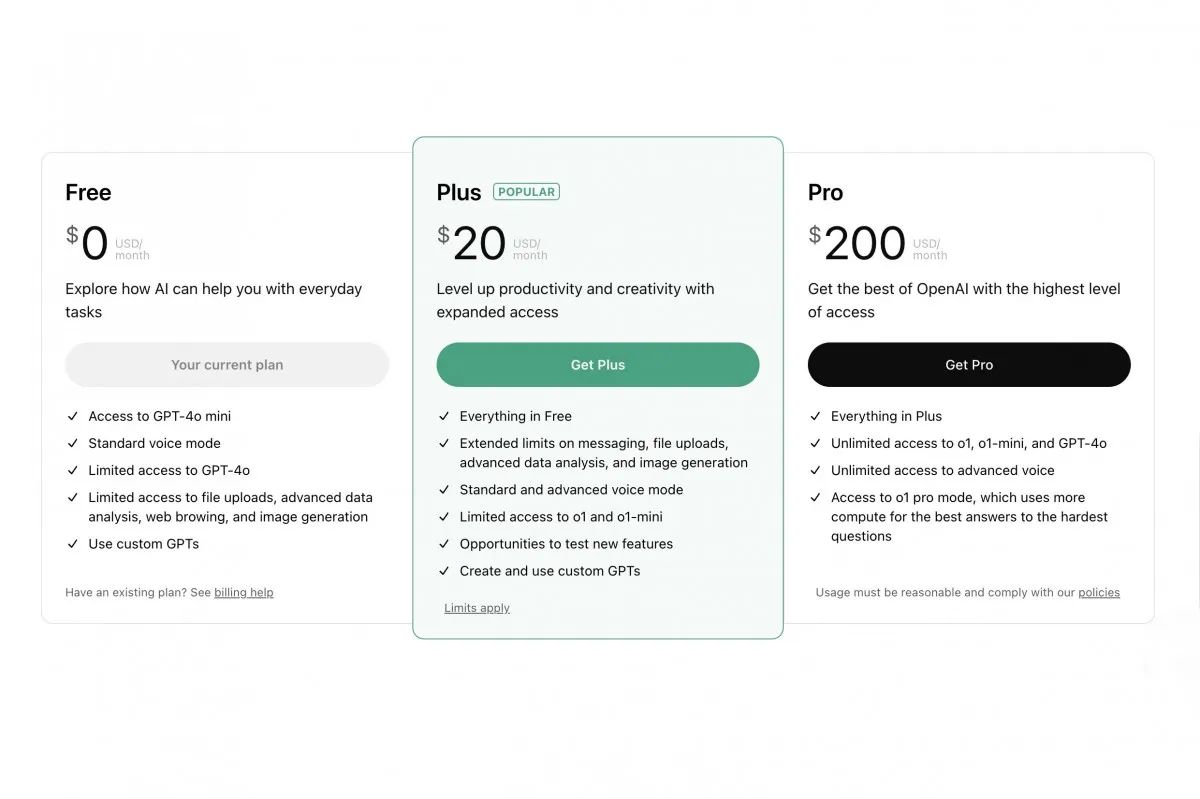
What About ChatGPT Pricing?
The original article cites specific historical prices for Plus, Pro, and Team plans.
However, prices, plan names, access limits, and features can change.
Before publishing a cost comparison, consult the official current pricing information and specify whether rates are monthly, annual, per-user, or subject to regional variation.
Avoid assuming that a higher-priced individual plan automatically permits account sharing.
3. ChatGPT Account-Sharing Policies and Risks
Does OpenAI Allow Multiple People to Use One Personal Account?
Personal accounts are intended for the individual account holder.
Sharing login credentials with other people is not an authorized replacement for a multi-user subscription.
Using a proxy, VPN, remote computer, or isolated browser profile does not change these account permissions.
Security and Privacy Risks
A shared account can expose business information to people who do not need access.
This may include uploaded customer documents, private prompts, internal discussions, and project materials.
When several employees use the same account, activity attribution becomes difficult.
If an employee leaves the organization, recovering exclusive control over shared credentials and sessions can also become complicated.
Interruptions and Verification
Account providers may require additional authentication, re-login, or security checks.
No browser configuration or IP-address arrangement guarantees that such checks will not occur.
Businesses should avoid building critical workflows around access arrangements that could be interrupted.
For a broader comparison of AI tools, see ChatGPT vs Gemini vs Claude: Which AI Is Best for Automation?.
4. Six Ways Teams Try to Share or Collaborate with ChatGPT
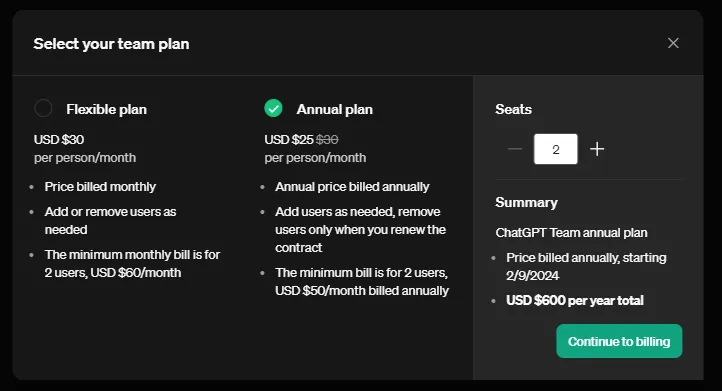
4.1. Use a Multi-User ChatGPT Workspace
This is generally the most appropriate approach when several employees need direct ChatGPT access.
A suitable multi-user workspace can give individuals their own access while offering administrative and collaboration capabilities according to the selected plan.
Advantages: Clearer user ownership, better account administration, and less dependence on shared passwords.
Limitations: Costs may increase with the number of users, and available features can differ between plans.
Before choosing a subscription, estimate the number of active users, required tools, governance needs, and sensitivity of the information being processed.
4.2. Share a ChatGPT Password
Password sharing may appear convenient because it does not require setting up multiple accounts.
However, it creates significant risks.
Employees may unintentionally see each other's conversations, change settings, or expose credentials.
If login credentials are associated with other authentication services, the potential impact may be broader.
Recommendation: Do not share a personal ChatGPT password as a cost-saving strategy.
4.3. Use the Same VPN
Some people believe that using the same VPN or public IP address makes shared account access safer.
A VPN changes network routing and can serve legitimate privacy or connectivity purposes.
It does not, however, grant multiple people permission to use one personal account.
It also does not resolve password sharing, access control, or confidential-data management.
Appropriate use: Network access approved by an organization.
Inappropriate use: Treating a common IP address as a way to authorize personal-account sharing.
4.4. Purchase Access to a Shared Third-Party Account
Some sellers advertise inexpensive access to pooled ChatGPT subscriptions.
This might look attractive compared with individual paid subscriptions.
However, buyers may not know who controls the account, who can read conversations, or whether access will remain available.
Usage limits, account ownership disputes, and exposure of sensitive data can create major operational problems.
For client-facing business work, these risks may outweigh the initial savings.
Recommendation: Avoid entering confidential business data into accounts with unclear ownership.
4.5. Access ChatGPT Through Remote Desktop
Remote Desktop allows an authorized person to control a computer from another location.
It can be useful for IT assistance or for employees connecting securely to their own work computers.
But providing several people with remote access to a computer may expose applications, local files, and confidential information.
Remote Desktop also does not transform a personal ChatGPT subscription into a multi-user license.
Recommendation: Use remote access for legitimate IT and business purposes with appropriate permissions, authentication, and monitoring.
4.6. Use Hidemium to Organize Browser Profiles
Hidemium supports separate browser profiles that can maintain different cookies, session information, and browser settings.
This can help businesses organize their work with multiple authorized online services.
For instance, a marketing team may create distinct browser environments for research, campaign administration, and other approved projects.
Each employee should still use ChatGPT through an account or workspace they are authorized to access.
Important distinction: Sharing an already authenticated Hidemium browser profile is not an approved workaround for allowing several people to operate one personal ChatGPT subscription.
Hidemium cannot guarantee freedom from account verification, restrictions, or suspension.
Its value in an AI workflow is organizational: keeping environments clear, reducing accidental session mixing, and supporting repeatable processes.
You can explore additional ideas in Top Five AI Prompt Scripts for ChatGPT, Claude, and Gemini Beginners.
5. How to Organize ChatGPT Workflows with Hidemium
The following five-step process adapts the original workflow for authorized individual accounts and team collaboration.
Step 1: Install Hidemium
Visit the official Hidemium website and obtain the application from an official source.
Check operating-system compatibility and organizational IT requirements.
Before deployment, establish who may create profiles and manage their configurations.
Step 2: Create a Browser Profile
Create a new profile and assign a clear project or employee name.
Examples include AI-Research-Team or Content-Editor.
Configure browser settings and network connections according to your organization's approved requirements.
Avoid changing technical identifiers merely to bypass account controls.
Step 3: Sign In with an Authorized Account
Open the profile and navigate to ChatGPT.
The authorized account holder should sign in using their own credentials and complete any required authentication.
Employees should not share passwords or one-time verification codes.
Step 4: Manage Sessions and Work Outputs
A browser profile may retain session information depending on its configuration and the website's behavior.
However, cookies may expire, sessions may end, and reauthentication may still be necessary.
Store important AI-generated work in an approved project-management or document system rather than relying solely on conversation history.
Step 5: Collaborate Through Appropriate Permissions
Use separate accounts or a suitable team workspace for employees who require direct ChatGPT access.
Browser profile sharing, where supported, should follow your organization's access rules and should not transfer personal ChatGPT sessions between people.
Define who owns each project, where outputs are stored, and how completed materials are reviewed.
The goal is to create a consistent and auditable AI workflow without relying on shared personal credentials.
6. Conclusion: What Is the Best Way to Collaborate on ChatGPT?
Sharing a personal ChatGPT Plus or Pro login can appear inexpensive, but it introduces policy, security, and operational risks.
Teams should instead use authorized accounts, appropriate collaboration features, or a workspace designed for multiple users.
Hidemium may help organize browser environments and repeatable workflows, but it does not replace the need for legitimate ChatGPT account access.
Learn more about Hidemium Antidetect Browser and evaluate whether its profile-management features fit your team's processes.
7. FAQ: Sharing ChatGPT Plus and Pro
Can Two People Share ChatGPT Plus?
Two people should not use the same personal account credentials. Each person should have appropriate access or use a supported team workspace.
Can a Whole Team Use One ChatGPT Pro Account?
A personal Pro subscription is not the same as a multi-user workspace license.
Does Using the Same VPN Make Account Sharing Safe?
No. A VPN does not change account permissions or guarantee uninterrupted access.
Can Hidemium Prevent Account Restrictions When Sharing ChatGPT?
No. Hidemium manages browser environments and cannot guarantee that an account will avoid security checks or restrictions.
What Should Small Businesses Choose?
Evaluate the number of employees who need direct AI access, the sensitivity of their work, and the collaboration features required. Separate accounts or a multi-user workspace are usually clearer options.
How Can Marketing Teams Reduce ChatGPT Costs?
Purchase access according to real usage, standardize prompt workflows, share completed outputs, and avoid unnecessary subscriptions rather than sharing passwords.