How to Integrate IPRoyal with Hidemium — Complete Privacy at Your Fingertips
Try Hidemium for free

How to Integrate IPRoyal with Hidemium — Complete Privacy at Your Fingertips
In today’s digital landscape, privacy, speed, and scalability are crucial. Whether you’re a digital marketer, developer, or eCommerce entrepreneur, managing multiple accounts and operations demands tools that are secure, seamless, and efficient.
That’s why combining Hidemium with IPRoyal creates a powerful solution — one that maximizes anonymity, minimizes detection, and supercharges your workflows. In this guide, we’ll walk you through how to integrate IPRoyal proxies into Hidemium, step-by-step.
Why Use Hidemium?
Hidemium is a modern antidetect browser trusted by professionals across the globe. It offers strong identity protection and allows users to manage countless digital personas with ease.
What Makes Hidemium Stand Out:
- Create unlimited browser profiles with unique fingerprints
- Native support for HTTP/SOCKS proxies
- Built-in automation and session isolation
- Ideal for social media management, scraping, dropshipping, and ad verification
- Clean UI and cross-platform performance
When paired with high-quality proxies like those from IPRoyal, Hidemium becomes your one-stop solution for secure and scalable browsing.
Why IPRoyal?
IPRoyal is a reliable proxy provider offering access to:
✅ 50M+ ethically sourced residential IPs
✅ Rotating and sticky residential proxies
✅ Datacenter, mobile, and sneaker proxies
✅ HTTP, HTTPS, and SOCKS5 support
✅ Affordable rates starting at $1.75/GB
✅ 99.9% uptime and fast response speeds
Whether you're managing accounts across countries or bypassing geo-restrictions, IPRoyal’s flexible proxy network keeps you anonymous and undetectable.
How to Set Up IPRoyal Proxies in Hidemium
1. Download and Install Hidemium
Go to hidemium.io/download and install the latest version for your system.

2. Log into Hidemium and Create a Profile
Once inside the Hidemium dashboard, click on “Add Profile” to get started.

3. Sign Up or Log Into IPRoyal
Visit IPRoyal.com and log in or create an account.

4. After you have logged in, choose the proxy that suits your needs and buy it.
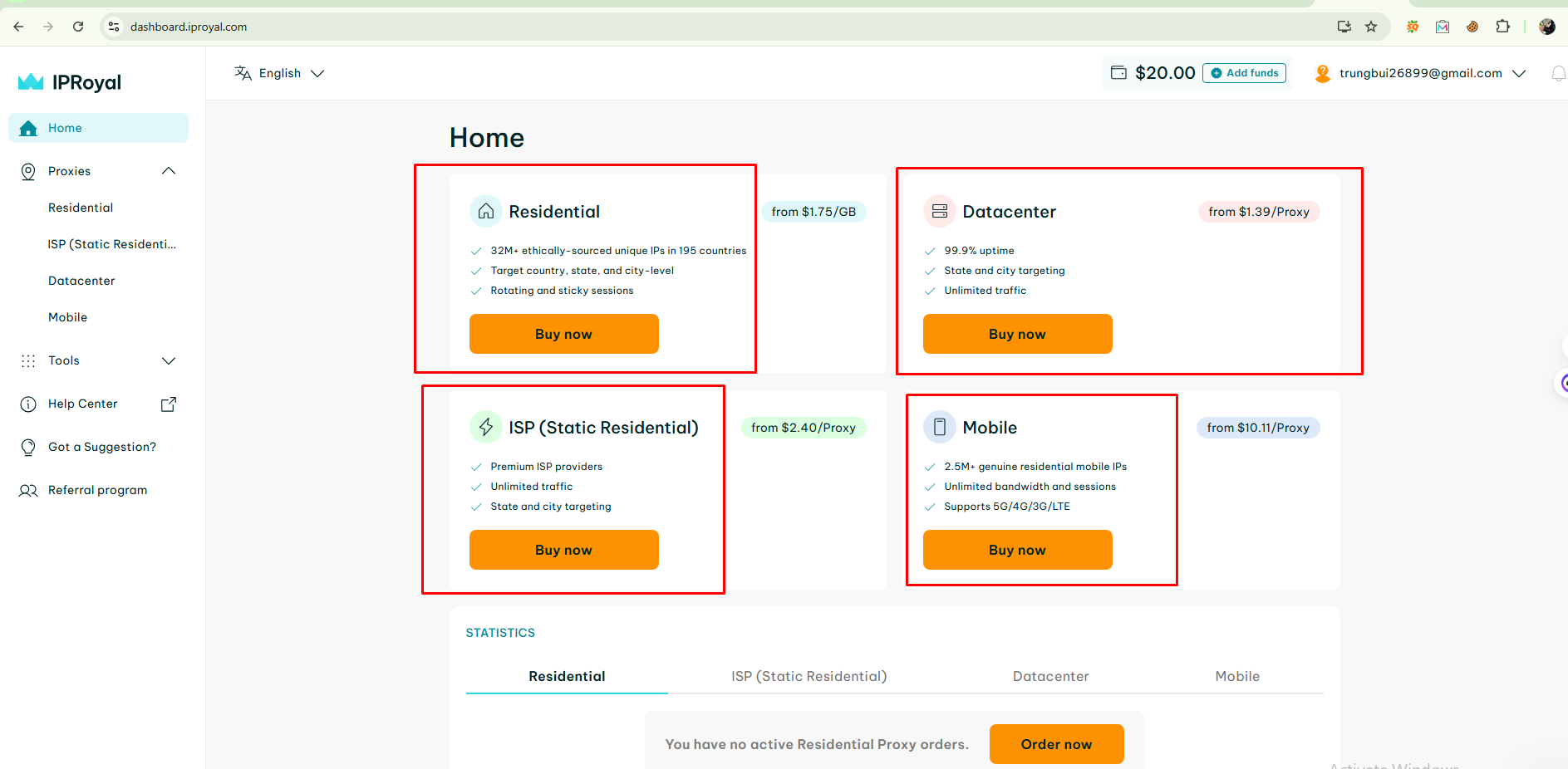
At IP Royal there are many types of proxies for you to choose from such as: Residential, Datacenter, ISP and Mobile Proxy.
5. Proxy access configuration options
Next, select the IP location you want, here I choose the country as US and the city as New York, proxy format as Socks5, your proxy will be returned as HOST:PORT:USER:PASS or you can customize it.
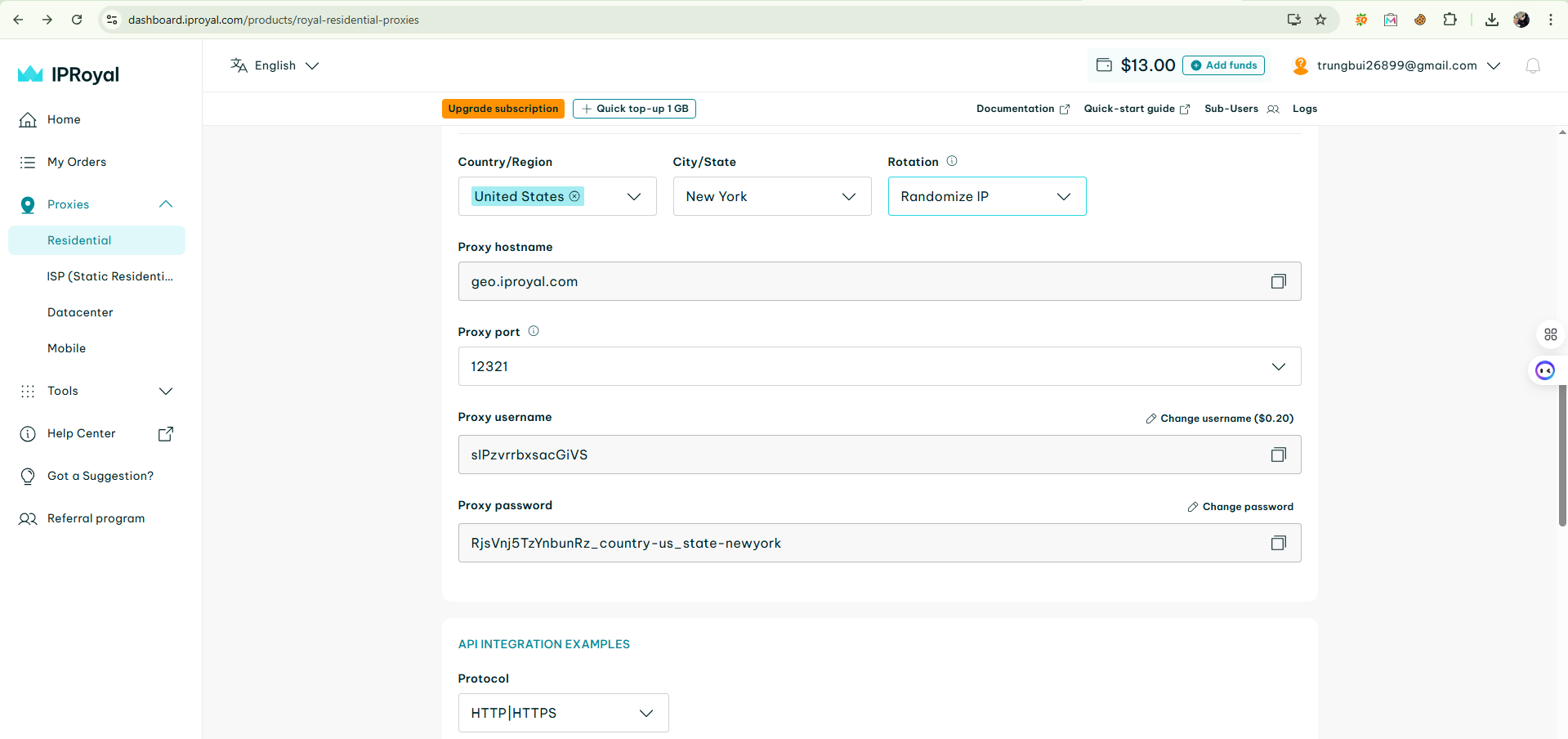
6. Back to Hidemium, after selecting add profile, click on the Proxy column and select Your Proxy

7. At your Proxy, you choose Proxy Type as HTTP|HTTPS, then fill in the parameters in Proxy as the IP parameters Royal provided
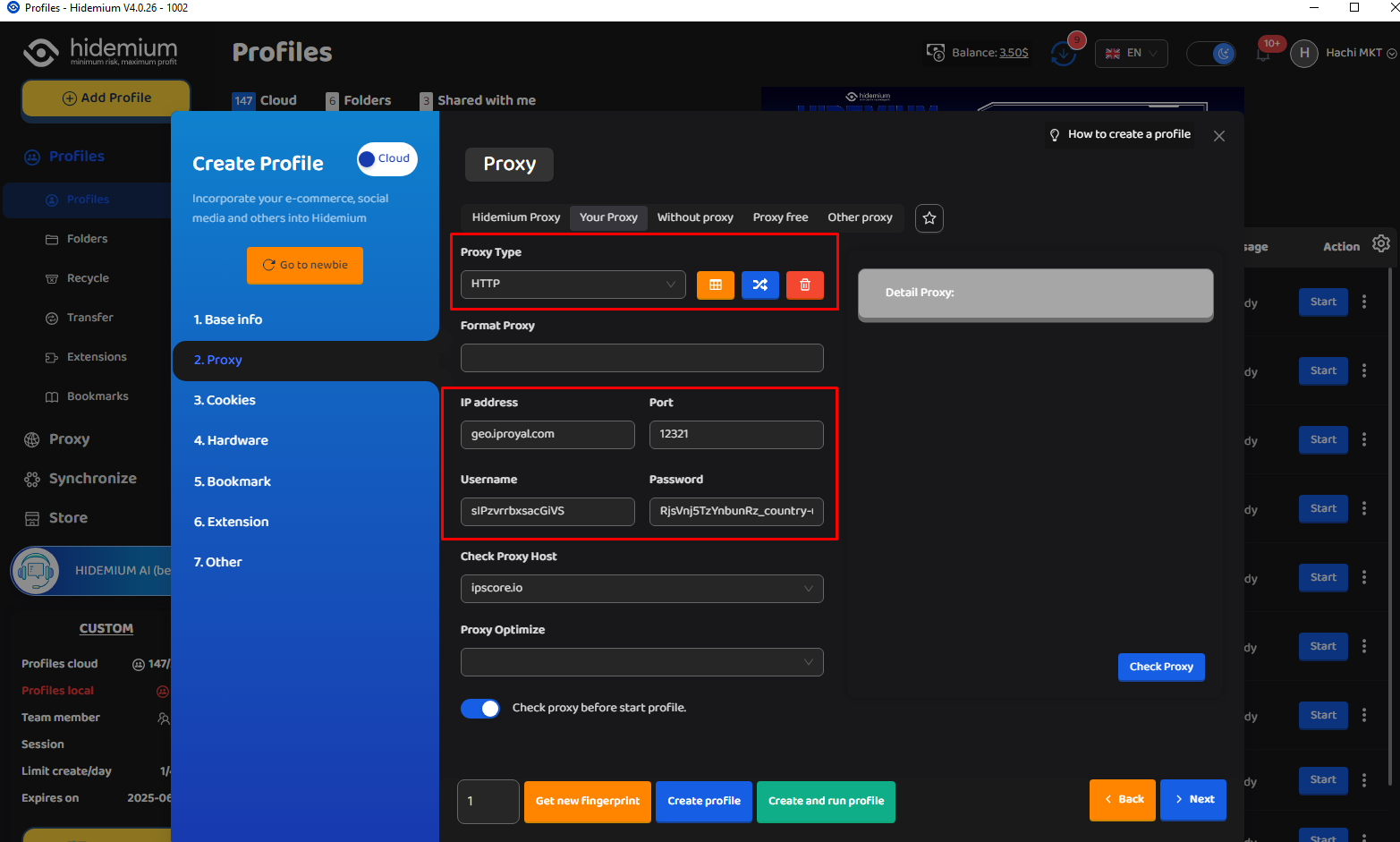
After filling in all the information such as: IP Address, Port, Username and Password, click on Check Proxy to see if it works, then select Create profile with Hidemium.
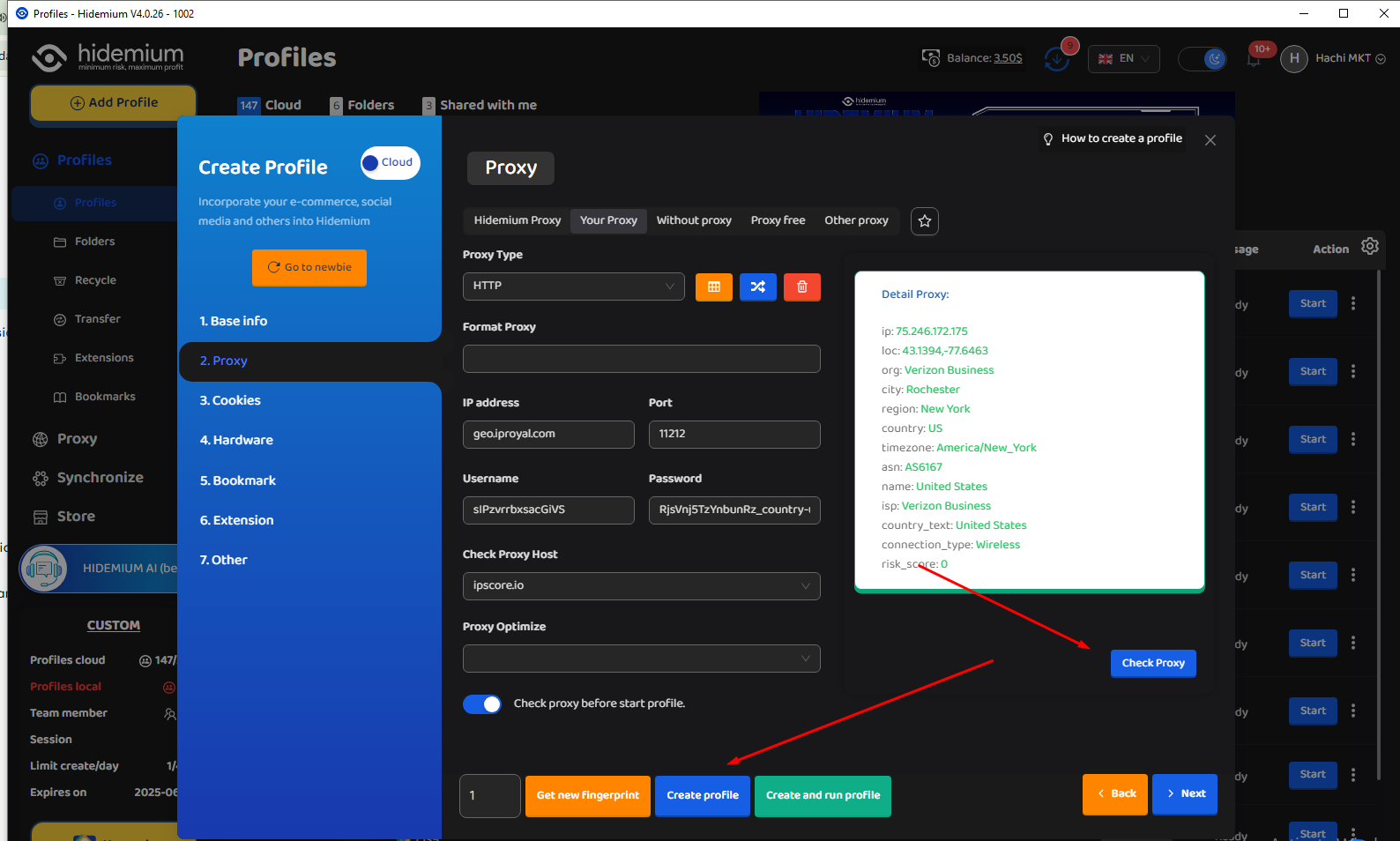
8. Then open the newly created profile and check the IP with any website you want.
If you're seeing the IP address and proxy information displayed, that means everything is set up correctly and your proxy is active. Enjoy using it!
Integrating IPRoyal proxies with Hidemium is a smart move for anyone looking to scale their online operations while maintaining top-tier privacy and control. With Hidemium’s robust browser profile management and IPRoyal’s diverse, high-quality proxy options, you get a reliable, flexible, and secure solution — perfect for everything from multi-account management to geo-targeted research.
Whether you're a seasoned marketer, a data-driven developer, or just starting out, this setup puts powerful tools at your fingertips. Try it out today and experience a safer, smoother, and more efficient way to browse and manage your digital presence.
Related Blogs

In China, the Internet censorship system – commonly known as The Great Firewall (GFW)– continuously blocks access to thousands of international websites and applications such as Google, Facebook or WhatsApp. Therefore, for tourists, foreigners living in China or local residents, VPN became an important tool to maintain digital freedom and access the services needed for work and personal[…]

Did you know? More than 25% of professional eBay sellers are using multiple accounts to increase revenue, spread risk, and avoid permanent bans. However, managing multiple eBay accounts without getting caught is a major challenge—unless you have the right tools.If you are really interested in multi-account eBay, selling anonymously or implementing dropshipping at scale, you've probably[…]

In the digital era, online platforms such as Facebook, Google, TikTok, Amazon, Shopee, and others continuously leverage AI and Big Data to analyze browser fingerprints, user behavior patterns, and connections between accounts. This puts individuals and businesses managing multiple accounts at high risk of suspension if they lack the right solution. Antidetect browsers have emerged as a “shield,”[…]

When managing multiple accounts on the same device, many individuals and businesses face issues such as unstable profiles and frequent account suspensions due to overlapping fingerprints, IP addresses, or behavioral patterns. This is where Antidetect Browsers become a foundational solution—giving each account its own distinct “digital identity,” enabling more stable operation and making detection[…]
.png)
BitBrowser is one of the widely used Antidetect browsers thanks to its ability to change Browser Fingerprint and create multiple independent browser profiles, helping to manage a large number of accounts effectively. However, in the context of many new anti-detection browsers being born with more modern technology, can BitBrowser still remain as competitive and effective as before? Join Hidemium[…]
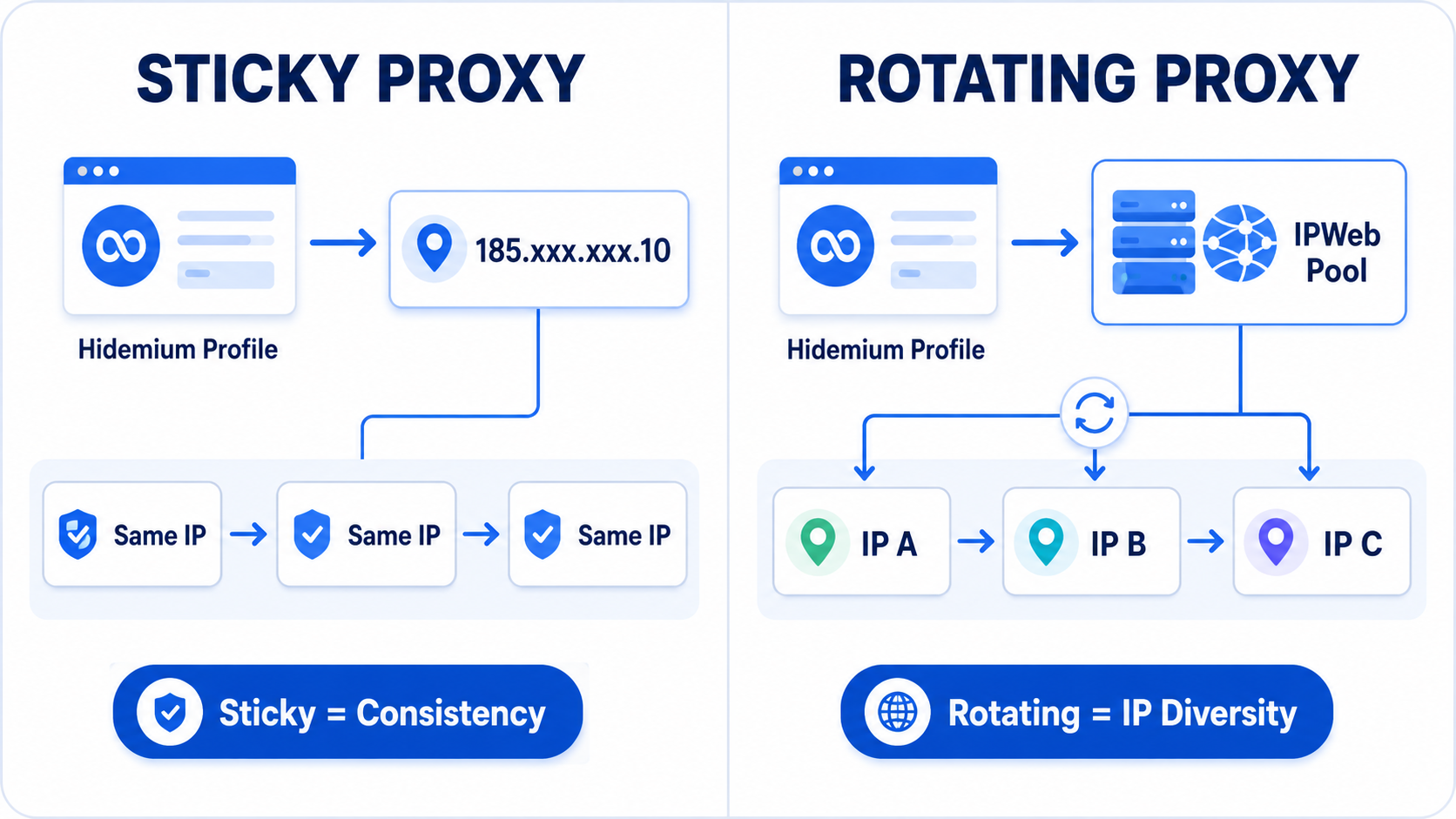
Title:Rotating vs Sticky Proxies for Hidemium: Which IPWeb Setup Should You Use? Meta description:Rotating or sticky proxy for Hidemium? Compare both IPWeb proxy setups, see which works best for stable sessions, research, geo testing and browser profiles. Rotating vs Sticky Proxies in Hidemium: Which IPWeb Proxy Setup Is Right for You?If you're using IPWeb proxies with Hidemium Antidetect[…]
