
Owning and managing multiple advertising (Ads) accounts is essential for scaling campaigns. However, Facebook continuously tightens its detection mechanisms and is ready to disable multiple accounts at once if it detects that the login environment is not “clean.”
In this article, we will guide you through building fully isolated browser environments to minimize abnormal flags and manage Facebook Ads accounts effectively using the Antidetect Browser Hidemium.
1. Why Is Managing Large Numbers of Facebook Ads Accounts So Challenging?
Facebook uses artificial intelligence (AI) systems to monitor user behavior, combining analysis of browser fingerprints, IP addresses, devices, and payment history. When managing a large number of Facebook Ads accounts, even a single account showing risky behavior or policy violations can place the entire system under scrutiny.
Common risks include:
Multiple accounts logging in from the same IP, device, or browser environment
Duplicate payment information (Visa/Mastercard cards, PayPal)
Abnormal behavior such as rapid logins, campaign creation, or sudden spending within a short time
Unnatural automation or identical actions performed across multiple accounts
Once Facebook flags one account as high risk, the system may:
Disable related ad accounts
Restrict spending or suspend the Business Manager
Trigger chain bans across accounts sharing the same IP, device, or payment method
Place the entire system under long-term monitoring
This is why managing large-scale Facebook Ads accounts using a traditional browser is no longer considered safe.
2. What Is a “Clean Environment” for Managing Facebook Ads Accounts?
A clean environment in Facebook Ads management is not just about changing IP addresses. It refers to a fully isolated digital workspace where each Facebook account operates as if it belongs to a separate device, a separate user, and a separate usage history.
Facebook does not evaluate accounts based on IP alone—it relies on a combination of browser fingerprint signals to identify and link accounts.
IP is only one small component of the identification system
Even with different IPs, if fingerprints are identical, Facebook can still link accounts
A properly “clean” environment must include:
Clean IPs: IPs that are not blacklisted, have not been previously abused, and match the account’s operating region
Unique browser fingerprints:
Including User Agent, Canvas, WebGL, AudioContext, fonts, timezone, screen resolution, and more
→ Each profile must have a completely unique fingerprint, avoiding duplication or unnatural patternsIsolated cookies and browsing data:
Each account has its own cookies, local storage, and cache, with no overlap from previously banned sessionsNatural usage behavior:
Login actions, feed browsing, and campaign creation should resemble real user behavior—no mass actions or mechanical patterns
Therefore, to manage large numbers of Facebook Ads accounts safely and sustainably, it is essential to build independent browser environments for each account—where fingerprints play the core role and IPs serve as a supporting factor.
3. Hidemium — The Ideal Solution for Creating a Truly Clean Environment
Hidemium is an antidetect browser purpose-built for managing multiple accounts on a single device.
Instead of relying on traditional browsers, Hidemium allows users to create fully isolated browser environments, where each profile is treated as a brand-new computer.
Each Hidemium profile includes:
A unique browser fingerprint
Independent cookies and local storage
The ability to assign a dedicated proxy/IP
Completely separate browsing history
As a result, Facebook recognizes each Ads account as being operated by a different user, on a different device, within a different environment—significantly reducing the risk of account linkage.
This is the core foundation that enables Ads teams to run dozens or even hundreds of accounts stably, without the need to invest in multiple physical machines or VPS setups.
Sign up and try Hidemium here: https://hidemium.io/
4. Steps to Set Up a Facebook Ads Management Environment with Hidemium
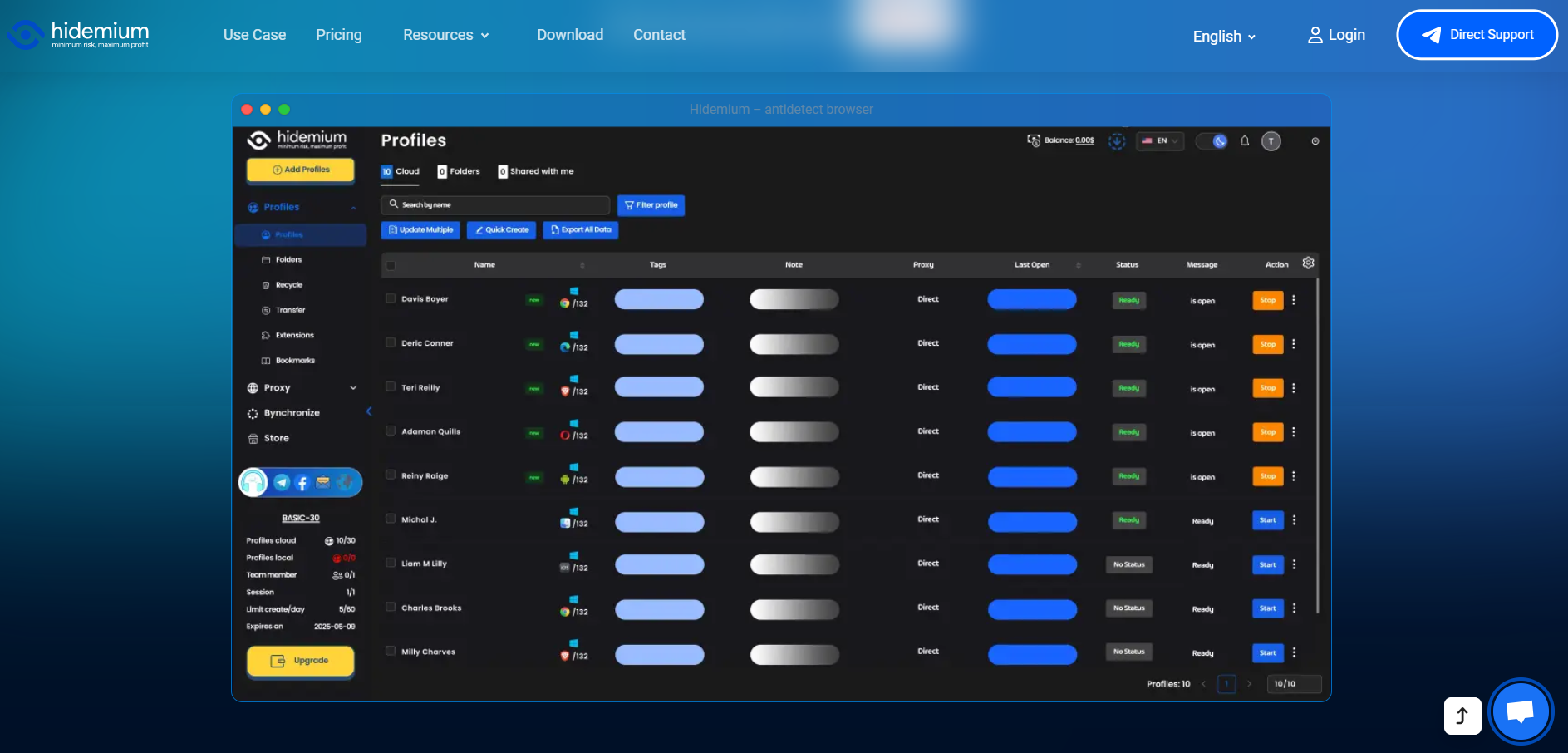
Step 1: Create a new profile in Hidemium
Open the Hidemium software and select “New Profile.” The platform provides an extensive configuration library, allowing you to customize the operating system (Windows, macOS, Linux) and browser version to match the type of account you are managing.
Step 2: Assign a dedicated proxy to each profile
To prevent Facebook from detecting multiple accounts logging in from the same Wi-Fi network, each profile should be paired with its own proxy (residential or 4G proxies are recommended). Hidemium supports direct proxy input and testing during the setup process.
Step 3: Synchronize fingerprint with IP and location
This is the most critical step. Hidemium automatically masks your real device parameters and replaces them with a secure, virtualized fingerprint. You can be confident that elements such as Canvas and WebGL are unique to each profile.
Step 4: Start managing and operating accounts
Once setup is complete, you can import cookies to log into accounts without entering passwords, helping reduce the risk of checkpoints.
5. Important Notes to Avoid Abnormal Facebook Scans
Before launching large-scale advertising campaigns or automation, it’s essential to understand some core principles to keep your accounts stable and avoid being flagged by Facebook. Below are key practices that help reduce risk and improve account trustworthiness during operation:
Maintain natural interactions
After logging in via Hidemium, avoid launching campaigns immediately. Spend time browsing the News Feed, watching videos, and making light interactions to build trust for the new device environment.Manage payment sources carefully
Avoid using the same Visa/Mastercard for too many different ad accounts. Reusing the same payment card across multiple accounts can easily trigger fraud suspicion and lead to account disablement.Leverage automation features wisely
Hidemium supports automation scripts that help maintain regular account activity (browsing, liking, sharing) in a consistent and natural way, saving time while keeping behavior patterns realistic.
6. Conclusion
Building a system to manage large volumes of Facebook Ads accounts is a must for professional marketing teams. To achieve long-term success, you need a solid technology foundation that can overcome increasingly strict review and enforcement barriers. Hidemium is a comprehensive solution that helps eliminate device overlap, protect account resources, and optimize workflows.
Don’t let your business operations be disrupted by the lack of the right tools. Download Hidemium now to protect your accounts: Download Hidemium
Related Blogs

Viettel DNS is a simple yet effective solution to bypass network restrictions like Facebook blocking, slow YouTube loading, or unstable internet connections. So what DNS addresses does Viettel currently offer? How can you change DNS settings to improve internet speed? Let’s dive into the details with Hidemium.1. List of Popular Viettel DNS AddressesViettel DNS is a Domain Name System service[…]

How to Convert YouTube Views into RevenueEvery day, millions of creators upload content to YouTube, sharing their passions, educating the masses, and entertaining audiences worldwide. But for those looking to turn their channel into a sustainable business, the ultimate goal is cracking the code of the view to money youtube pipeline.Understanding exactly how a simple click translates into actual[…]

MarsProxies and Hidemium: Integration Guide Managing multiple accounts from a single device has long been essential, especially for those handling numerous advertising, e-commerce, or social media accounts.An effective anti-detect browser simplifies this by isolating each account’s browser profile, cookies, and data, allowing safe management of multiple accounts without letting target websites[…]
.png)
Residential proxies enable breathing of browsing software. Residential proxies are more effective at connecting you than data center proxies since they originate from actual devices. Reading this post right now if you’re unsure about the circumstances under which and from whom to get a residential proxy.What is a residential proxy?Proxies are more difficult to identify than datacenter IPs because[…]

You're wondering...How to calculate TikTok earningsHow can you maximize your income from today's most popular short-video platform? Understanding TikTok's reward system and applying smart monetization strategies is key to turning your passion for content creation into a stable source of income.This article Hidemium will give you a comprehensive overview of How TikTok calculates earnings, analyze[…]

In the process of doing business online, many sellers face the problem of accounts being repeatedly suspended even though their content does not violate any rules and their ads fully comply with platform policies. This leads to business disruptions, declining revenue, and major difficulties in scaling operations. The root cause lies in poor digital identity management.That is why more and more[…]
