





Managing multiple accounts, clients, or online projects through the same browser can create operational problems. Teams may accidentally use the wrong account, mix browsing sessions, or lose track of which environment belongs to a particular project.
As the number of accounts grows, these mistakes can become more difficult to manage.
An antidetect browser offers a way to create separate browser environments and organize them through a more structured workflow.
However, profile isolation should not be confused with guaranteed anonymity or protection from account suspension.
Quick answer: A sustainable multi-profile management system combines separate browser profiles, consistent configurations, appropriate proxy settings, clear account ownership, access controls, and regular monitoring. Hidemium helps organize browser environments for legitimate operations, but it cannot guarantee that platforms will not associate or restrict accounts.
This guide explains how antidetect browsers work, how Hidemium supports multiple profiles, and what businesses should consider before scaling.
1. Why Build a Sustainable Multi-Profile Management System?
Organizations managing several accounts often need to separate information across customers, markets, and projects.
Without clear organization, employees may sign in to the wrong account, use an incorrect browser session, or change settings belonging to another team member.
Reduce Operational Confusion
A structured profile system gives each environment a recognizable name and purpose.
For example, an agency can group profiles by customer or campaign rather than maintaining an unorganized list of accounts.
Clear ownership also improves handovers when responsibilities change.
Separate Browser Data
Different projects may require separate cookies, local storage, browser preferences, and authenticated sessions.
Keeping these environments apart reduces accidental data mixing.
However, separated browser data does not guarantee that websites cannot recognize relationships through other signals.
Support Team Growth
Managing a few accounts manually may be straightforward.
Managing dozens of authorized project environments requires consistent naming, access policies, documentation, and routine maintenance.
Sustainability means reducing mistakes while respecting platform rules, not creating unlimited accounts.
2. What Is an Antidetect Browser?
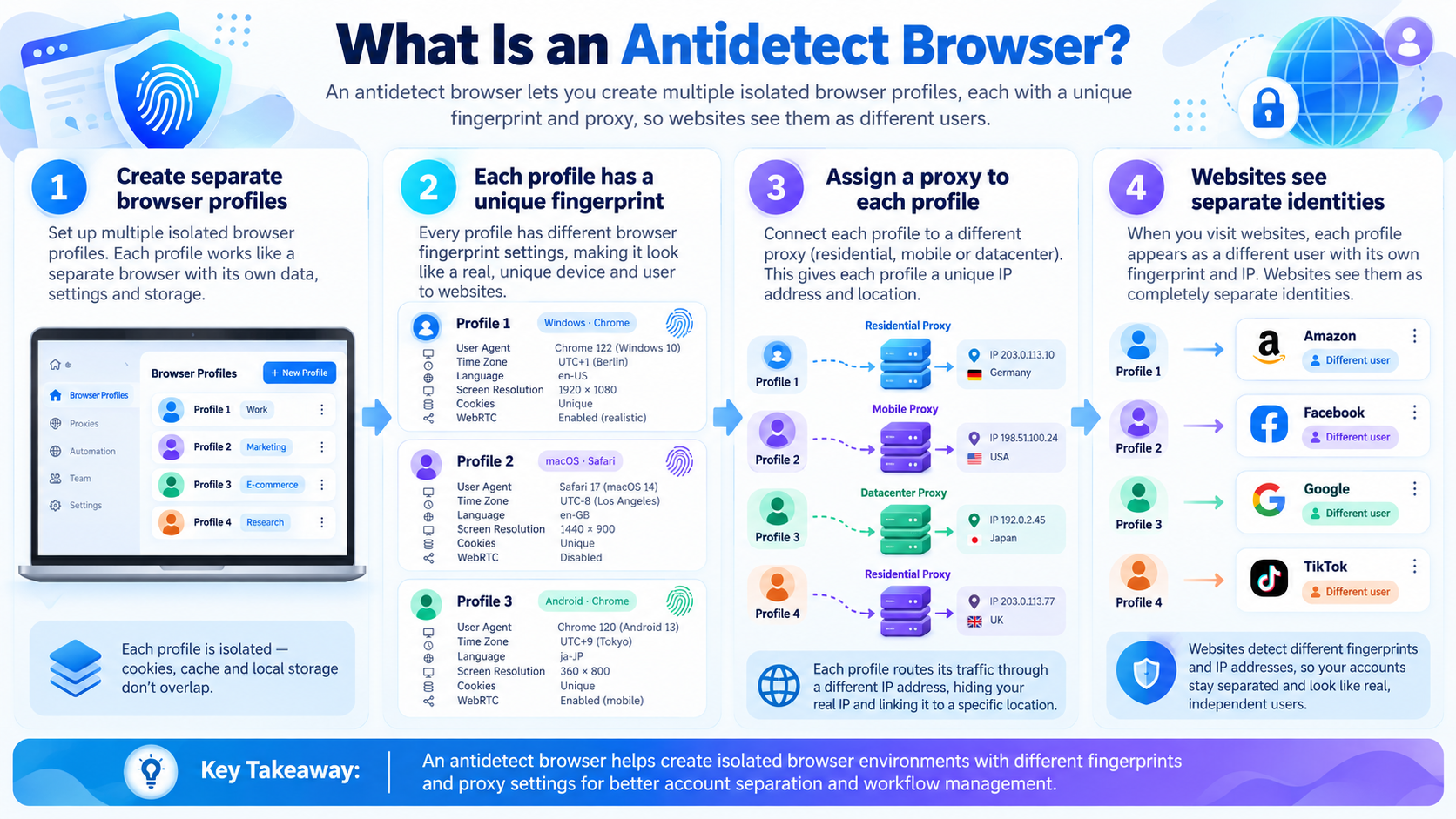
An antidetect browser is a browser designed to create and manage separate browsing profiles with configurable environment characteristics.
Each profile can maintain its own session data and selected browser settings.
Understanding Browser Fingerprints
A browser fingerprint is a collection of characteristics a website may observe from a browser environment.
Examples include the user agent, operating system characteristics, screen size, language, time zone, available fonts, and signals associated with Canvas, WebGL, or Audio Context.
Websites may combine these characteristics with cookies, IP addresses, login information, and activity signals.
Consequently, browser fingerprints are not equivalent to IP addresses, and changing either one does not guarantee anonymity.
How Is an Antidetect Browser Different?
Conventional browsers already provide various ways to manage user profiles.
Antidetect browsers place additional emphasis on configuring browser environments and organizing multiple profiles within a dedicated management workflow.
The objective for legitimate teams is to maintain consistent project environments and avoid operational confusion.
Explore Hidemium's use cases for examples of browser-profile workflows.
3. How Does Hidemium Antidetect Browser Work?
Hidemium is an antidetect browser intended to support the creation and management of separate browser profiles.
Its relevant capabilities include browser-environment configuration, session data separation, and proxy integration.
3.1. Configurable Browser Fingerprints
Profiles can be configured with browser characteristics suitable for a particular testing or operational environment.
Depending on the available settings, these may include user agent information, display parameters, language, time zone, and certain browser API characteristics.
Configuration consistency is important.
For instance, an authorized localization test might require browser settings that reflect the target market.
However, no fingerprint configuration can guarantee that a website will accept an account or consider the environment legitimate.
3.2. Separate Cookies and Session Data
Profiles can maintain their own cookies, cache, local storage, and login sessions.
This reduces the chance that an employee unintentionally uses one project's authenticated browser state for another project.
For example, an agency managing authorized customer accounts can assign a separate profile to each client environment.
Sensitive information still requires secure authentication and appropriate access controls.
3.3. Proxy Integration
Hidemium supports configuring proxies for browser profiles that require different network connections.
A proxy changes the network route and outgoing IP address; it does not automatically modify every browser characteristic.
Depending on the task, businesses may consider static or rotating connections.
For workflows requiring long sessions, connection consistency may matter more than frequent IP changes.
Proxy usage should follow the destination platform's access policies and the organization's security requirements.
3.4. Consistent Profile Environments
Repeatedly changing important browser settings without a clear reason can make troubleshooting harder.
A better practice is to document configurations and modify them only when required for legitimate testing or maintenance.
For ongoing work, teams should record changes to network settings, profile ownership, and other important parameters.
3.5. Centralized Profile Organization
When profiles are organized through a common interface, teams can classify and locate their working environments more efficiently.
Consistent naming and grouping make it easier to distinguish customers, regions, or operational roles.
The value lies in a more manageable workflow rather than guaranteed protection from platform detection.

4. Applying Hidemium to Multi-Profile Operations
4.1. Isolate Profiles by Project
One practical approach is to maintain separate environments for different authorized projects.
An agency might use a dedicated profile group for each customer.
Each group should have a documented purpose, an owner, and agreed operating rules.
Profile isolation reduces certain operational mistakes, but it cannot guarantee that two accounts will never be associated by a platform.
4.2. Organize Accounts for Scalability
A naming convention is useful when many employees work with the same environment library.
For example, a name could identify the client, platform, market, and responsible team.
Documentation should also describe which users may access a profile, change proxy settings, or edit configurations.
Organizations working with advertising projects can also explore Hidemium's content about managing multiple Facebook ad accounts.
Account access must always remain authorized.
4.3. Reduce Mistakes Caused by Shared Environments
Using one browser environment for unrelated projects can create confusion around cookies and login sessions.
Separate profiles help reduce that risk.
However, account restrictions can occur for many reasons, including security checks, policy violations, and authentication problems.
An antidetect browser does not replace account compliance or platform security controls.

5. Combining Hidemium with a Sustainable Workflow
Technology alone is not sufficient for long-term operations. A clear management process matters just as much.
Step 1: Inventory Authorized Accounts
Document the accounts and projects your organization is permitted to manage.
Assign responsibility for each environment.
Avoid maintaining unused profiles without a defined purpose.
Step 2: Create a Grouping Structure
Group profiles by customer, campaign, market, or department.
Use consistent naming conventions so new employees can understand the system.
Step 3: Configure and Test Profiles
Create profiles with appropriate browser settings and confirm that required websites and authorized workflows function correctly.
Check session behavior and any connection requirements.
Test a small group before expanding.
Step 4: Assign Proxies When Needed
Not every profile needs a separate proxy.
Use one when the workflow requires a specific network location, stable outgoing address, or another legitimate connectivity feature.
Verify whether the service can maintain the connection for the required period.
Step 5: Protect Authentication and Access
Use strong passwords, multifactor authentication where supported, and role-appropriate account permissions.
Do not distribute login credentials or session information to unauthorized users.
Step 6: Monitor Operations
Record configuration changes, connection issues, assigned owners, and relevant maintenance events.
Periodically review profiles that are no longer needed.
This helps control complexity and operational cost.
Best practice: Rather than attempting to imitate human behavior or manipulate fingerprint changes to avoid security checks, prioritize authorized access and predictable, documented workflows.
6. When Should Businesses Consider Hidemium?
Hidemium may be relevant to teams that need multiple separated browser environments for legitimate work.
Potential users include marketing agencies, ecommerce operations, website testing teams, and businesses coordinating authorized customer projects.
For someone managing only one personal account, a conventional browser may already be sufficient.
Before adopting an antidetect browser, evaluate compatibility, team requirements, data protection, available features, and overall costs.
You can learn more through the Hidemium website or the official download page.
7. Frequently Asked Questions
What Is an Antidetect Browser?
An antidetect browser is a browser designed to manage separate environments with configurable browser characteristics and independent session data.
Can Hidemium Manage Multiple Browser Profiles?
Hidemium is designed for multi-profile management. Practical limits and simultaneous performance depend on the service plan and device resources.
Does Hidemium Prevent Account Suspensions?
No. Account restrictions depend on the policies and security decisions of individual platforms. Browser-profile management cannot guarantee protection.
Does Every Profile Need a Separate Proxy?
No. Proxy allocation should depend on the specific network, location, and operational requirements of the profile.
Is a Browser Fingerprint the Same as an IP Address?
No. A fingerprint describes characteristics of the browser environment; an IP address identifies a network connection endpoint.
Is Hidemium Suitable for Agencies?
It may be useful for agencies organizing multiple authorized browser environments. Teams should evaluate relevant features and workflows before adopting it.
Do I Need an Antidetect Browser for One Account?
Usually not. A conventional browser and standard account security measures may be sufficient for a simple single-account workflow.
8. Conclusion
A sustainable multi-profile management system requires more than opening multiple accounts.
It involves separating browser environments, organizing projects, maintaining consistent configurations, managing permissions, and monitoring operations.
Hidemium can support these needs through profile management, session separation, and proxy integration.
However, it does not guarantee anonymity, prevent all account restrictions, or eliminate the need to follow platform policies.
If your organization needs a more structured way to manage authorized browser environments, explore Hidemium's use cases and evaluate the solution with a small pilot before scaling.