
The best antidetect browser for affiliate marketing depends on your workflow, team size, proxy requirements, automation needs, and budget. Hidemium is worth evaluating for organized browser-profile workflows and team collaboration; GoLogin emphasizes accessible profile management; Multilogin appeals to technical teams; Dolphin Anty is positioned toward ad-oriented workflows; AdsPower offers automation-oriented features; Undetectable emphasizes profile management options; and Incogniton provides an approachable starting point.
This comparison covers seven tools, explains how browser isolation works, and offers a practical checklist for choosing software.
1. Best Antidetect Browsers for Affiliate Marketing: Quick Comparison
Browser | Consider it for | Key point to evaluate | Potential trade-off |
| Hidemium | Affiliate teams and growing operations | Profile organization, proxy configuration, collaboration | Validate plan-specific team and automation features |
| GoLogin | Individuals and small teams | Ease of setup, profile sharing | Review subscription limits |
| Multilogin | Technical and agency workflows | Browser environments, APIs, teamwork | Consider learning curve and budget |
| Dolphin Anty | Paid media and social campaigns | Profile workflows, team organization | Verify workflow-specific automation |
| AdsPower | Repeatable browser operations | RPA, integrations, proxy setup | Assess configuration complexity |
| Undetectable | Teams needing profile options | Local/cloud workflow and management | Confirm suitability and capacity |
| Incogniton | Freelancers and beginners | Core profile separation | Compare advanced automation needs |
This is a suitability guide, not a laboratory ranking. No independent fingerprint-resistance, account-survival, uptime, or speed benchmark was provided for these seven products. Test each candidate under the same conditions before committing.
2. What Is an Antidetect Browser?
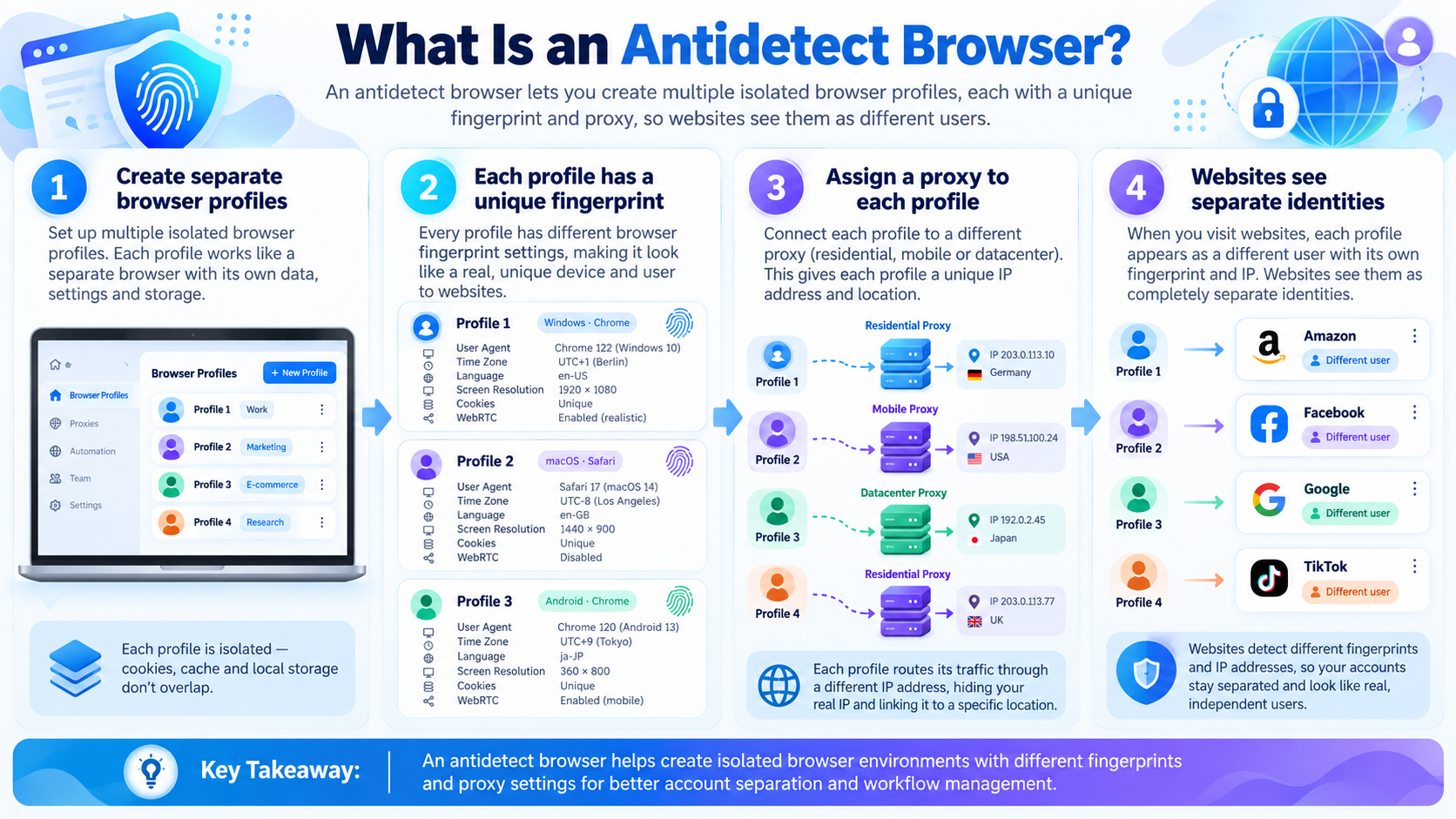
An antidetect browser is a browser-profile management tool that helps create separate browsing environments with distinct cookies, local storage, settings, and configurable browser-fingerprint characteristics. Common controls may include user-agent information, Canvas and WebGL-related settings, language, timezone, and proxy assignment.
For an affiliate team, the practical advantage is organization: different approved clients, campaigns, or testing environments can have separate profiles rather than sharing one browser session. Profile isolation also helps limit accidental cross-contamination of cookies and saved sessions.
It is important to distinguish privacy controls from invisibility. Websites can still observe IP information, behavior, authentication events, account relationships, payment information, and signals outside the browser.
3. Why Affiliate Marketers Use Browser Profiles
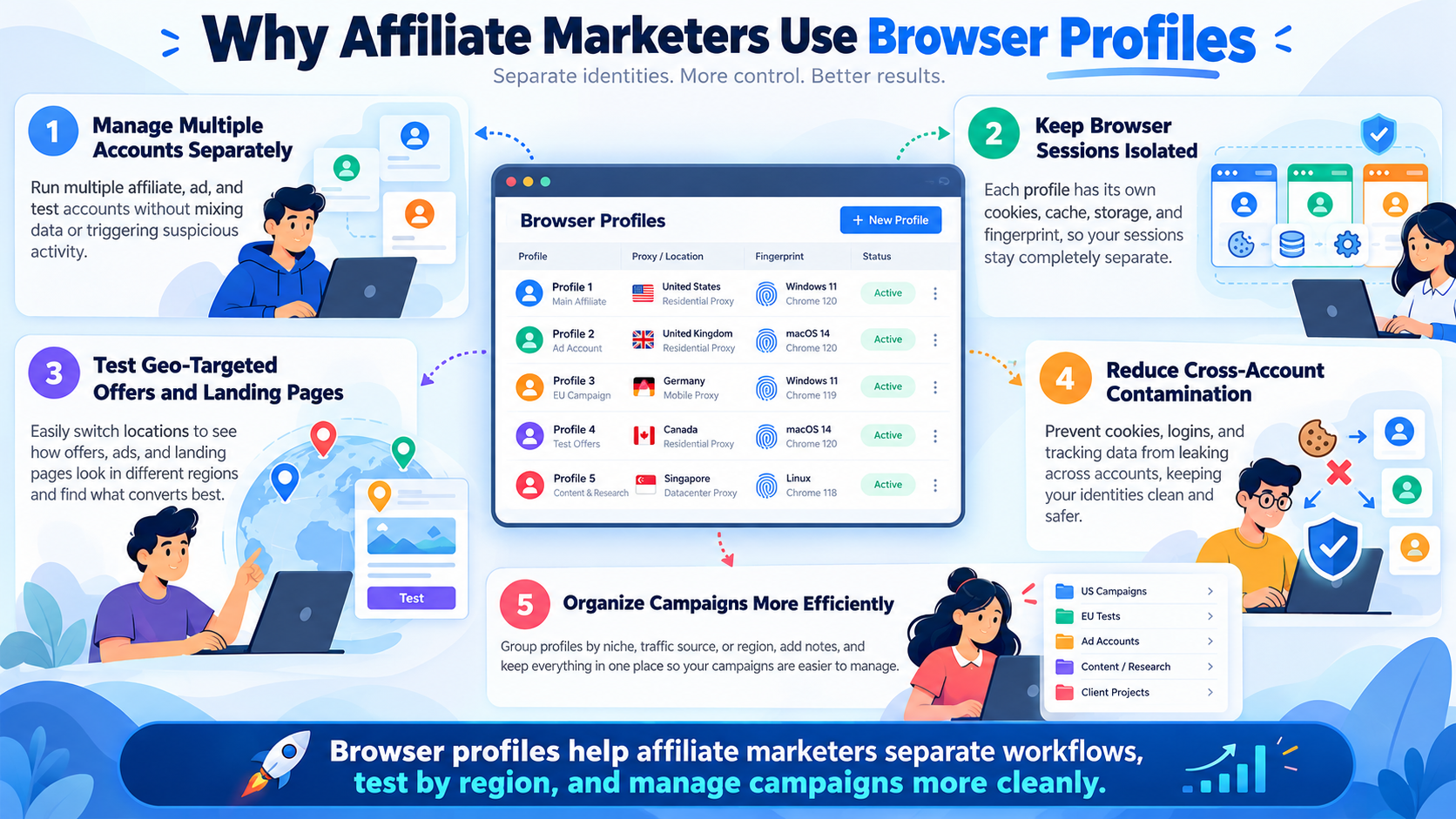
Affiliate work frequently involves checking landing pages, managing approved advertising assets, collaborating with partners, comparing geographic experiences, and running authorized quality-assurance tests. Separate browser profiles can make these activities easier to document and repeat.
Campaign organization: Assign each client or project a labeled profile with its own settings and notes. This reduces confusion when teams switch between projects.
Consistent testing: Preserve an approved test environment so that cookies, language, timezone, and other settings do not change unexpectedly during comparisons.
Team collaboration: Where supported, define ownership, sharing, and role-based access rather than circulating login credentials in unsecured messages.
Automation: Browser APIs or no-code actions can reduce repeated work, provided the automation is permitted by the relevant site or platform.
Regional quality assurance: Pair a configured profile with a legitimate regional proxy to review localized pages. The IP address is only one location signal; language and account settings may also affect results.
For campaign planning beyond browsers, consult top affiliate marketing tools to boost conversion.
4. Hidemium: A Candidate for Structured Affiliate Operations
Hidemium Antidetect Browser is featured in the source article as a browser-profile solution for marketers, ecommerce teams, and agencies. Its described workflow covers separate browser environments, proxy configuration, automation capabilities, and team-oriented management.
Why evaluate it: Teams that move between multiple approved client environments may appreciate a central method for organizing profiles and assigning connection details.
What to verify: Check how profiles are stored, what collaboration permissions your subscription includes, whether automation is available on your plan, and which proxy protocols and operating systems are supported. Also test whether session data and settings remain consistent across team handoffs.
Best fit: Agencies and affiliate teams seeking a structured workflow rather than a collection of unmanaged browser installations.
For related operating ideas, see Hidemium's article about improving affiliate workflows.
5. GoLogin: Accessible Profile Management
GoLogin is a widely discussed option for running separate browser profiles. The original article highlights profile sharing, folder-style organization, proxy options, and use across different working environments.
Strengths to investigate: How quickly a new user can create a profile, how profiles are shared, whether a preferred proxy service integrates cleanly, and how teams handle session ownership.
Limitations to check: Subscription restrictions, the number of allowed profiles or collaborators, and the availability of automation in the plan you intend to buy.
Best fit: Individuals and smaller teams who value a straightforward profile workflow and want to compare pricing tiers carefully.
Read the existing GoLogin review for MMO beginners for more context.
6. Multilogin: A Technical-Team Option
Multilogin is commonly considered by teams looking for configurable browser environments and programmatic workflows. The source material discusses Chromium- and Firefox-oriented environments, proxy options, API integrations, and team access.
Strengths to investigate: Whether its browser engines meet your testing needs, how it handles shared profiles, and whether API documentation supports your approved automation tasks.
Limitations to check: The learning curve, operational overhead, and cost for your required number of users or profiles. A technically sophisticated product is not automatically the best value for a small affiliate operation.
Best fit: Agencies or technical teams that will actually use advanced environment controls and integrations.
See the Multilogin alternative and review for additional background.
7. Dolphin Anty: Campaign-Oriented Profile Workflows
Dolphin Anty is often discussed in connection with advertising operations and social-media campaign organization. The source article identifies automation, teamwork, and profile management as its main attractions.
Strengths to investigate: How conveniently users label and group profiles by campaign, assign team permissions, and perform repetitive approved QA checks.
Limitations to check: Application stability on your machines, current automation coverage, integration requirements, and support responsiveness. Reports of performance problems should be tested rather than treated as universal conclusions.
Best fit: Marketing teams that organize substantial parts of their work around campaigns and shared browser environments.
Read the Dolphin Anty comparison before shortlisting it.
8. AdsPower: Automation and Repeatable Tasks
AdsPower is known for browser-profile management alongside automation-oriented workflows. In the supplied article, relevant capabilities include Chromium- and Firefox-based environments, proxy settings, RPA features, and developer APIs.
Strengths to investigate: Whether no-code automation covers your repetitive operations, whether you can inspect or stop scripts, and how reliably you can reproduce a profile configuration across a team.
Limitations to check: The time required to configure RPA, plan restrictions, workflow maintenance, and compatibility with the applications you actually use.
Best fit: Teams with repeatable, authorized browser-based tasks and a clear process for monitoring automation quality.
Our AdsPower browser review provides an additional comparison point.
9. Undetectable: Profile Flexibility for Experienced Users
Undetectable is another browser-profile product featured in the original comparison. It is discussed in connection with configurable fingerprints, multiple profiles, proxy assignment, and automation options.
Strengths to investigate: Local versus cloud profile handling where offered, profile export or portability, and whether profile storage matches your team's security requirements.
Limitations to check: How easy it is for a new team member to learn the software, whether the requested profile volume is supported, and which collaboration options are available in your chosen plan.
Best fit: Users prepared to assess configuration details and technical workflow requirements before purchasing.
For more background, see the Undetectable browser review.
10. Incogniton: A Starting Point for Simple Profile Separation
Incogniton focuses on core profile-management needs. The source article mentions separate cookies, profile labeling, import/export features, and an entry-level offering.
Strengths to investigate: Ease of profile creation, basic separation between testing environments, and whether the interface works well for a freelancer's daily routine.
Limitations to check: Current free-plan limits, team-sharing permissions, and whether advanced automation is available. Free-plan quotas and pricing change, so verify them directly rather than relying on older blog figures.
Best fit: Freelancers, assistants, or small projects testing the value of dedicated browser profiles before adopting a larger team platform.
See the Incogniton comparison and review.
11. How to Choose the Right Antidetect Browser
Start with the work you need to complete, not the biggest feature list. Evaluate five dimensions:
Profile requirements: Estimate how many active profiles you need, how long you must retain them, and whether profiles require separate storage or backup rules.
Team access: Decide whether one person owns each profile, who may edit settings, and how access is revoked when staff change roles.
Proxy compatibility: Confirm HTTP, HTTPS, or SOCKS5 support as relevant. A proxy protocol must match the endpoint supplied by the provider. Also verify whether the proxy's public IP and session duration meet your test plan.
Automation: List the repeated tasks you are allowed to automate. Compare native actions, RPA, scripting interfaces, error logging, and ways to stop a failed process.
Total cost: Calculate subscription fees, proxy charges, setup time, failed sessions, and training. A low entry price is not necessarily the lowest operational cost.
Give each browser the same trial task and document the result. A small team may prioritize usability; a technically staffed agency may value APIs and permission management more highly.
12. Antidetect Browser vs Proxy vs VPN
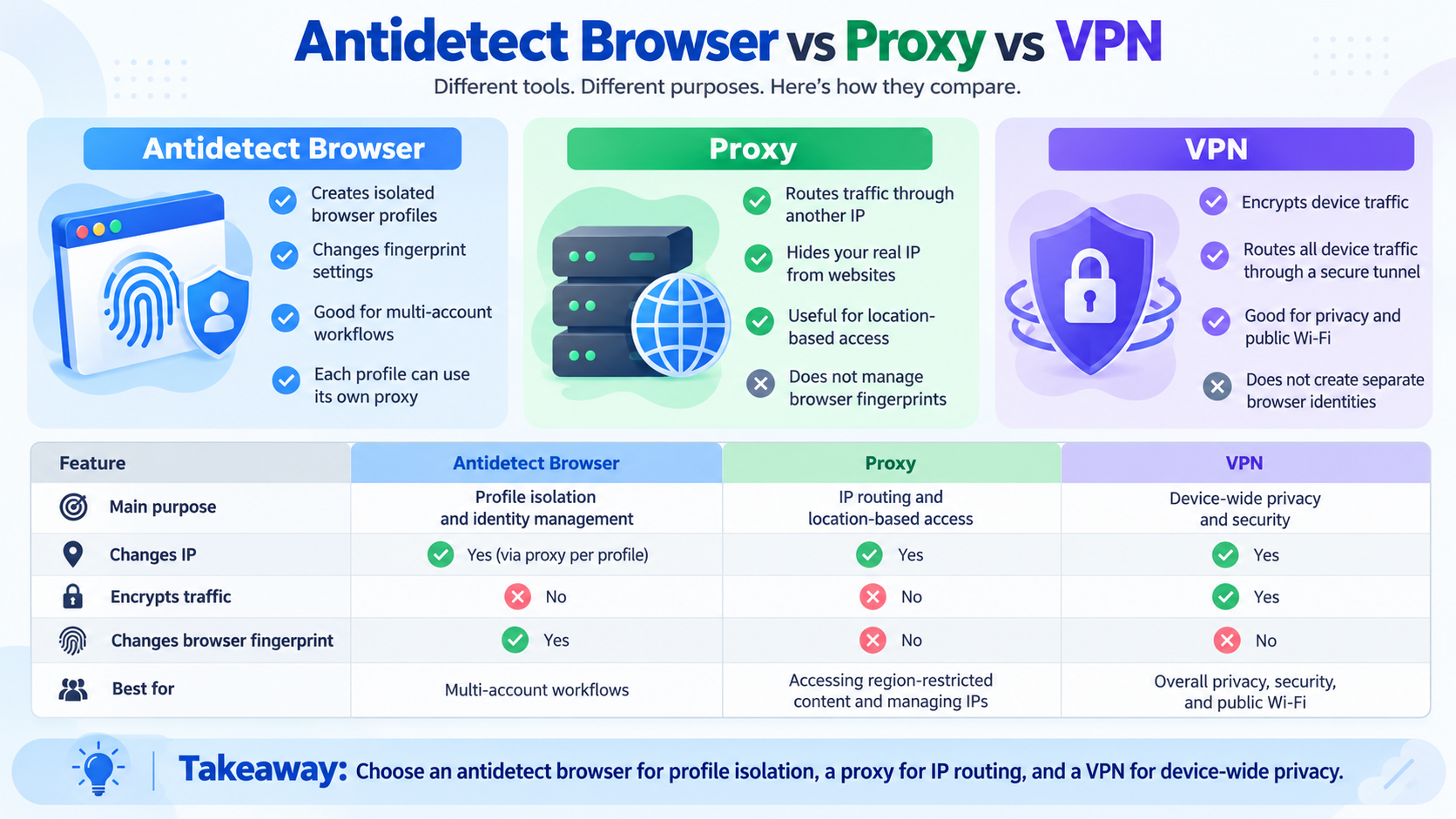
These products solve different problems. A browser-profile manager separates browser data and configurable settings. A proxy supplies a different network route or public IP address.
One product does not fully replace another. A profile without a proxy can still expose your normal public IP. A proxy without separate profiles does not automatically isolate cookies or local storage. A VPN alone does not create distinct browser workspaces.
A legitimate regional test may use a dedicated profile plus a suitable proxy, with the correct language and location preferences.
13. A Practical Evaluation and Rollout Checklist
Before introducing an antidetect browser to an affiliate team, run a pilot rather than migrating everything immediately.
- Define the use case. Identify approved accounts, target websites, expected profiles, and intended team members.
- Select two or three candidates. Pick products matching your size, platform requirements, and budget.
- Create a test profile. Configure language, timezone, cookies, and other settings needed for authorized QA.
- Add a suitable proxy if required. Confirm the protocol, credentials, public IP, and location.
- Run an ordinary task. Open approved websites, inspect expected content, and monitor session consistency.
- Test collaboration. Check permissions, profile locking, ownership, and how a teammate receives access.
- Measure repeatability. Record setup minutes, errors, proxy cost, and whether saved settings remain intact.
- Review security. Require strong credentials, least-privilege permissions, and a clear access-removal process.
- Compare outcomes. Choose the product that solves your actual workflow with acceptable cost and support.
Avoid running an account-risk experiment as a substitute for security evaluation. A browser cannot guarantee protection against platform enforcement.
14. Frequently Asked Questions
What is the best antidetect browser for affiliate marketing in 2026?
There is no universal winner. Hidemium is worth evaluating for organized affiliate team workflows; AdsPower for automation-related needs; Multilogin for technical operations; and tools such as GoLogin or Incogniton for potentially simpler starting points. Validate specific features and plans before choosing.
Is an antidetect browser legal?
The software itself can have legitimate privacy and workflow-management uses. Whether a particular activity is lawful or permitted depends on local rules, website terms, affiliate agreements, and how the tool is used.
Do I need a proxy with an antidetect browser?
Not always. You need a proxy when a task requires a particular network route or public IP. Separate browser profiles alone do not change your external IP address.
Can an antidetect browser prevent account bans?
No. Account enforcement may depend on policy violations, authentication patterns, payment relationships, activity, and other signals. No tool can guarantee that an account will not be restricted.
Which browser is best for beginners?
Prioritize clear setup, easy profile management, transparent pricing, and responsive support. Trial Hidemium, GoLogin, or Incogniton against the same simple task rather than trusting a generic ranking.
Which option works best for agencies?
Look for reliable collaboration permissions, profile ownership, auditability, integrations, and predictable scaling costs. Different agencies will reach different conclusions depending on their workflows.
Is automation necessary for affiliate marketing?
No. Automation helps only when you have recurring, approved tasks that are worth maintaining. Many small teams can begin with manual profile management and add automation later.
Conclusion: Choose a Browser That Fits the Workflow
The best antidetect browser for affiliate marketing is the one that helps your team maintain organized, consistent, permissioned browsing environments without unnecessary operational complexity.
Start by testing two or three candidates, review their current product documentation, and compare real setup time, collaboration quality, proxy compatibility, and total cost. If team-based browser profiles are your priority, explore Hidemium and evaluate its available features against your checklist.
Related Blogs

The rapid advancement of AI and Big Data is profoundly transforming how digital platforms collect, analyze, and evaluate user data. In this context, Antidetect Browsers are playing an increasingly important role in supporting multi-account management and adapting to an ever more complex digital environment, opening up new development trends for the future.1. The impact of AI and Big Data on[…]

In an era of shrinking internet privacy, the need for anonymity while browsing the web has become more important than ever. In fact, most websites now use fingerprinting techniques to collect user data. Even when using incognito mode, these technologies can still identify your device through the unique characteristics of your browser and system.Modes like “Incognito” or “Private Browsing” only[…]

In today's digital age, online account security is an important factor for every user. YouTube, the world's largest video sharing platform, is no exception. A hacked YouTube account can lead to loss of data, videos, and even personal or business reputation. In this article, learn how to recover a hacked YouTube account effectively with Hidemium Antidetect Browser.1. How to know if your YouTube[…]
Running a dropshipping business on eBay can be highly profitable, but it also comes with a major risk: unexpected account suspensions. For dropshippers, managing multiple accounts on the same computer without proper protection can easily lead to account bans.Even a small mistake—such as using duplicate IP addresses or exposing your browser fingerprint—can result in immediate suspension. So how[…]
.png)
Using multiple Gmail accounts can help you separate personal and work emails, but it can also become challenging when you constantly switch between accounts or need to keep track of important emails. You may encounter issues like sending emails from the wrong account or managing a cluttered inbox. Here are effective methods and tools to help you efficiently manage multiple Gmail accounts.1.[…]
Remote work did not simply change where employees open their laptops. It changed the boundaries businesses need to secure.A company may now have employees working from home, managers traveling between locations, cloud applications holding sensitive data, and physical offices operating without a security specialist permanently on-site. This distributed model creates a problem for security teams[…]
