

MarsProxies and Hidemium: Integration Guide
Managing multiple accounts from a single device has long been essential, especially for those handling numerous advertising, e-commerce, or social media accounts.
An effective anti-detect browser simplifies this by isolating each account’s browser profile, cookies, and data, allowing safe management of multiple accounts without letting target websites link them.
MarsProxies Features Overview
MarsProxies offers a range of affordable proxy services. It's ideal for individuals and businesses seeking reliable, easy-to-use proxies. With five types of proxies, it caters to diverse needs such as web scraping, automation, testing, eCommerce, and more.
- Global network: Boasts over 1 million proxies in 190+ locations.
- Proxy variety: Choose from multiple proxy types for your specific tasks.
- Reliable & secure: Provides high uptime, security features, and unlimited bandwidth options.
- Budget-friendly: With non-expiring residential traffic and customizable plans for other proxy types.
- 24/7 support: Offers round-the-clock customer assistance via live chat, email, and Discord.
MarsProxies has a user-friendly dashboard that makes setting up and using proxies easy, even if you're new to them. Their blog and use case section provide helpful information so you can get the most out of your proxies. All MarsProxies services support SOCKS5 for greater flexibility online.
Residential proxies offer customizable options for rotating or sticky IPs, two-factor authentication, and traffic that doesn't expire. Datacenter, ISP, mobile, and sneaker proxies are very fast with unlimited bandwidth and threads. It's a simple service that meets all the needs of your next small or medium-sized project.
What Is MarsProxies Used For?
MarsProxies is all about giving you fast, reliable proxies that won't break the bank. They work great for everything, from safe and efficient web scraping projects, social media management, ad verification, marketing research, eCommerce, bypassing geo-restrictions, any other scenario where you need to use IPs from a specific location.
To top it off, they offer 24/7 support, and have a great community. If you want good-quality proxies without spending a lot, MarsProxies is a great option.
How to Use Hidemium with MarsProxies
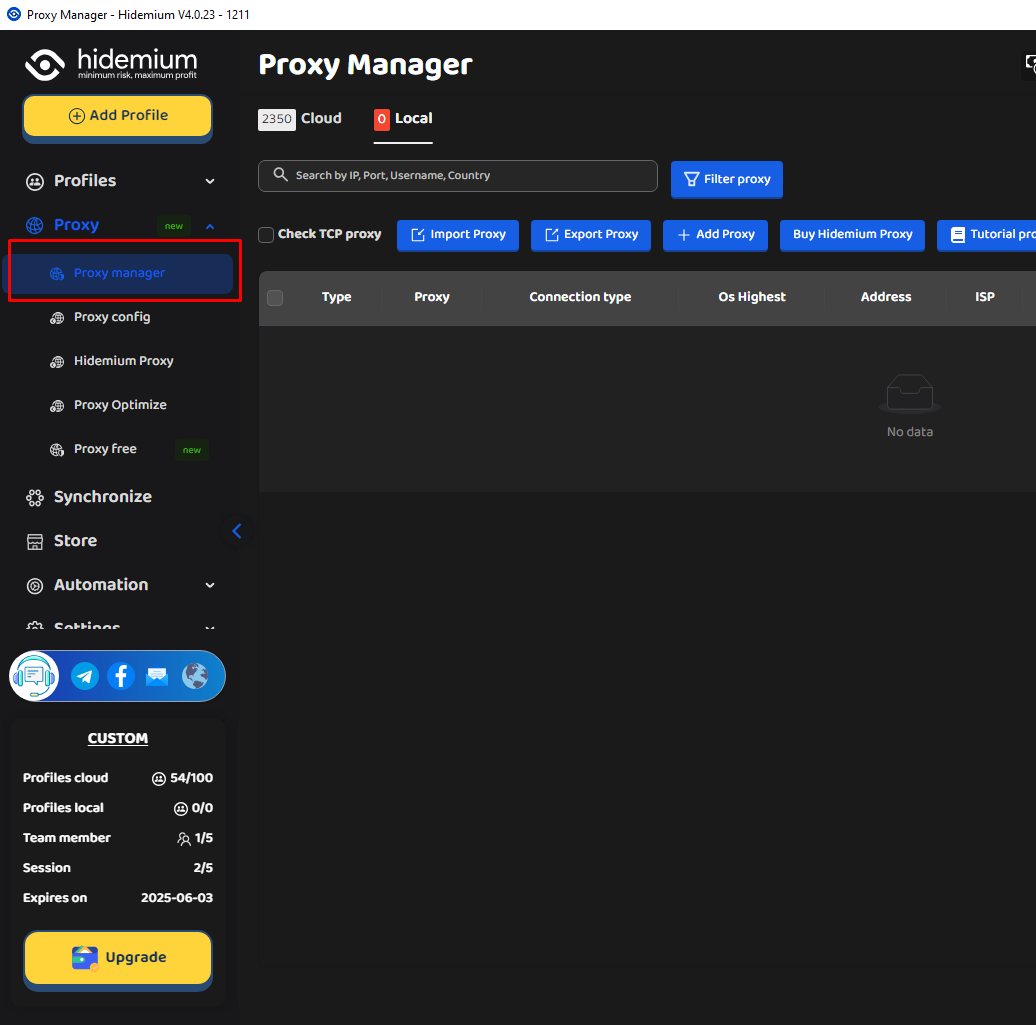
1. Open Hidemium and click on Proxy Manager.
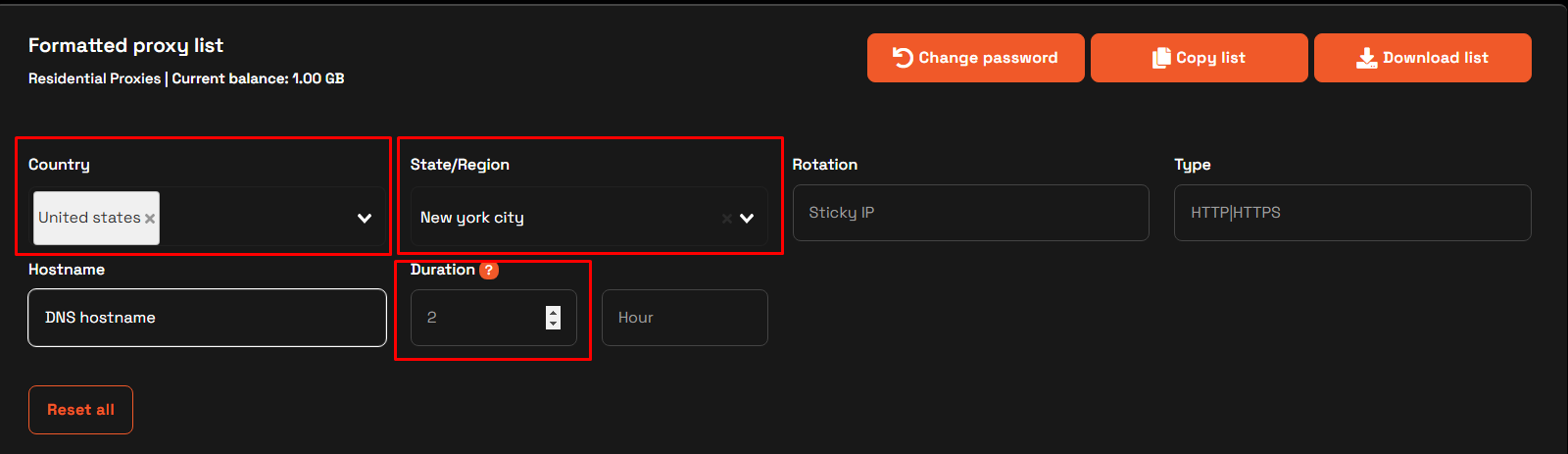
2. Visit the MarsProxies website, go to the MarsProxies dashboard, and configure your proxies. We’ll use proxies from the United States, New York City, with sticky sessions , HTTP(S) protocol, and a session duration of 2 hours.
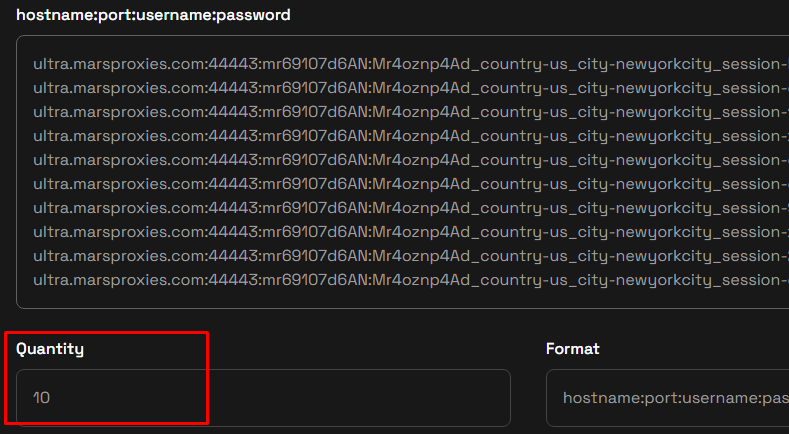
3. Scroll down to the hostname:port:username:password field and select the number of unique sessions you want to generate. Hidemium will recognize the format so you don’t need to change it.
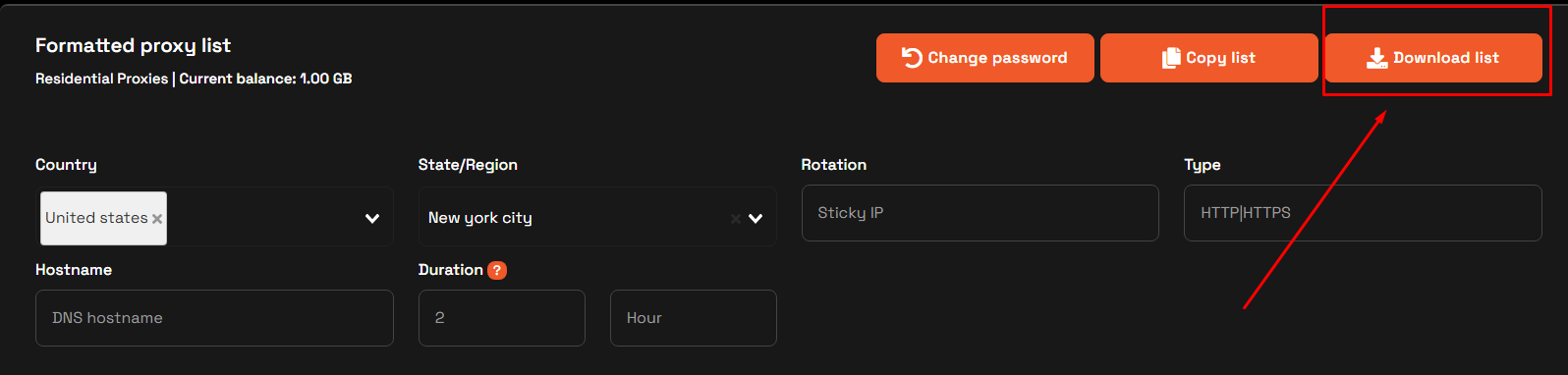
4. Once you’ve configured your proxies, click the Download list button on top to save your generated proxy sessions into a text file (Proxy_list.txt).
5. Go back to Hidemium and click the Import Proxy button.
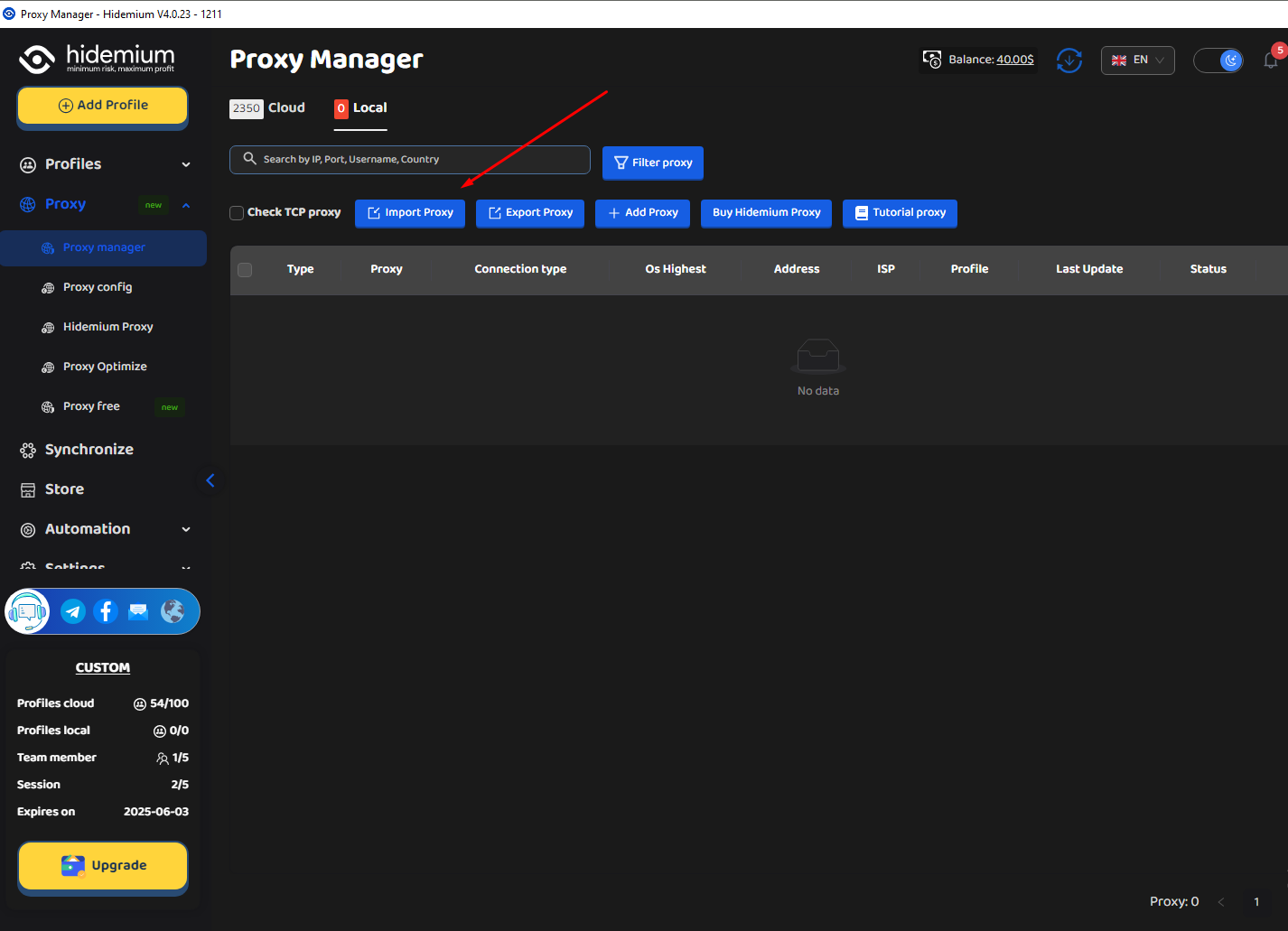
6. Choose HTTP for the proxy type, select File under Type import, and navigate to your Proxy_list.txt file. Click Import when done.

7. Each session will show up as a separate proxy here.
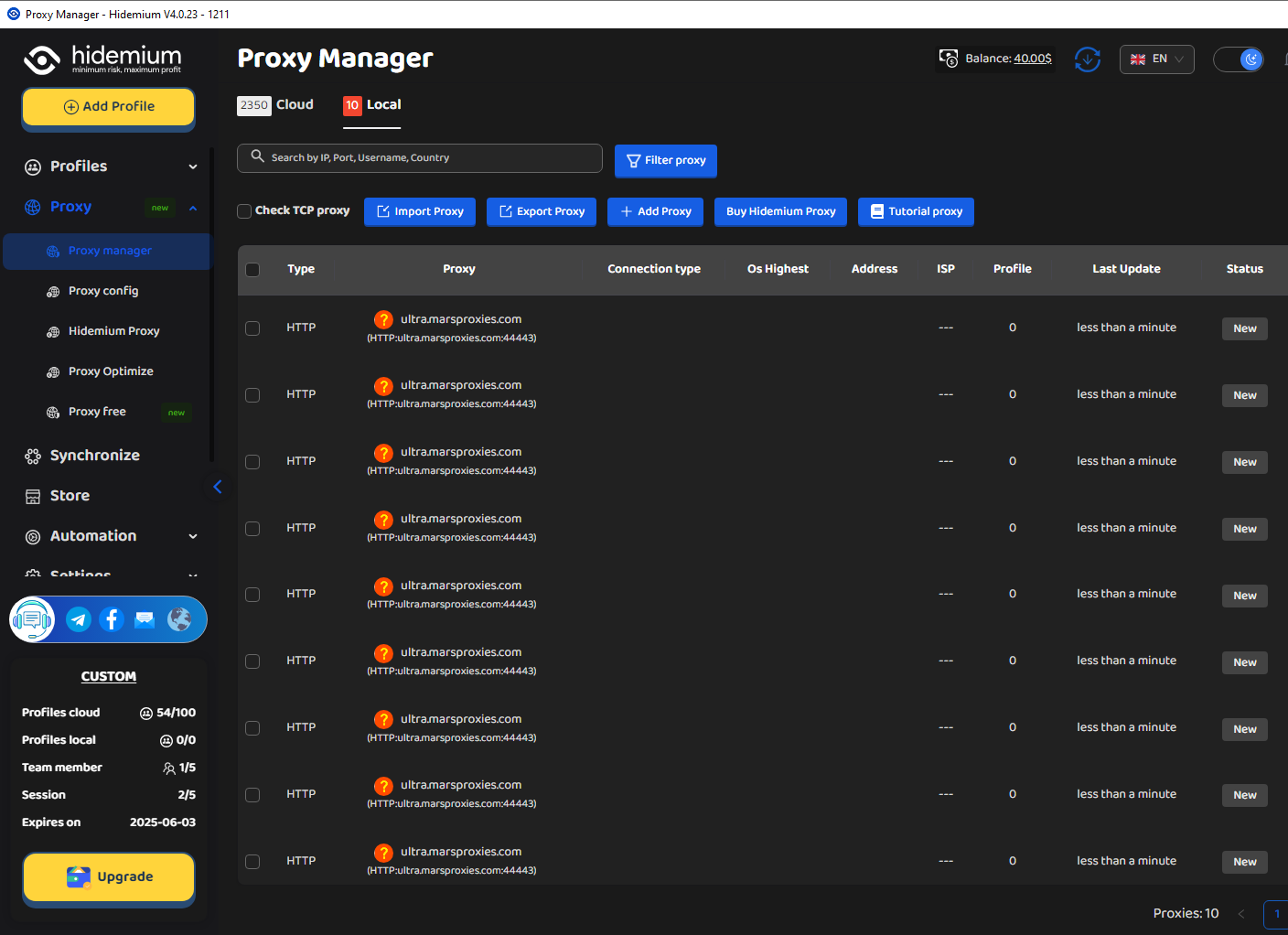
8. You can select all proxies and click the Check button to test them.
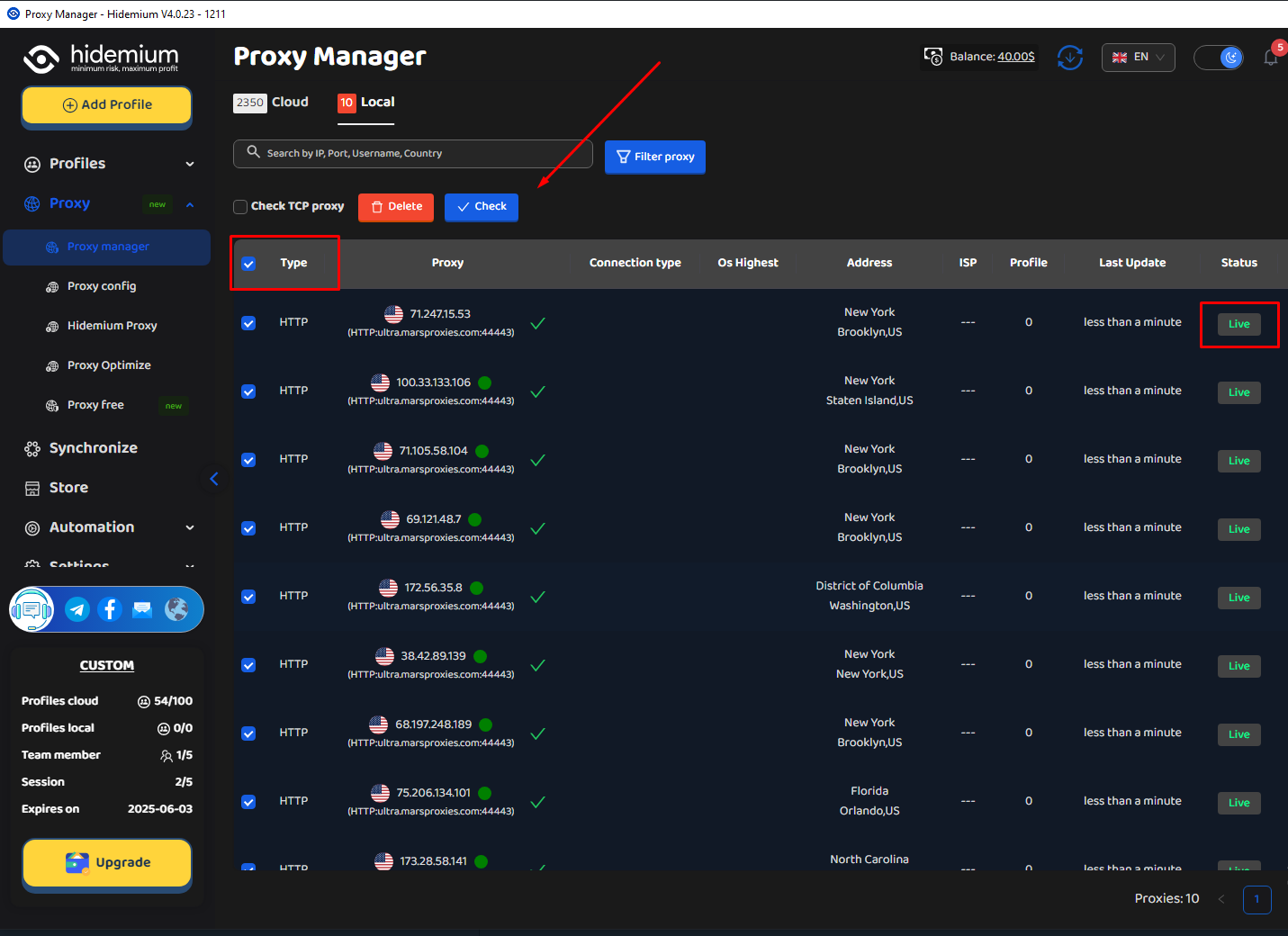
9. Hidemium will test each proxy you imported and show some useful details for them - IP address, location, and more. From here, click the Add Profile button to create a new browser profile.
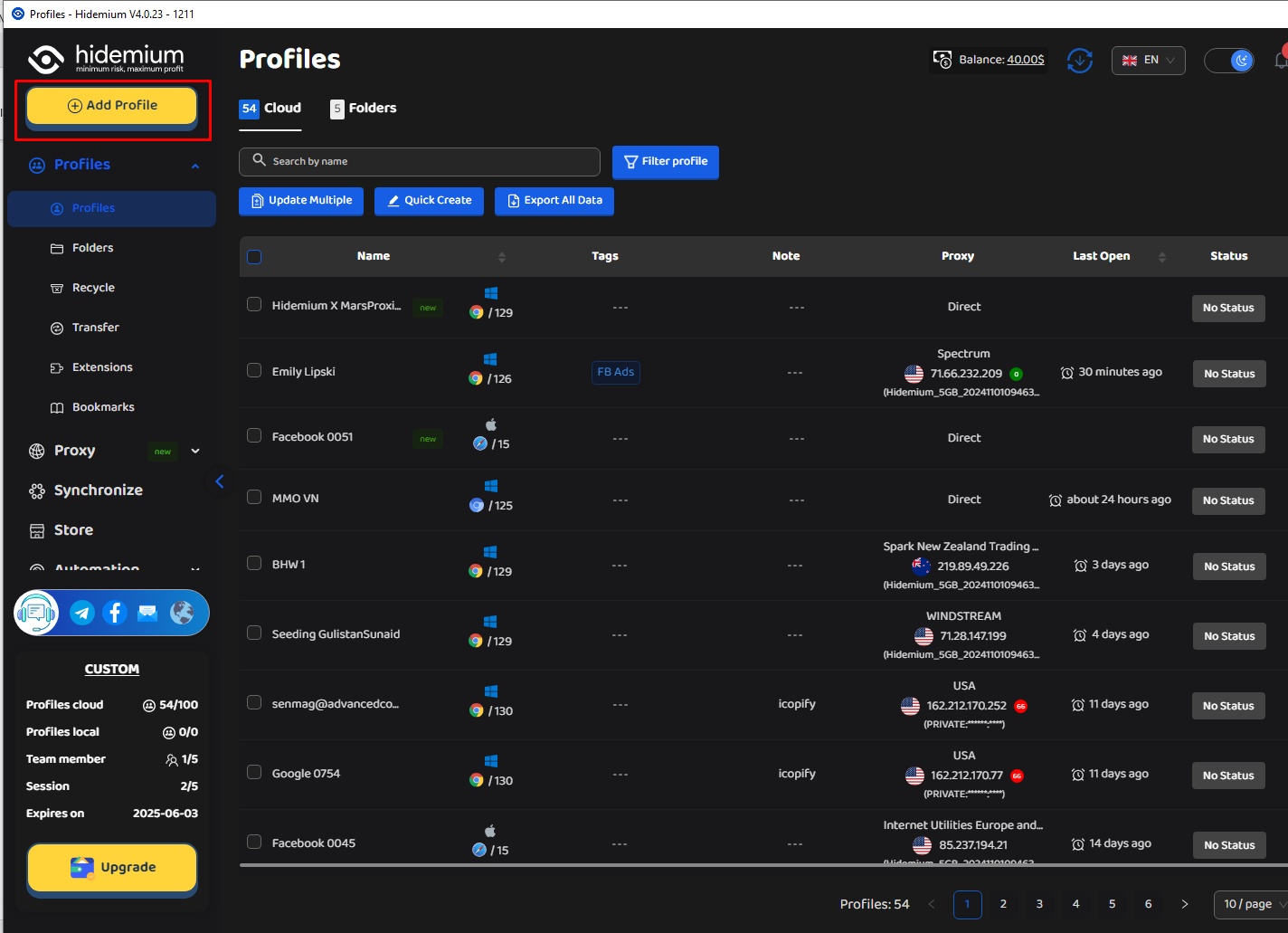
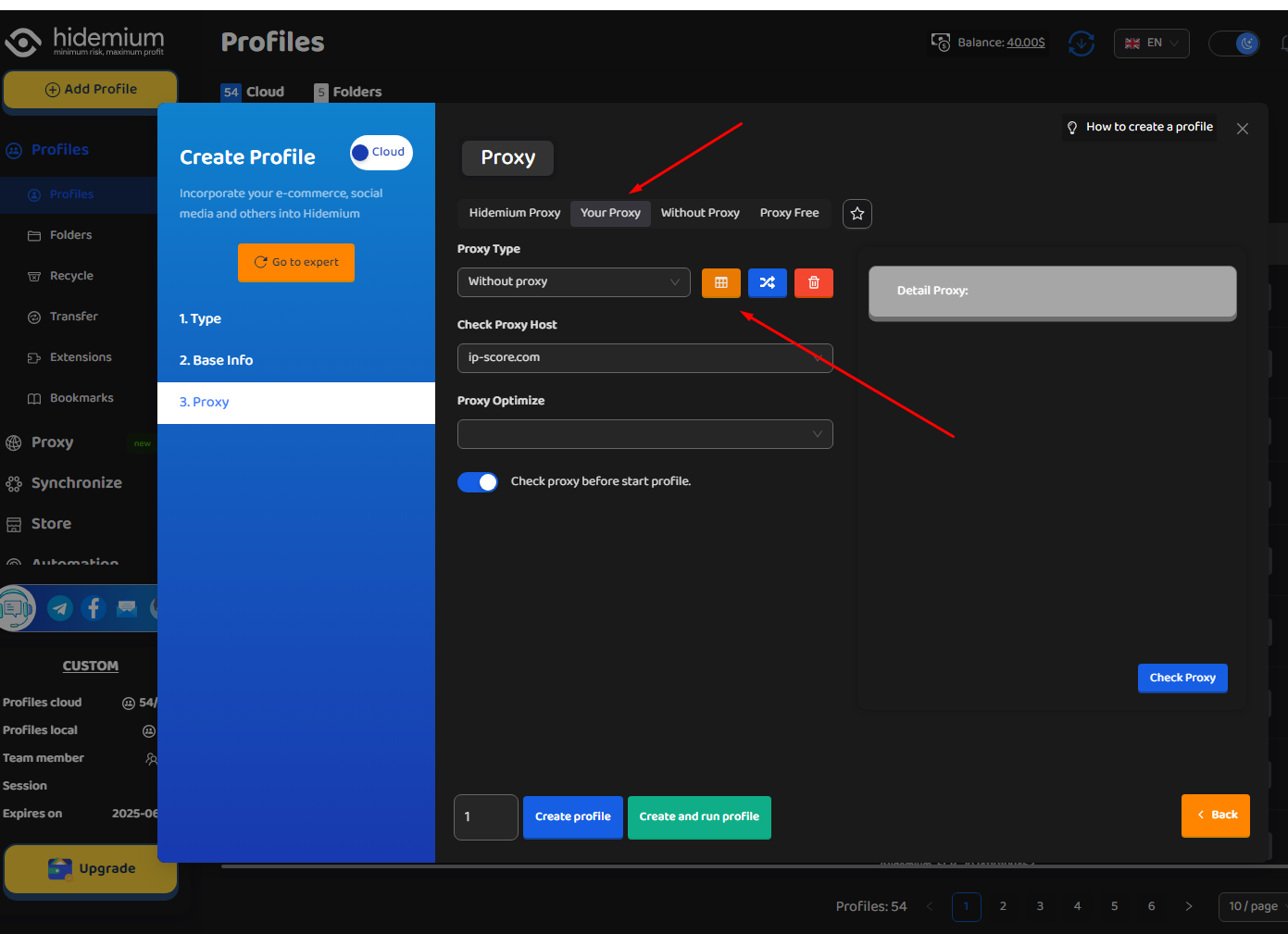
10. Follow the instructions until you reach the Proxy section. Click on Your Proxy here. Clicking the orange icon will display the list of your previously saved proxies.
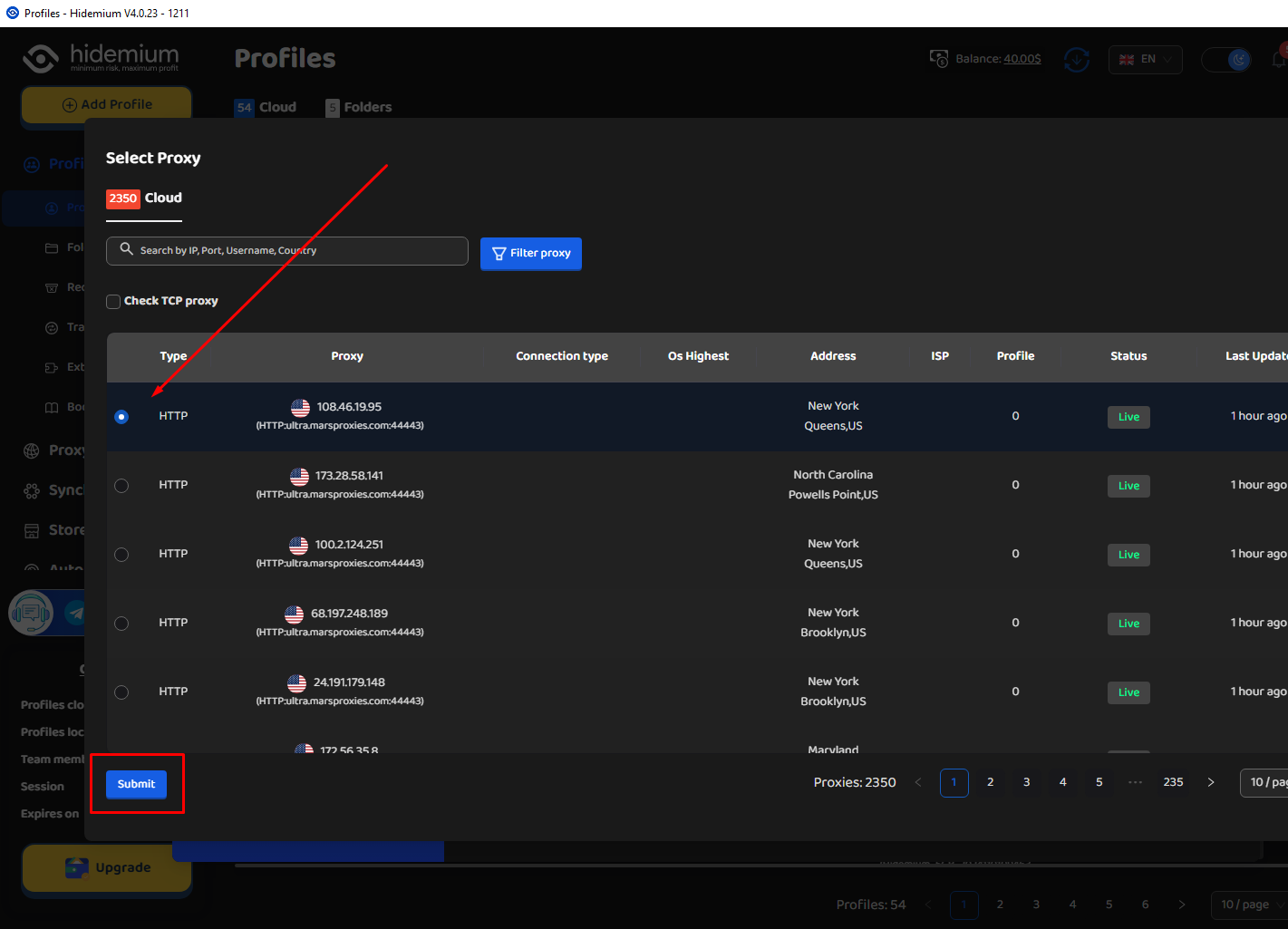
11. Select the proxy you want to use with your browser profile and click Submit.
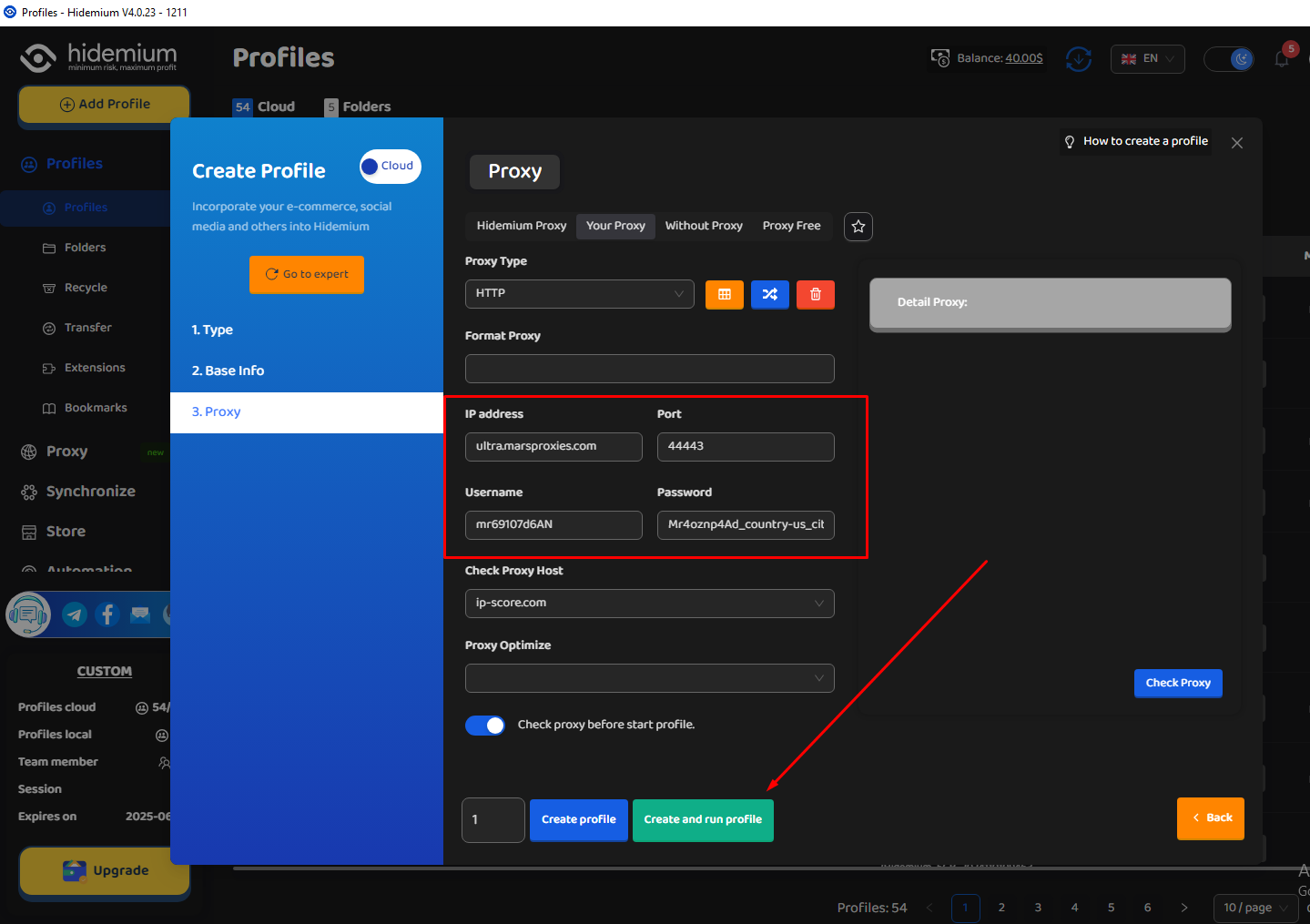
12. Your browser profile will show up in the Profiles section. All that’s left to do is click the Start button to launch it.
13. Once the browser window starts up, you can perform a check to make sure your browser profile and fingerprint are authentic.
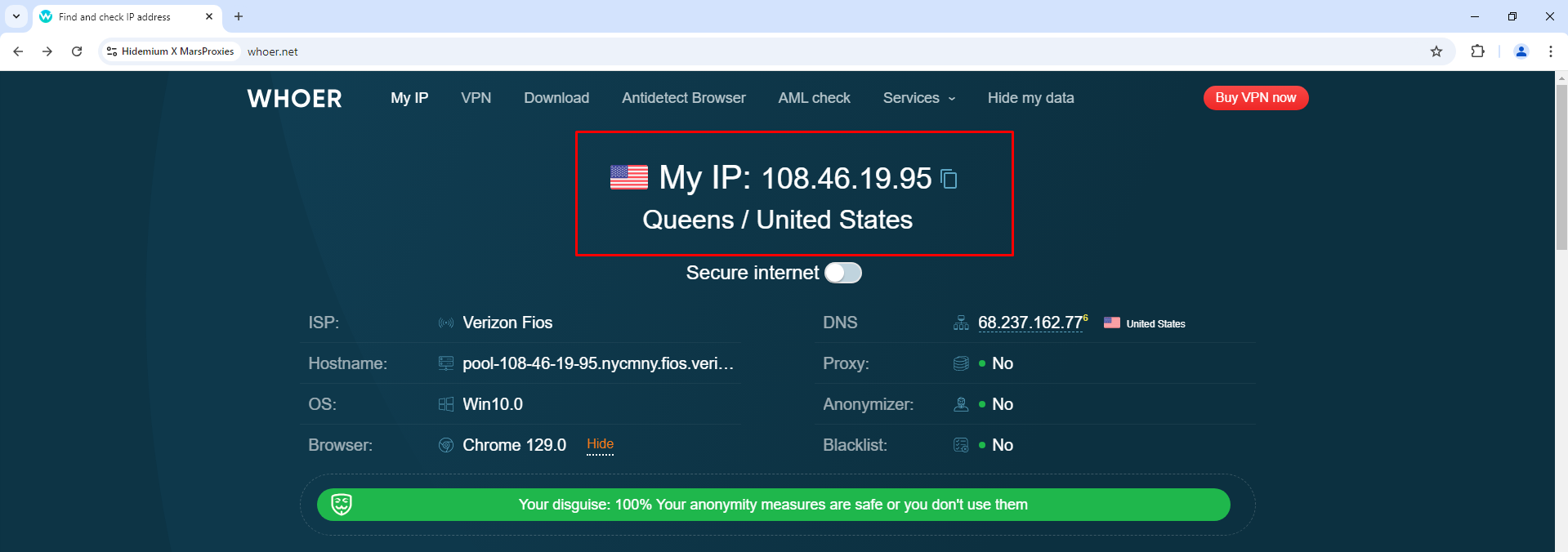
If you see your proxy’s IP address and details, that means everything works correctly and your proxy is ready to go. Enjoy your work!
Conclusion
The partnership between MarsProxies and Hidemium offers the perfect solution for users who value privacy, easy management, and cost savings. With MarsProxies’ wide range of real global IPs and Hidemium’s simple management tools, users can enjoy unmatched online freedom and security.
Now is the ideal time to join, with special discounts available. Don’t wait—take action today to enhance your network performance and capabilities!
Related Blogs

If you've ever experienced region-based access restrictions, account suspensions, or concerns about your personal information being compromised online, you understand the crucial role of a quality proxy service. IPBurger was created to address these issues by providing a flexible, highly secure, and easy-to-use proxy system.Whether you need to collect data, manage multiple accounts, or simply[…]
Chances are, you are reading this article on a browser built on the Chromium framework. While Google Chrome remains the undisputed heavyweight champion of the internet, an entire ecosystem of fantastic alternatives has quietly taken over the web. These are known as chromium based browsers, and they are reshaping how we experience the internet.If you are tired of your computer slowing down due to[…]

In the connected world, network speed and stability play a key role in every online activity. UDP Proxy (User Datagram Protocol Proxy) appears as an effective support tool to help optimize data transmission performance, reduce latency and improve user experience.In this article, we will learn in detail what a UDP Proxy is, how it works and the outstanding benefits when applied in practice,[…]
.png)
In the digital era, Botnet is one of the biggest threats to network security. So exactly What is a botnet?? How to recognize and Prevent DDoS attacks from Botnet effectively? Let's go together Hidemium Find out details in the article below.1. What is a botnet? Popular attack targetsBotnet (short for “robot network”) is a network of infected computers, phones, or IoT devices. malicious code and[…]
IP Checker is a feature of Hidemium that automatically matches the location settings of your browser fingerprint profile to your external IP address settings.Web platforms consider a mismatch between system and IP location information a red flag. IP Checker location allows you to avoid this flag IP, fly under the radar, and achieve greater account security.What is IP Checker?When a browser[…]

Starbucks Mobile App Not Working? Complete Troubleshooting GuidePicture this: you're running late for work but desperately need your morning caffeine fix. You reach for your phone to place a quick mobile order — and instead of the familiar menu, you're greeted with a frozen screen, a payment error, or a mysteriously missing rewards balance. Few things are as frustrating as technology standing[…]
