
Clicking Start but your Hidemium profile won’t open? Whether you see “Cannot check proxy,” get stuck on “Running Command,” or receive no clear error, start with the message on your screen.
Follow the relevant steps below and try opening the profile after each change.
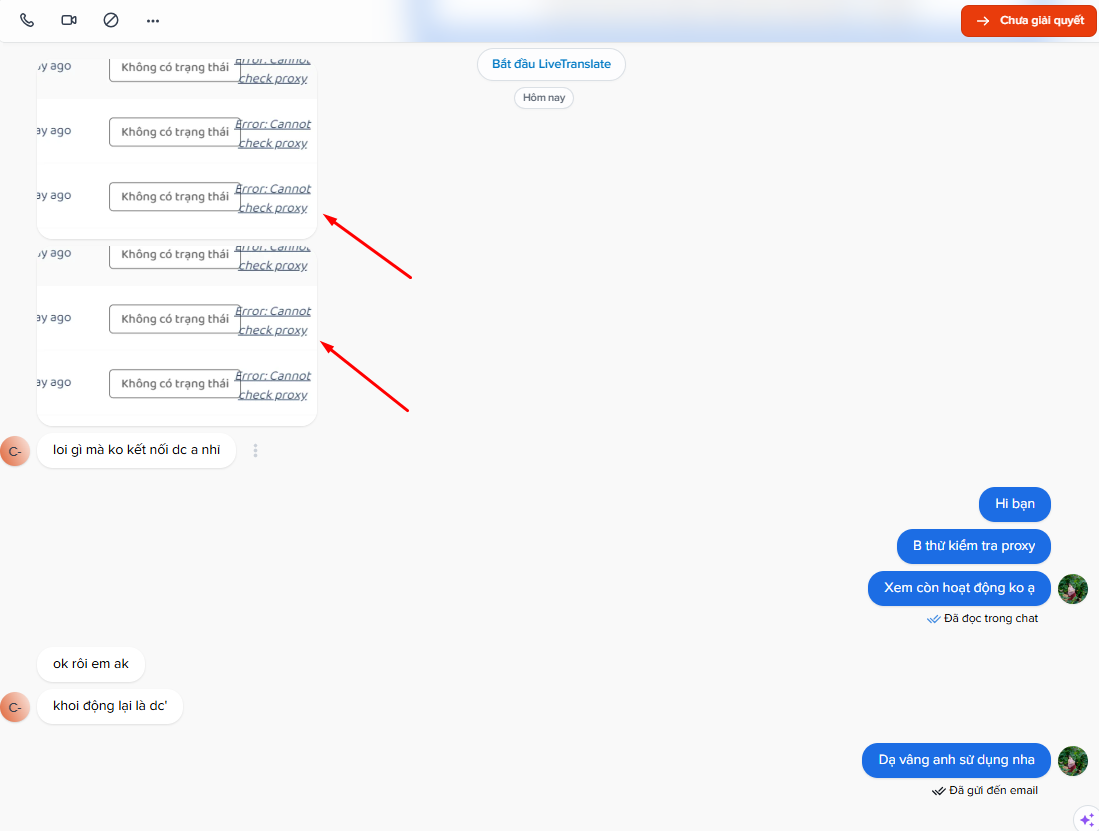
1. “Cannot Check Proxy” Error
Check the proxy assigned to your profile:
- Verify the IP address, port, username, password, and proxy type.
- If the proxy is offline, replace it or contact your provider.
- If it works elsewhere, try another IP-check service in Hidemium, if available.
- Temporarily disconnect any active VPN or Cloudflare WARP/1.1.1.1 connection, then test again.
Never share proxy credentials publicly.
2. Profile Stuck on “Running Command”
First, check whether the issue affects one profile or all profiles. Then:
- Temporarily disable recently added or updated extensions.
- Create a test profile without extensions and compare the result.
- Look for Windows notifications showing that an application or file was blocked.
If the problem continues, contact support for guidance on changing servers or resetting application resources. Do not delete profile data to troubleshoot this error.
3. No Clear Error Message
Check the available space on the drive storing Hidemium and your profile data:
- Windows: Open File Explorer → This PC.
- macOS: Open System Settings → General → Storage.
If the drive is nearly full, move or remove unnecessary personal files and try again. Avoid deleting Hidemium folders unless you know exactly what they contain.
Also record your Hidemium version, your computer’s operating system, and the operating system configured inside the affected profile.
4. Windows Defender or Antivirus Blocking Hidemium
Open Windows Security → Virus & threat protection → Protection history. Look for a detection recorded around the time you tried to launch the profile.
If you confirm that Hidemium was blocked and your installer came from an official source, follow Hidemium’s guide to fixing profiles that won’t launch.
Only add exclusions when necessary. Excluded folders receive reduced antivirus scanning protection.
Step 1: Under Virus & threat protection settings, select Manage settings.
Open Manage settings in Windows Security.
Step 2: Scroll to Exclusions and select Add or remove exclusions.
Open the Microsoft Defender exclusions list.
Step 3: Select Add an exclusion → Folder, then add each Hidemium folder separaChoose Folder to add the relevant Hidemium directory.
After selecting Add an exclusion → Folder, add these two folders one at a time.
1. Hidemium installation folder
C:\Users\[username]\AppData\Local\Programs\hidemium_4
If you installed Hidemium in a different location, select that folder instead.
2. Hidemium data folder
C:\Users\[username]\.hidemium_4
Replace [username] in both paths with your Windows username. Once both folders appear in the Exclusions list, return to Hidemium and click Start on the affected profile.
5. Smart App Control on Windows 11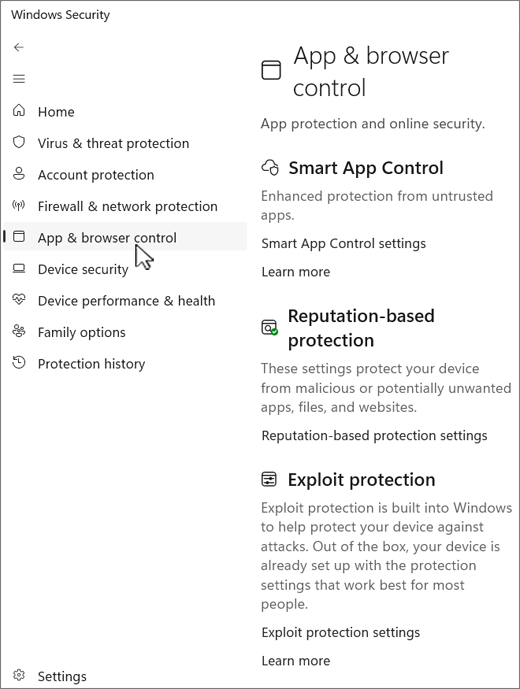
If a warning specifically mentions Smart App Control, open:
Windows Security → App & browser control → Smart App Control settings
Capture the warning and send it to support.
Smart App Control works separately from Defender Antivirus, so adding an antivirus exclusion may not resolve this type of block. Avoid disabling Smart App Control or reinstalling Hidemium before identifying the cause.
Still Can’t Open Your Profile?
Send support the following:
- A full screenshot of the error or a short recording from the moment you click Start.
- Your Hidemium version and operating system.
- Whether one profile or all profiles are affected.
- The steps you have tried and their results.
Hide passwords, tokens, and other sensitive information before sharing.
If the Hidemium application itself shows a blank screen or freezes at the logo, see the application troubleshooting guide.
Need more help? Visit the official Hidemium website to find a support channel. A clear error screenshot and a brief description will help the team investigate faster.
Related Blogs
iOS on PC: Best Emulators, Gaming & Integration GuideApple's ecosystem is famous for its "walled garden" approach — seamless, secure, and tightly optimized. But what happens when you need to step outside that ecosystem? Whether you are a software developer testing a new application, a gamer wanting a larger screen, or a professional streamlining a cross-platform workflow, the desire to run iOS on[…]
.png)
In the competitive arena of Amazon e-commerce, ranking higher in search results is pivotal for success. With over 2 million active sellers vying for customer attention as of 2024, optimizing your product listings with effective Amazon SEO techniques is no longer optional—it's a necessity for any dropshipping business. Whether you're wondering "what is dropshipping" or you're an experienced seller[…]

Whether you are a dedicated mobile gamer looking for a competitive edge on a larger screen, an app developer testing a new interface, or someone who manages multiple accounts across platforms, finding the best android emulator is the key to a seamless experience. For those involved in multi-account management or automation workflows, the choice of emulator — and how you pair it with the right[…]
In response to feedback from our valued users and customers, we are excited to announce that our popular Multibrowser product will now be known as Hidemium.We understand that the name of a product is crucial in conveying its purpose and value, and after careful consideration, we believe that Hidemium better represents the features and benefits of our browser.Hidemium, reflects our commitment to[…]

Amazon and Amazon Marketplace are part of the same e-commerce ecosystem, but they are not the same selling model. Amazon Retail sells products directly to customers, while Amazon Marketplace allows third-party sellers to list and sell products through Amazon’s platform.The main differences between Amazon vs Amazon Marketplace involve who owns the inventory, seller fees, fulfillment, customer[…]
You're wondering...How to calculate TikTok earningsHow can you maximize your income from today's most popular short-video platform? Understanding TikTok's reward system and applying smart monetization strategies is key to turning your passion for content creation into a stable source of income.This article Hidemium will give you a comprehensive overview of How TikTok calculates earnings, analyze[…]
