

I. Introduction to B2Proxy Residential Proxies
B2Proxy Official Website
B2Proxy is a professional provider specializing in global residential proxy services, offering high-purity residential IPs sourced from real ISP home networks. These proxies are widely used in cross-border e-commerce, online advertising, data collection, social media management, and account registration and verification.
Key Features of B2Proxy IP Services
- Proxy Plans: Residential Proxies / Unlimited Residential Proxies / Static Residential Proxies
- Coverage: 195+ countries and regions worldwide
- IP Pool: 80M+ real residential IPs
- Protocols Supported: HTTP / SOCKS5
- Additional Benefits: 1GB free trial traffic, 24/7 customer support
B2Proxy provides highly available, anonymous, and low-risk residential IPs, making it an excellent match for use with the Hidemium anti-detect browser for multi-account isolation, anti-association protection, and long-term stable operations.
II. Setup Guide
Step 1: Register and Log In to Your B2Proxy Account
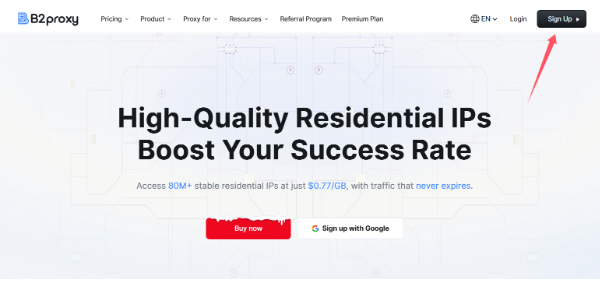
1. Visit the B2Proxy official website:
Click “Sign Up” in the top-right corner to create and log in to your account.
2. Enter the user dashboard and select a proxy plan that fits your needs. Available options include:
- Residential Proxies
- Static Residential Proxies
- Unlimited Residential Proxies
3. Go to the “Username / Password” page to generate your proxy credentials.
4. Configure the following parameters based on your requirements:
- Country / Region
- Session type
- Nearest proxy host
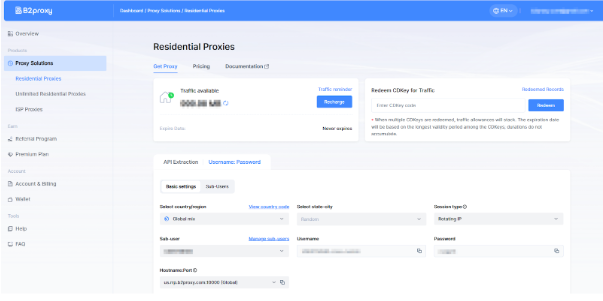
The generated proxy details will include:
- Proxy Host
- Port
- Username
- Password
Please save this information securely, as it will be required when configuring Hidemium
Step 2: Download and Register Hidemium
Download and install the client, then complete account registration and login.
Hidemium is a professional anti-detect browser that creates an independent browser fingerprint, local cache, and network environment for each account, effectively reducing account linkage and risk-control issues.
Step 3: Create a Browser Profile in Hidemium
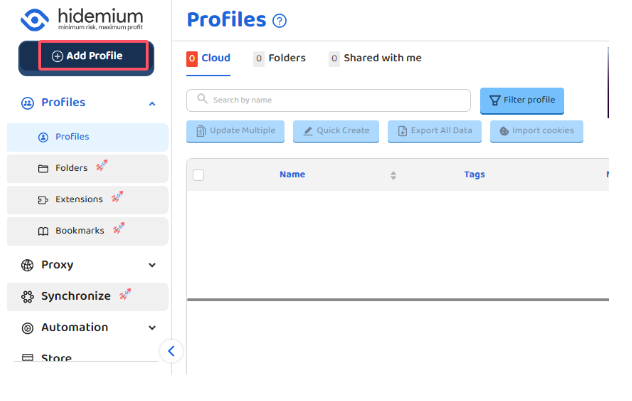
After logging into Hidemium, click “Add Profile.”
Step 4: Bind B2Proxy Residential Proxy in Hidemium
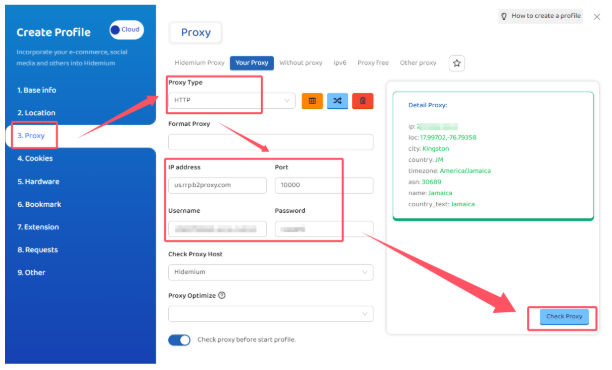
In the browser profile configuration page, locate the Proxy Settings section and fill in the details as follows:
- Proxy Type: HTTP or SOCKS5
- IP / Host: Proxy host provided by B2Proxy
- Port: Corresponding port number
- Username: Proxy username
- Password: Proxy password
Step 5: Test the Proxy and Save the Configuration
After completing the setup, click “Check Proxy.”
Once the system confirms a successful connection, save the browser profile.
Hidemium will then automatically create:
- An independent browser fingerprint environment
- An isolated residential IP network environment
This effectively reduces the risk of account association and improves login success rates and overall stability.
III. Summary
By combining B2Proxy’s real residential proxies with Hidemium’s browser fingerprint isolation, you can effectively solve key challenges in multi-account operations:
- Preventing account linkage
- Creating more realistic and trusted login environments
- High IP purity with lower ban and risk-control rates
- Long-term account stability
- More efficient multi-account and team management
Whether you operate Amazon, TikTok Shop, Temu, Shopee, or independent websites, or engage in advertising campaigns, social media matrix management, or data scraping, the B2Proxy + Hidemium solution can significantly enhance account security and overall operational efficiency.
Related Blogs

When managing multiple accounts for MMO, eCommerce, or multi-platform marketing, IP address and geographic location are always among the top risk factors. If multiple accounts log in from the same IP or an incorrect location, platforms can easily detect account linkage, leading to suspensions or bans.This is also why using a proxy alone is no longer sufficiently safe. A more sustainable solution[…]

As an agency takes on more clients, account management costs grow alongside the number of working environments and the coordination required between team members. Beyond browser and proxy subscriptions, staff spend time configuring profiles, checking connections, handing over access, and troubleshooting issues.Looking only at software invoices can lead agencies to underestimate the cost of[…]

In the era of digital data explosion, the need to collect and process information from the Internet is becoming increasingly urgent. This is the time Web Scraping Serves as a powerful alternative to time-consuming and resource-intensive manual data collection methods.So What is Web Scraping? How does it work and what value does it bring to individuals or businesses? Let's find out Hidemium[…]

Digital marketing today runs on speed and volume. Brands are expected to push out fresh creatives constantly, and traditional video production simply can’t keep up. That’s where an AI Facebook ad generator comes in. These tools take product links, scripts, or raw assets and turn them into ready-to-use Facebook video ads with minimal manual editing. 1. Pollo AI Pollo AI works as a practical AI […]

Did you know that websites can recognize your browser using technical information even when you are not logged in or using cookies?Every time you visit a website, your browser may reveal details such as your IP address, operating system, screen resolution, language, time zone, Canvas rendering, and WebGL characteristics. Together, some of these signals can contribute to a browser fingerprint,[…]

When applied correctly, the 10 Antidetect Browser tips not only significantly reduce the risk of account restrictions but also enhance stability in multi-account management. Close synchronization between browser fingerprints, IP addresses, and access behavior helps platform AI systems assess activity as more natural.In addition, these techniques optimize marketing operations, save management[…]
