

In 2025, the need to manage multiple accounts on platforms like Facebook, Amazon, or TikTok is increasing, especially for affiliate marketers, e-commerce shop owners, and digital advertising experts. Indigo Browser, an antidetect browser aimed at the Russian market, was noted for its simple interface and basic fingerprinting capabilities.
However, with limitations in performance, features, and cost, many users are looking for more powerful alternatives such as Hidemium, GoLogin, Multilogin, or Undetectable.io. This article will review Indigo Browser in detail, analyzing why you should consider another effective antidetect browser in 2025.
1. What is Indigo Browser?
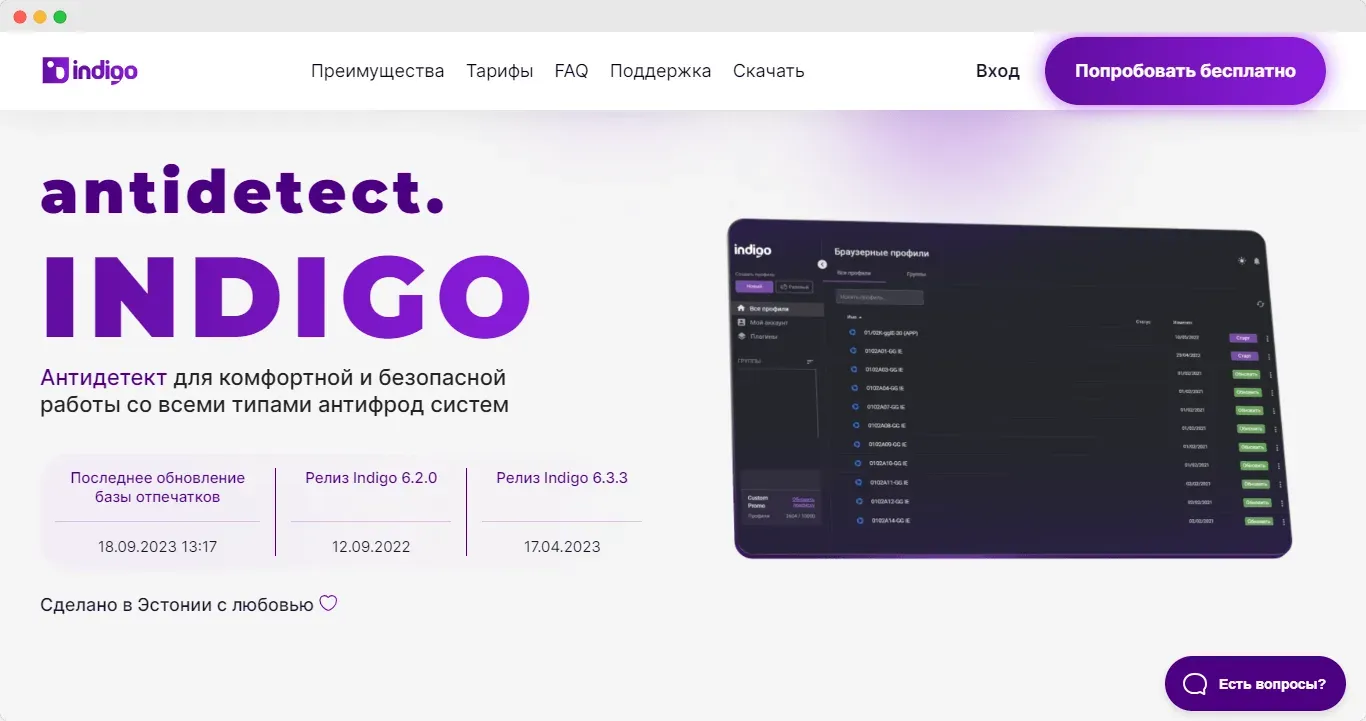
Indigo Browser is an antidetect browser designed to support management of multiple online accounts through independent browser profiles, each owning separate fingerprints (like User-Agent, screen resolution, operating system). Launched with the goal of serving the Russian market, Indigo offers a simple, intuitive interface, with the same features as Cookie Robot to enter cookies or heat the profile. This tool allows users to simulate actual devices, reducing the risk of detection on platforms with strict anti-cheat systems.
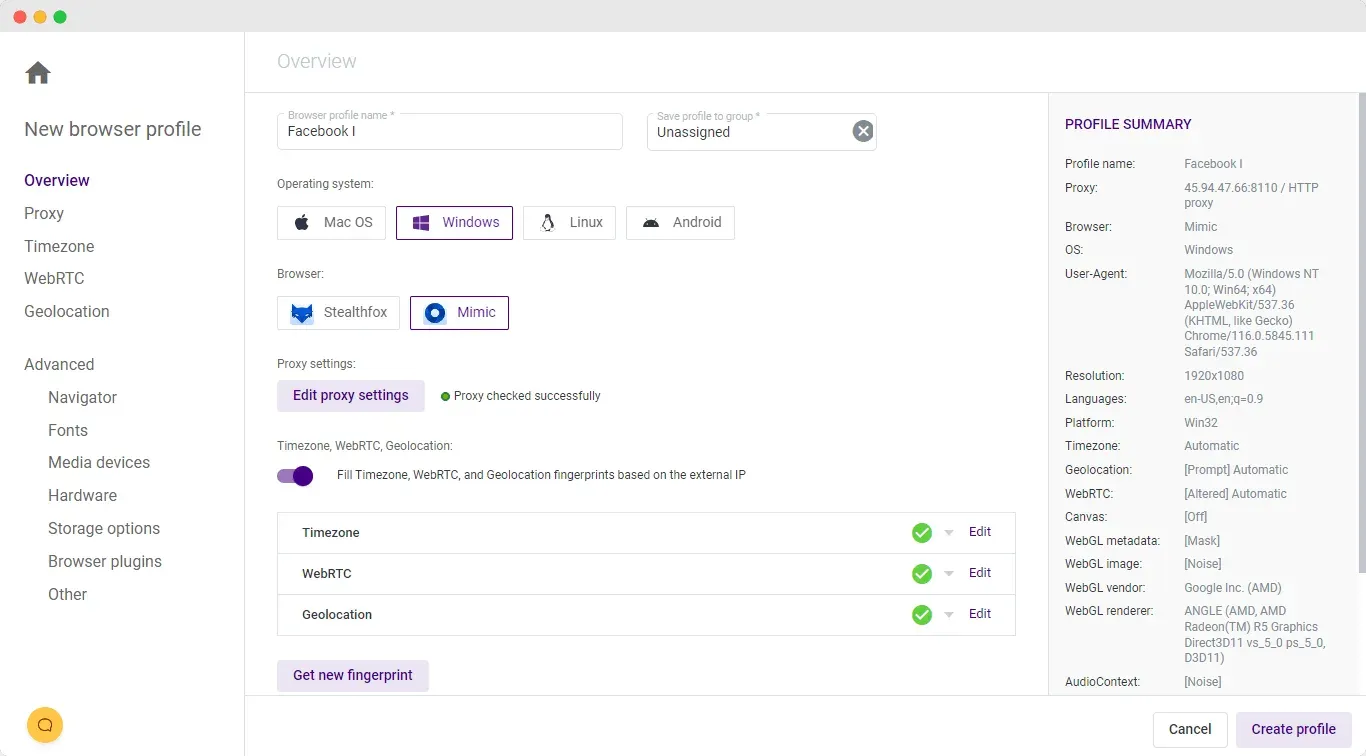
Indigo supports quick profile creation with Chrome or Firefox profiles, basic proxy integration, and regular fingerprint updates. However, it only has a desktop version, lacks mobile/web apps, and doesn't support advanced features like mass actions or two-factor authentication (2FA). At 3 times the cost of competitors like GoLogin, Indigo is more suitable for individuals or small projects with the need to manage a limited number of accounts.
2. What are the advantages of Indigo Browser?
With the development of many antidetect browsers, choosing the right browser to ensure safety when managing accounts is extremely important. Below are the outstanding advantages of Indigo, a product that has been on the market for many years and is trusted by many people. Let's learn more about the benefits that Multilogin brings before you decide to invest.
2.1 Clean and intuitive interface
Indigo Browser has a simple, neat interface and has a good English version, making it easy for users to get used to from the first use. Although there are no detailed instructions for beginners, the Russian-language docs provide fairly complete usage information.
2.2 Supports basic fingerprinting and security checks
Indigo Browser provides the ability to create browser profiles with separate fingerprints, which enables device-independent emulation. This tool has passed the above standard security test Pixelscan, demonstrating basic digital fingerprint concealment. Additionally, Indigo has features Cookie Robot, allows importing JSON cookies or automatically crawling websites for profile warmup, supporting safer account management.
2.3 Update fingerprint and browser core
Indigo automatically updates the app and browser core on first launch, ensuring compatibility with modern websites. Indigo's website clearly displays the date of the last fingerprint update, giving users a sense of confidence in its protection against anti-fraud systems. This is a strong point for users with experience in secure browsing.
2.4 Quick customer support via Live Chat
Indigo's support team responds quickly via Live Chat channel, bringing convenience to users when encountering problems. Although support documentation is not extensive, this speed of response is an advantage, especially when compared to browsers that lack timely support.
2.5 Fast and flexible profile creation options
Indigo provides mode Create profiles automatically with pre-set fingerprint parameters, along with clear explanatory notes. Users can choose between Chrome or Firefox profiles, providing flexibility when working with different platforms. This feature saves time for those who need to set up a profile quickly.
3. What are the disadvantages of Indigo Browser?
Indigo Browser is a browser designed to support multi-account management and increase productivity, especially suitable for non-technical users. However, it is not a complete antidetect browser and has certain limitations. Below are the disadvantages of Indigo Browser
3.1 Limited functionality, lack of advanced features
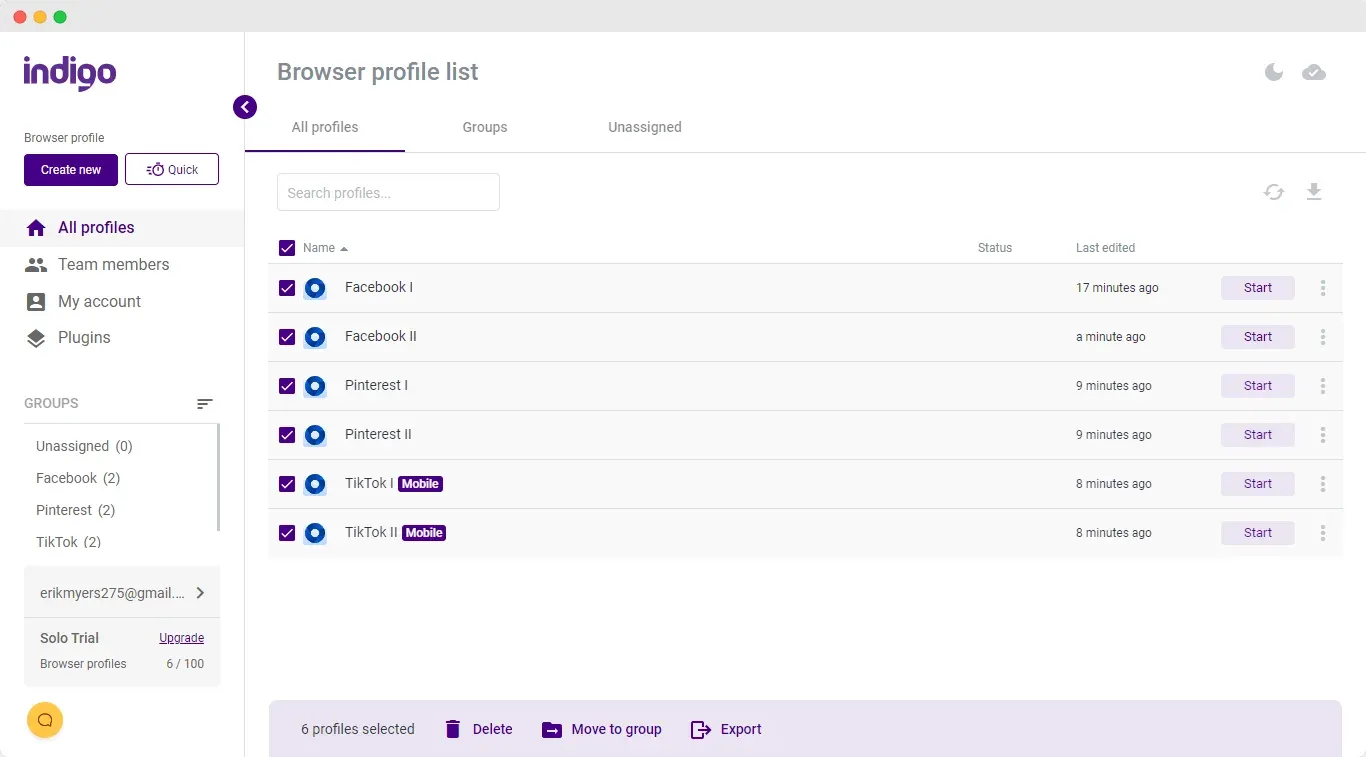
Despite its simple interface, Indigo Browser is... Missing many important features compared to competitors like Hidemium. Tool not supported mass action (mass actions) or launch a batch of records (mass launch), making it difficult to manage a large number of accounts (30-40 profiles). The profile table interface cannot be customized, does not display proxy information, tags or last access time, reducing management efficiency.
3.2 Profile launch performance is slow
Indigo Browser has a slower profile launch speed of approx 20% Compared to other browsers on the same device configuration. For example, launching 6 profiles takes approx 45 seconds, and performance may be worse when processing large numbers of records. This is inconvenient for projects that require high speed, such as digital advertising or large-scale affiliate marketing.
3.3 Manual and ineffective proxy management
Proxy integration in Indigo is a major weakness. User must add proxy manually for each profile, there is no independent proxy manager or bulk insert option. This process is especially time-consuming when managing more than 10 records.
3.4 Missing mobile and web versions
In 2025, Indigo Browser remains Only desktop version is supported, there is no mobile app or web version for remote working. While competitors like GoLogin offer both Android apps and web versions to launch profiles on any device, this limitation makes Indigo less flexible, especially for users who need to work across platforms.
3.5 High cost compared to value
Indigo Browser has a price 3 times higher compared to GoLogin, while offering fewer features and poorer overall quality. Indigo's paid plans do not disclose advanced feature details, and users cannot fully test them during the 7-day trial period. This makes it difficult for Indigo to compete in terms of cost-effectiveness, especially with large teams or enterprises.
3.6 Lack of 2FA security and complicated registration process
Indigo is not supported two-factor authentication (2FA), increasing the risk of account theft. The registration process is also more complicated than other browsers, requiring creating accounts on both the website and application, filling in personal information, and connecting via Telegram. This causes inconvenience and reduces user experience.
4. Hidemium is a better alternative to Indigo
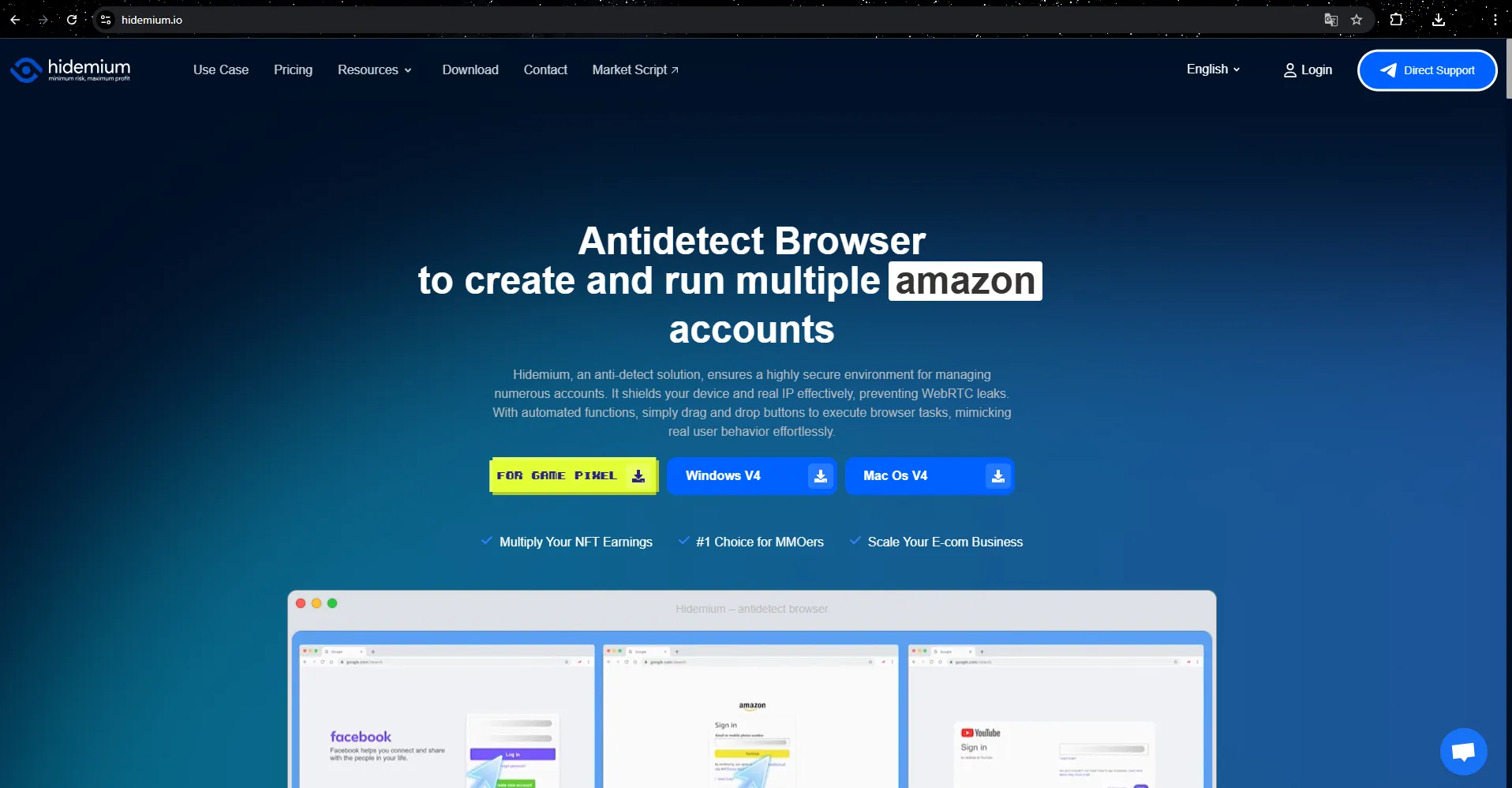
In 2025, Hidemium stands out as a strong alternative to Indigo thanks to its range of outstanding features and notable advantages in the field of security and automation. Here are the reasons why Hidemium could become the ideal replacement for Indigo in the future:
Outstanding flexibility and versatility
Hidemium is not only suitable for simple tasks like Indigo but also meets complex requirements, from high security to automation and synchronization of many different tools. Support for features such as managing multiple browser profiles with separate custom parameters, including country, device, cookies, proxy, Fingerprint, language and screen resolution, helps users optimize and control many factors at the same time.
Smart automation mode with built-in AI
One of the highlights of Hidemium compared to Indigo is its ability to integrate AI, especially models like ChatGPT, Gemini, and Claude. These models help users create and use Prompt Script without programming knowledge. With just a few simple lines of command, AI will automatically build smart scripts to perform operations such as filling out forms, scrolling pages, or clicking buttons accurately and quickly.
Superior security and Fingerprint change feature
Hidemium offers flexible IP address changes thanks to diverse proxy and VPN support. At the same time, the software also uses advanced technology to effectively simulate and change Fingerprint browser, helping to hide user traces and ensure high security. This feature not only helps avoid detection by anti-bot systems, but also helps protect identity and personal data throughout the web browsing process.
Preferential trial package and dedicated support
Hidemium especially attracts users with its attractive trial package, providing clean proxies updated daily and the ability to create up to 1000 profiles in the experience package. This provides high quality of use and meets the needs of both beginners and professionals in the MMO field. Furthermore, with the Vietnamese support team, all problems will be resolved quickly and accurately, ensuring maximum peace of mind for customers.
Compatible with many platforms and devices
Hidemium operates smoothly on many different operating systems such as Windows, macOS, Linux and Android, ensuring convenience for users on diverse devices. This is a great strength, helping Hidemium be able to serve many users with different requirements.
With such outstanding features, Hidemium is not only a perfect alternative to Indigo but also the optimal tool for digital marketing, affiliate, dropshipping, and personal data security campaigns in 2025.
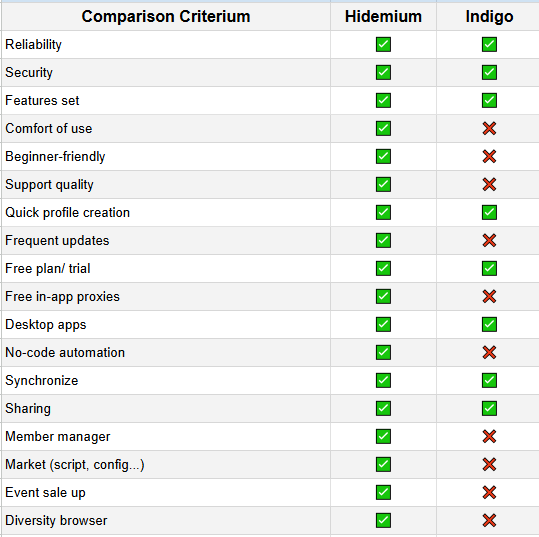
To compare more clearly, we make a comparison table below:
✍️ Compare Hidemium and Indigo
Hidemium is a new generation antidetect browser, designed for an easy-to-use, multi-featured experience and supports code-free automation. Features such as quick profile creation, profile sharing, script/config sharing market, free internal proxy support and modern interface help new users easily get acquainted and use effectively.
Indigo Browser, despite being a long-standing antidetect tool, is not updated regularly, has an outdated interface, and lacks modern features like member management, codeless automation, or shared configuration libraries. However, Indigo still has strengths in security and synchronization between devices.
Select Hidemium if you want a modern, easy-to-use antidetect browser with powerful extensibility and automation.
Select Indigo Browser If you are familiar with the old ecosystem and only need basic antidetect features without high requirements for UI/UX or automation.
5. Conclusion
Indigo is a worthy choice for those who need an Antidetect Browser with full security features and support Multi-account management, and optimized for MMO, marketing or dropshipping activities.
However, if you are looking for a more robust solution, support AI automates user behavior and well compatible with the global market, Hidemium can be a worthwhile alternative. With a clear advantage in number of features, friendliness to new users, attractive free trial policy and strong automation capabilities, Hidemium proves to be an outstanding choice for those looking for a multi-talented, safe and effective browser.
Don't let technical barriers slow you down in the world of MMO or multi-account marketing.
>>> Learn more:
Related Blogs

Are you concerned about protecting your identity and personal information while browsing the internet or performing web scraping tasks? Residential proxies might be the solution you're looking for. In today's digital landscape, many internet users rely on residential proxies to secure their data and improve their web scraping efforts. Simply put, a residential proxy acts as a "bridge" to hide[…]

In today's article, we will explore Multilogin – one of the prominent names in the Antidetect Browser field. Multilogin has established its position due to its stable operation and long-standing presence in the market. However, it also attracts attention because of its high price and customer-specific support options. Notably, with the latest Multilogin X update, there have been significant[…]

Are you looking for a way to generate passive income without complicated skills, techniques, or owning a website? Affiliate marketing with ClickBank is the ideal choice for beginners, and when combined with tools Antidetect Browser Hidemium, you can optimize your campaigns for maximum effectiveness. In this article, we will guide you step by step to make money online with ClickBank without a[…]

Managing multiple accounts becomes difficult when several sessions share the same browser environment. Cookies, local storage, browser settings, IP addresses, and device-level signals can all contribute to how a platform evaluates a session.Hidemium Antidetect Browser helps teams separate browser profiles, sessions, proxy configurations, and browser environments so each workflow can be managed[…]

In the digital age, protecting personal information when accessing the internet has become an urgent need. Rent a VPN are increasingly being chosen by many people as a safe, flexible and budget-friendly solution. However, among a series of suppliers on the market, how to choose a cheap VPN service but still ensure performance, security and stability? Let's Hidemium Antidetect Browser Explore[…]

In the digital era, running hundreds of accounts simultaneously across social media and e-commerce platforms has become an essential need for businesses and MMO professionals. However, investing in large numbers of physical smartphones is not only costly and difficult to maintain, but also poses potential risks such as battery overheating and fire hazards.This is where Cloud Phone technology,[…]
