.png)

TikTok is not just an entertainment app but also a "goldmine" for content creators and brands to generate massive income. However, to make your posts on TikTok attract millions of views, selecting the ideal posting time—often referred to as the "golden hour"—is a crucial factor in increasing engagement and effectively connecting with your audience.
1. What is the "golden hour" for posting on TikTok?
The "golden hour" refers to the period when TikTok users are most active during the day. This is the perfect time to upload videos, allowing your content to reach a larger audience and increasing its chances of being recommended by TikTok. However, depending on the type of video or product, the target audience will vary, meaning the ideal posting time will also differ based on the characteristics of the user group you're aiming for.

2. Why is choosing the right time to post on TikTok important?
Choosing the right time to post on TikTok plays a vital role as it directly affects the views and engagement of your video. Posting during the "golden hour" helps your video capture attention more easily, increases interaction, gains followers, and can even land it on the trending list. This not only helps your content spread widely but also boosts your efforts in building a personal brand or conducting business on this platform.
>>>> Learn more :How to run multiple TikTok accounts without getting banned
3. Summary of the "Golden Hours" to Help TikTok Videos Go Viral
Choosing the right time to upload videos on TikTok is crucial to increasing views and engagement. Below are the ideal time slots you can reference to optimize the effectiveness of your posts on the platform.
3.1 Time Slots with the Highest Engagement
6 AM - 9 AM: A time when people start their day and often use TikTok to catch up on updates.
11:30 AM - 1:30 PM: Lunchtime, when users take a break and look for entertainment on TikTok.
6 PM - 8 PM: After work, users tend to relax and engage more, creating opportunities for higher interaction.
10 PM - 12 AM: Night owls spend this time scrolling through TikTok the most.
However, not all TikTok channels have the same "golden hours." You should experiment with posting at different times to determine the most suitable slots for your audience.
3.2 Time Slots with Low Engagement
In addition to the "golden hours," avoid posting during low-engagement periods. Based on Influencer Marketing Hub's survey, here are some ineffective timeframes:
Monday: 11 AM - 9 PM
Tuesday: 10 AM - 12 PM
Wednesday: 9 AM - 10 PM
Thursday: 1 PM - 6 PM
Friday: 4 PM - 4 AM
Saturday: 12 PM - 6 PM
Sunday: 5 PM - 6 AM
3.3 Effective Time Slots by Content Field
Each industry has its own optimal posting times to reach the right audience. Below are "golden hours" by industry, as surveyed by SocialPilot:
Restaurants: 11 AM - 1 PM and 2 PM - 5 PM (Monday to Friday).
Gym and Sports: 5 AM - 8 AM and 6 PM - 9 PM (weekdays).
Photography: 2 PM - 3 PM (after lunch).
Technology: 7 PM - 9 PM (weekdays).
Entertainment and Music: 2 PM - 4 PM (Friday and Saturday).
Fashion and Beauty: 3 PM - 6 PM and 7 PM - 11 PM (Tuesday to Friday).
Each industry has its own optimal schedule; adjust your posting times to align with your field to achieve the best results.
3.4 Best Times to Post According to Influencer Marketing Hub
Based on analysis of over 100,000 TikTok posts, here are the best times to post videos for high engagement:
Monday: 6 AM, 10 AM, 10 PM.
Tuesday: 2 AM, 4 AM, 9 AM.
Wednesday: 7 AM, 8 AM, 11 PM.
Thursday: 9 AM, 12 PM, 7 PM.
Friday: 5 AM, 1 PM, 3 PM.
Saturday: 11 AM, 7 PM, 8 PM.
Sunday: 7 AM, 8 AM, 4 PM.
4. How to Determine the Best Time to Post on TikTok for Virality
In addition to Hidemium's suggestions, you can explore the golden hours to post TikTok videos yourself, making them more likely to go viral. Here are steps to help you optimize your video posting times:
4.1 Switch to TikTok Pro Account
Start by upgrading your TikTok account to a Pro account to access TikTok Analytics. This will allow you to track the effectiveness of your posting times. Follow these steps to switch to a Pro account:
Log in to your TikTok account and go to your Profile.
Tap the three-line icon.
Select "Manage Account" and switch to a Pro account.
Choose the type of account that suits your channel and follow the instructions.
Once upgraded, access the Analytics section in the settings menu to view detailed data.
4.2 Explore Analytics Features
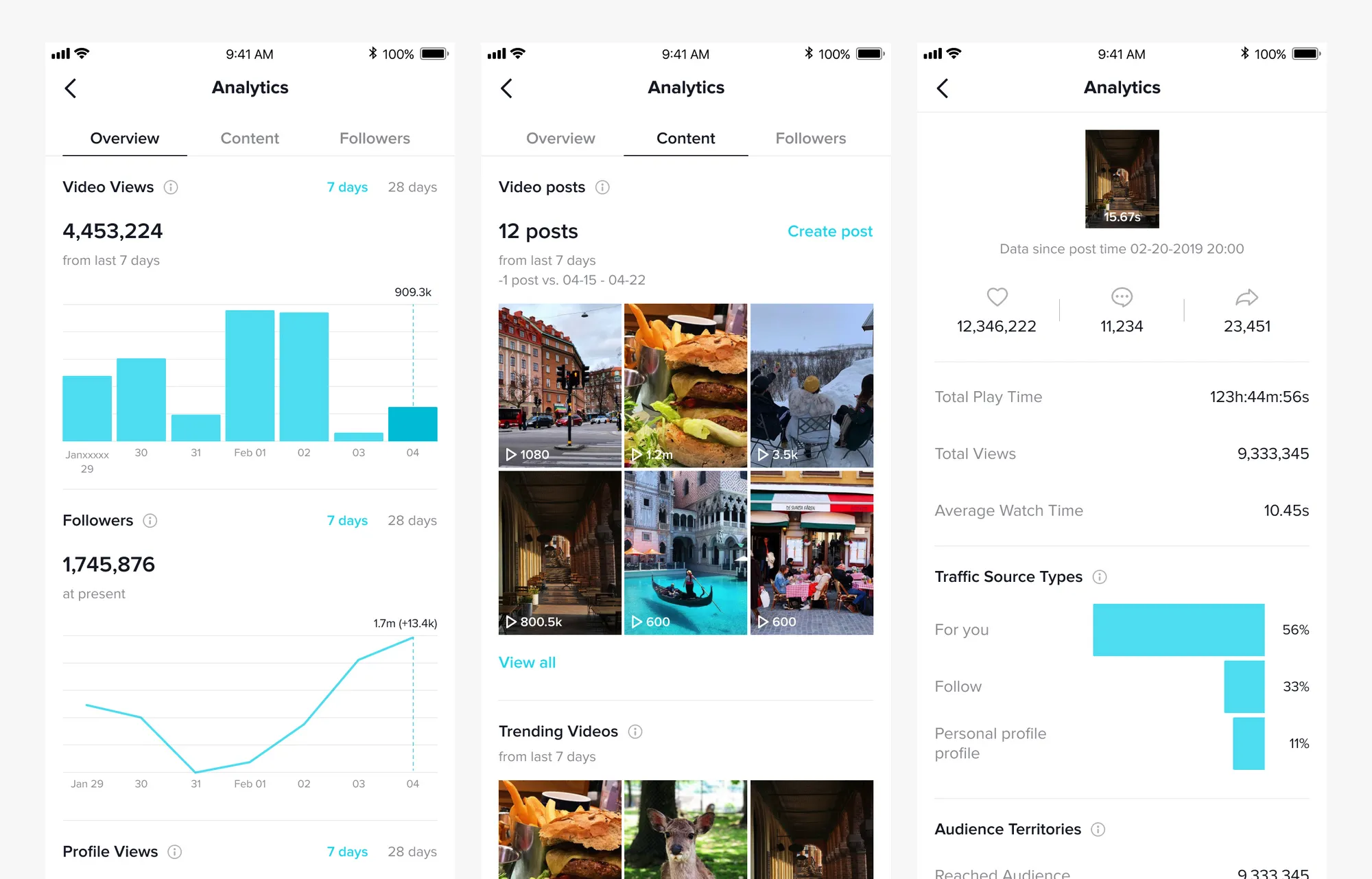
TikTok Analytics is a useful tool for measuring the performance of your videos. Its sections include:
Overview: Provides data on video views, followers, and profile views.
Content: Displays metrics related to likes, views, and watch time of your posts.
Followers: Tracks follower growth, content engagement, and viewer locations.
4.3 Set Priority Areas and Locations
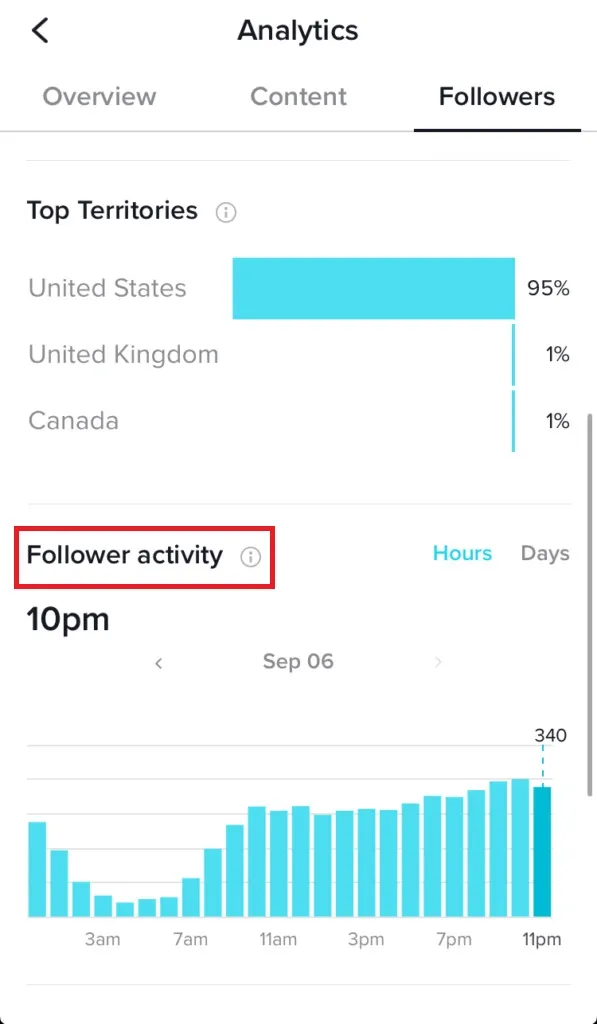
To optimize posting times, target specific regions where your audience is located. Go to the Followers tab and select "Top Territories" to identify the areas with the largest follower base.
4.4 Identify Peak Activity Times of Followers
Plan your posting schedule to align with the times when your followers are most active. Posting at the right time increases the chances of your videos trending and reaching a wider audience.
TikTok users typically look for fresh videos on the For You Page, and videos with high engagement within a short time frame are more likely to go viral. Use data from your Business Account or TikTok Creator account to determine the best times.
4.5 Use Analytics to Find the Best Posting Times
In the Content section of Analytics, you can evaluate the performance of your past posts. Review metrics such as likes, comments, shares, average watch time, and reach. This information helps you refine your posting schedule and increase the chances of your videos going viral.
5. Tips for Choosing the Best Time to Post TikTok Videos
When determining the ideal time to post videos on TikTok, consider the following important points:
Avoid posting too many videos at once: Uploading multiple videos within the same time frame can overwhelm your audience and reduce the chances of them watching all your content.
Additionally, you might experiment with different posting times if:
You increase your video posting frequency.
You participate in trending challenges or viral trends on TikTok.
You use hashtags relevant to current trends to expand your reach.
You collaborate with KOLs or influential TikTokers.
You actively engage with other posts on the platform.
You stay updated on TikTok algorithm changes.
You consistently create unique, high-quality, and creative content on TikTok.
Experiment and remain flexible in your strategy to discover the most optimal posting times for your videos!
>>> Learn more:Tips for Optimizing TikTok Shop: Easily Get Your Videos to the Top
6. Tips to Accelerate Your TikTok Videos to Trending Status
To get your videos trending on TikTok quickly, besides posting during the ideal time slots, you should also implement other effective strategies. Below are some tips to enhance your video reach and boost engagement:
6.1 Cross-interact with other accounts
Cross-interaction is an effective way to expand your audience. You can share your content with followers of other TikTok accounts, thereby increasing views and followers. For instance, Logan Paul collaborated with Mark Dohner to create a video that garnered over 932,500 likes and 1,500 shares.
6.2 Use trending hashtags in video descriptions
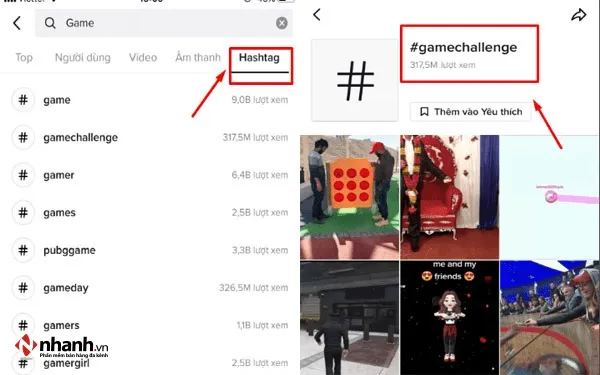
Hashtags on TikTok play a vital role in helping users find videos related to specific topics. Using trending hashtags increases the chances of your video appearing on the platform, enhancing views and engagement. Therefore, always research trending hashtags and include them in your video descriptions.
6.3 Actively engage with viewers
Spending time replying to comments and liking viewer interactions is crucial. People leaving comments often expect responses, and this effort not only boosts engagement but also increases the chances of your video being prioritized for display on TikTok.
6.4 Increase posting frequency
Posting videos regularly can be challenging since creating consistent content isn’t always easy. However, don’t stress too much about finding new ideas. Sometimes, videos about your daily life can captivate audiences and inspire them.
6.5 Enhance the credibility of your TikTok account
TikTok tends to favor trustworthy accounts. To increase your account's credibility, make sure to update all essential information, such as profile picture, password, TikTok ID, display name, bio, and links to other platforms like Facebook, Instagram, and YouTube (if applicable).
>>> Learn more:Tips to Optimize TikTok Shopping Ads for New Sellers
7. Conclusion
Through this article, you’ve gained detailed insights into the best times to post on TikTok, helping you attract viewers and boost followers quickly. Hopefully, this information will help you grow your TikTok channel successfully!
Thank you for exploring these suggestions from Hidemium. Don’t forget to follow Hidemium’s latest articles to discover more helpful tips on TikTok!
Related Blogs
.png)
As internet users become more aware of the need to protect their personal information, hiding IP addresses and maintaining anonymity has become a priority. Whether you're trying to avoid unwanted ads, stay safe from cyber threats, or access restricted content, bypassing an IP ban can be essential. In this article, we'll explore the most popular methods to change or hide your IP address and ensure[…]

The GoLogin antidetect browser is a long-standing and reputable option, outstanding with the ability to protect personal identity and enhance privacy when accessing the Internet. Thanks to the ability maintain anonymity, GoLogin is trusted by the MMO community and professional users for secure multi-account management.However, in the context of 2026 with the appearance of many competitors[…]

Have you ever needed to access TikTok but didn’t have your phone nearby? I’ve been there too – when my phone ran out of battery or I just wanted to see notifications on the big screen without distraction. That’s when,TikTok Web becomes a great choice, bringing a smooth and surprisingly convenient experience.With TikTok Web, you can easily do a lot of things: from browsing your For You Page,[…]

Did you know? More than 25% of professional eBay sellers are using multiple accounts to increase revenue, spread risk, and avoid permanent bans. However, managing multiple eBay accounts without getting caught is a major challenge—unless you have the right tools.If you are really interested in multi-account eBay, selling anonymously or implementing dropshipping at scale, you've probably[…]

If you are looking for Proxyium alternatives, there are several free web proxies worth comparing before you choose one.For quick browser-based access, services such as CroxyProxy, KProxy, hide.me Web Proxy, 4everproxy, ProxySite, BlockAway, and VPNBook Web Proxy are commonly considered alternatives to browser-based proxy services like Proxyium.The right choice depends on what you actually need.[…]

Data represents a valuable asset for any organization. Financial records, employee details, and proprietary information all require protection. The boundaries of data security have shifted because cloud solutions and remote work continue to expand. Protecting this information demands a comprehensive approach to online privacy and security across the entire organization.Financial penalties,[…]
