Hướng dẫn dùng màn hình Proxies Hidemium - hidemium


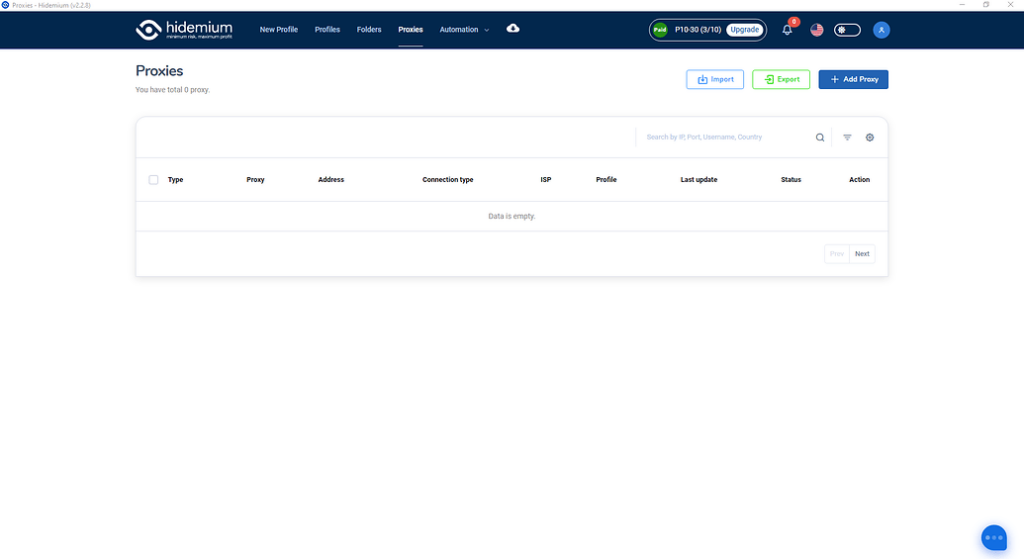
Tùy theo mục đích quản lý proxy của anh em nhé, màn hình này sẽ cho thấy bạn đã và đang dùng proxy nào, cho phép bạn check live sống chết của proxy ra sao, cho phép bạn tìm kiếm truy vấn filter theo proxy type, country, ISP, status…
Ok giờ chúng ta đi vào phần đầu tiên:

Anh em ấn vào nút Import thân thiện này hộ mình nhé.

Màn hình hiện lên ta có các lựa chọn sau đây:
Type: Kiểu proxy bạn muốn import hàng loạt
Type import: Kiểu định dạng import, nếu là text thì bạn paste text xuống ô Text bên dưới, nếu là file thì hãy chọn file để đưa vào import nhé.
Định dạng hỗ trợ của team mình đây nhé:
SSH,SOCKS5,SOCKS4,HTTP: IP|port|username|password

Chọn nơi cần lưu thế là đã lưu toàn bộ proxy của mình về nhé. Muốn đưa sang tài khoản khác lại chọn chức năng import có thể import nguyên data proxy từ tài khoản này sang tài khoản khác nhé.
ADD PROXY

Anh em điền loại proxy của mình vào rồi ấn Check Proxy trước khi là Add Proxy nhé. Proxy live mới cho Add vào nha.
CHECK LIVE

Anh em chọn proxy cần check, sẽ có nut Check Live hiện bên trên, việc của anh em là ấn check xong chờ kết quả nhé.

Tích xanh là Live
Tích đỏ là Die
Tương tự sẽ là chức năng delete xóa hàng loạt.
Đi vào chi tiết chúng ta có:
- Detail
- Quick create
- Edit
- Delete
Detail: Chúng ta sẽ xem được full thông tin proxy tại chức năng này

Quick create: Tạo nhanh profiles với Proxy đã chọn
Edit: Sửa lại thông tin proxy đã chọn, nhớ ấn check proxy trước khi lưu lại
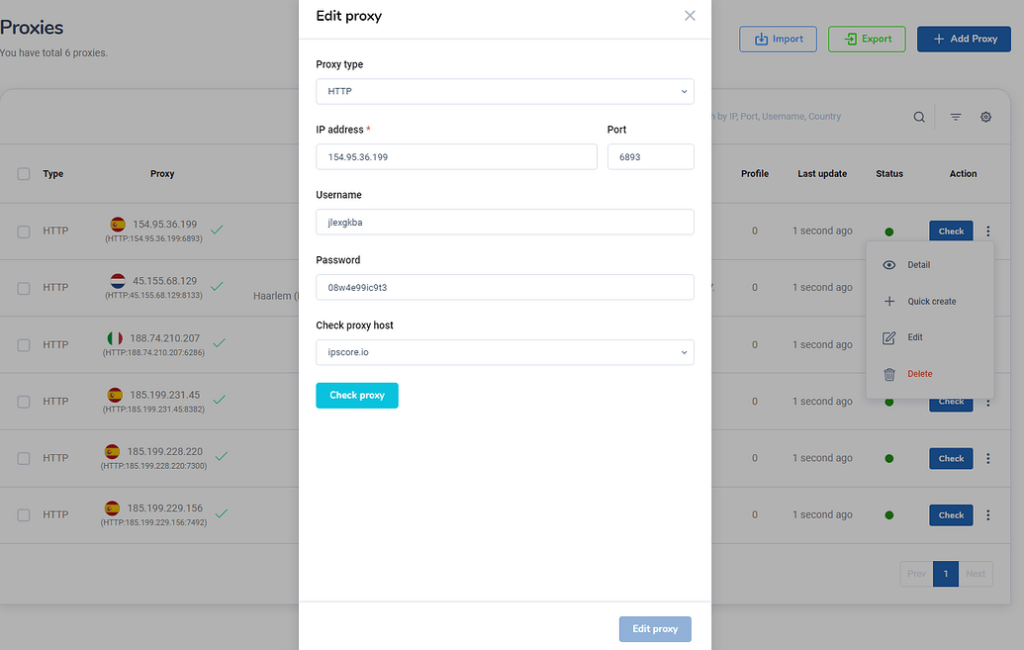
Delete: Xóa proxy đã được chọn
Và quan trọng hơn để sử dụng màn hình Proxy này anh em phải mua plan trước khi truy cập vào nhé. Link mua nâng cấp tài khoản tại: https://hidemium.io/pricing 1
Related Blogs
.png)
When you access the internet, you're not only tracked by cookies as in the past. Today, websites can identify users through a more sophisticated method.– browser fingerprint(browser fingerprint). This is a type of "digital signature" created fromYour device and browser environment are the main factors.That's also why tools like BrowserScan were created. Instead of being anonymous, this tool helps[…]

In China, the Internet censorship system – commonly known as The Great Firewall (GFW)– continuously blocks access to thousands of international websites and applications such as Google, Facebook or WhatsApp. Therefore, for tourists, foreigners living in China or local residents, VPN became an important tool to maintain digital freedom and access the services needed for work and personal[…]
.png)
Scale 10000 Profiles Daily with Hidemium and FleetProxy for Multi Account SuccessThe desk fan hums, and the monitor shows more tabs than you could ever manage by hand. Ten profiles open, then fifty, then hundreds, each one carrying a separate login and staying alive without conflict.That’s the kind of environment Hidemium creates.Behind it all, FleetProxy feeds each connection a path that feels[…]

How to Get More Views on TikTok: 10 Proven Steps That Actually Work If your TikTok views are stuck or falling, the problem is rarely just “the algorithm.” The issue is usually a mix of content, targeting, and signals TikTok uses to decide who should see your videos.Here’s how to get more TikTok views using a simple system: diagnose what’s wrong, optimize your videos for discovery, post[…]

Opening a store on Etsy is an excellent opportunity to start a business. However, to attract customers and increase traffic to your store, you need a clear strategic plan and effective execution.This article by Hidemium will guide you step-by-step on setting up an Etsy store and share effective strategies to help you drive traffic and boost sales growth. 1. What is Etsy?Etsy is a popular[…]

Step 1: Download and install PIA S5 Proxy Website: https://account.piaproxy.com/register?invitation_code=HQINQFP2 Invitation Code: HQINQFP2 Step 2: Add proxy settings 1. After selecting the country, continent, and city, click the “Refresh” button, and then right-click to select the proxy IP and port 2. Then click the port forwarding list below and copy the port number you just selected 3. Open […]
