Check Your Browser Privacy & Security – FV.Pro Online Test
Test your browser’s privacy and security with FV.Pro. Detect IP leaks, WebRTC exposure, fingerprinting risks, and more. Stay anonymous and protect your online identity today!
What is FV.Pro?
FVPro is a browser privacy and security testing tool that helps users understand what information their browser is exposing to websites. When you access the internet, your browser can reveal multiple signals such as your IP address, WebRTC status, time zone, language, operating system, screen resolution, cookies, login sessions, and browser fingerprint.
Instead of checking each signal manually, FVPro brings key browser signals together in a visual test. This allows users to quickly detect risks such as IP leaks, WebRTC exposure, or fingerprinting risks before using their browser for important work.
FVPro is suitable for marketers, SEO specialists, agencies, e-commerce teams, affiliate users, researchers, and anyone who regularly works with multiple accounts, projects, or markets.
FVPro browser privacy test showing IP address, WebRTC, connection status, and fraud score
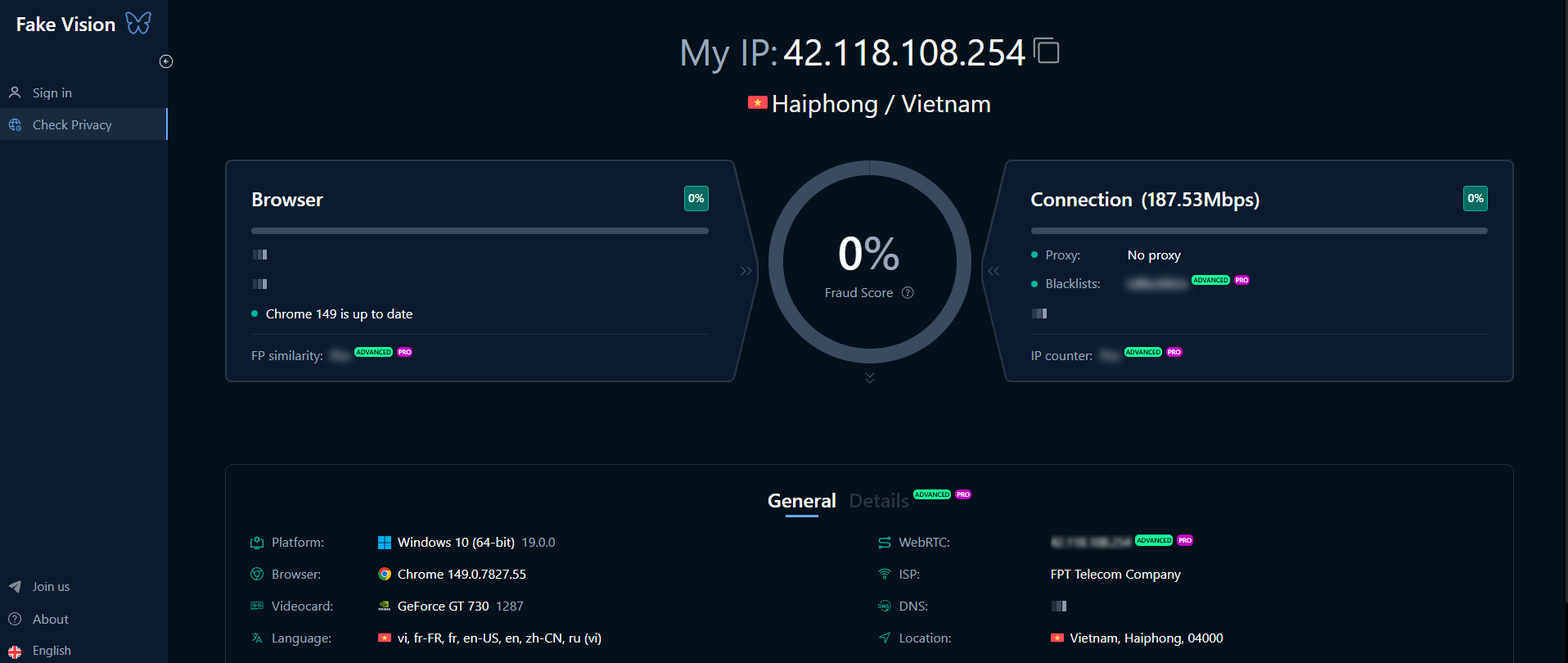
How Does FVPro Check Browser Signals?
Every website can collect certain data from your browser. These signals do not only come from your IP address, but also from WebRTC, browser fingerprint, cookies, sessions, time zone, language, and device information.
FVPro helps you check these signals to see whether your current browser setup is exposing inconsistent information. For example, you may be using a proxy from one country, but your WebRTC or time zone may still show data from another location. These inconsistencies can affect browser privacy and the trust level of your browser environment.
How Is FVPro Different from a Regular IP Checker?
A regular IP checker only shows your current IP address. FVPro goes deeper by checking multiple browser signals, including IP address, WebRTC, browser fingerprint, cookies, sessions, and device information.
This is especially useful if you work with proxies, VPNs, or an antidetect browser. Instead of only knowing whether your IP has changed, you can check the entire browser environment to see whether the signals are consistent.
What Is FVPro Used For?
FVPro is used to check browser privacy, detect information leaks, and support browser profile management for different work purposes. It is useful not only for individual users who want to protect their privacy, but also for teams working in SEO, marketing, e-commerce, affiliate marketing, or website testing.
Checking IP Leaks and WebRTC Exposure
One of the most important use cases of FVPro is detecting IP leaks and WebRTC exposure. If you are using a proxy or VPN, but your browser still exposes your real IP through WebRTC, websites may be able to see information you did not intend to reveal.
FVPro helps you check these risks before starting your work. This is an important step for anyone who needs a stable, private, and consistent browser environment.
Identifying Browser Fingerprinting Risks
Browser fingerprinting is the process of collecting multiple signals from your browser and device. These signals may include your operating system, fonts, screen resolution, language, time zone, canvas, WebGL, and other browser-level data.
FVPro helps users check fingerprint-related signals to understand how their browser may be identified online. This is useful when you need to evaluate browser privacy or check a browser environment before using it for SEO research, campaign checking, website testing, or account management.
Separating Work by Client, Project, or Market
If you work with multiple clients, accounts, or markets, using the same browser for every task can create confusion. Cookies, sessions, and login history may get mixed across different projects.
FVPro helps you check and organize browser profiles based on specific purposes. For example, one profile can be used for market research, another for ad checking, another for website testing, and another for client work.
This separation makes your workflow clearer, reduces the risk of using the wrong account, and keeps browser data more separate across different tasks.
Working with Proxies, VPNs, and Antidetect Browsers
FVPro can be used together with proxies, VPNs, or an antidetect browser to check the consistency of your browser environment. In this setup, a proxy or VPN handles the IP layer, while an antidetect browser helps manage browser profiles, fingerprints, cookies, and sessions.
When used with Hidemium, FVPro can help users check browser signals first, then create and manage separate browser profiles for daily work.
Key Benefits of FVPro
FVPro helps users better understand how their browser appears to websites. Instead of guessing whether a browser setup is private or reliable, users can check specific signals and make adjustments when needed.
Better Control Over Browser Privacy
Browsers can expose more information than many users realize. FVPro helps check key signals such as IP address, WebRTC, browser fingerprint, cookies, sessions, time zone, and device information.
As a result, users can detect potential issues early, especially when working with multiple online environments or when they need better digital identity protection.
Saving Time When Checking Browser Environments
Instead of using several separate tools to check IP, WebRTC, or fingerprint signals, FVPro brings the most important checks into one easier-to-understand test. This saves time, especially for marketers, SEO specialists, agencies, or e-commerce teams that need to check multiple profiles regularly.
Reducing the Risk of Mixing Cookies, Sessions, and Browser Settings
When working with multiple accounts or projects, mixing cookies and sessions can lead to login errors, account confusion, or inconsistent browser data. FVPro helps users check and organize browser environments more clearly.
Each browser profile should be assigned to a specific purpose, such as SEO research, landing page testing, campaign checking, or client account management. This makes the workflow cleaner and easier to control.
Suitable for SEO, Marketing, E-commerce, and Testing
FVPro is suitable for different types of users. For SEO specialists, it is useful when checking search results or website interfaces from different regions. For marketers, FVPro supports campaign and landing page testing. For e-commerce teams, it helps manage store-related tasks, markets, and accounts. For agencies, FVPro helps separate working environments by client.
How to Use FVPro?
To use FVPro effectively, start by defining your testing purpose. Do you want to check browser privacy, detect IP leaks, check WebRTC exposure, evaluate fingerprint signals, or organize browser profiles for work?
Step 1: Identify Workflows That Need Separation
First, divide your work into clear groups based on purpose. For example, you may have one group for SEO research, one for website testing, one for campaign checking, and one for client work.
Defining workflows clearly helps you understand which profiles need to be created, which profiles need to be tested, and which profiles should be used with a proxy or VPN.
Step 2: Run the FVPro Browser Privacy Test
After defining your purpose, you can run the FVPro Browser Privacy Test to check the main browser signals. Key signals to review include IP address, WebRTC exposure, browser fingerprint, time zone, language, device information, cookies, and session data.
The test results help you understand how your current browser appears to websites and whether anything needs to be adjusted.
Step 3: Check Consistency When Using a Proxy or VPN
If you use a proxy or VPN, FVPro can help check whether your browser signals match the intended setup. For example, your IP, WebRTC, time zone, and fingerprint should present a reasonable and consistent browser environment, instead of showing conflicting information.
This is an important step before using a profile for tasks such as website testing, SEO research, campaign checking, or market analysis.
Step 4: Use FVPro with Hidemium
FVPro is useful for checking browser privacy and detecting signals that may expose information. Meanwhile, Hidemium helps create and manage separate browser profiles, including cookies, fingerprints, proxies, and login sessions.
If you need both browser privacy testing and multi-environment management, you can use FVPro together with Hidemium to build a clearer workflow for SEO, marketing, e-commerce, testing, or account management.
Check Browser Privacy with FVPro
Your browser may be exposing more information than you realize. IP leaks, WebRTC exposure, browser fingerprints, cookies, and session data can all affect how websites see your browsing environment.
FVPro helps you check these signals faster, understand potential risks, and prepare a better browser environment before starting your work.
Run the FVPro Browser Privacy Test
If you want to check your current browser, start with the FVPro Browser Privacy Test to see whether signals such as IP, WebRTC, fingerprint, cookies, and sessions are exposing information.
Use Hidemium to Manage Separate Browser Profiles
FVPro helps you check browser signals, but if you need to create and manage multiple separate browser profiles, you can combine it with Hidemium. With Hidemium, you can manage cookies, fingerprints, proxies, and login sessions for each profile more clearly.
Frequently Asked Questions about FV.Pro
What is FV.Pro?
What does FV.Pro test for?
-
FV.Pro analyzes multiple privacy aspects, including:
- - IP Address Exposure – Checks if your real IP is visible.
- - WebRTC Leak – Detects if WebRTC reveals your real IP.
- - Fingerprinting Risks – Identifies tracking methods like Canvas, WebGL, and Audio fingerprinting.
- - User-Agent & Device Info – Shows details that websites can use to track you.
